How to create comparison posts with AI: A complete guide

Katelin Teen
Last edited February 1, 2026
Creating a high-quality comparison blog post takes significant effort. These "Product A vs. Product B" articles, which detail features, pricing, and other key differences, are valuable for SEO and genuinely assist audiences. However, the time spent on research and data compilation can be substantial.
What if you could turn that manual labor into a few minutes of polishing? This is where AI can step in. The right tool can handle the research and drafting, allowing you to scale up your content creation without sacrificing the quality that builds trust and brings in traffic.
This guide covers the essential components of an effective comparison post, a step-by-step process for using AI, an overview of available tools, and tips for optimizing your content. We've used this method to scale our own content strategy. With tools like the eesel AI blog writer, we grew our blog from 700 to 750,000 daily impressions in just three months.
What is a comparison post and why does it matter?
A comparison blog post is content that places two or more products or services side-by-side to help readers make an informed decision.
For businesses, these posts are a strategic asset. Here’s why they are important:
- Boosts website traffic: Comparison posts target people who are actively trying to make a decision. They are past the "what is it?" phase and are now asking, "which one should I get?" This means you're attracting high-intent organic traffic that's much closer to buying.
- Enhances SEO: People search for these comparisons all the time. Keywords like "[competitor] vs [your product]" or "[competitor] alternatives" have high commercial intent. Ranking for these terms puts you directly in front of potential customers at a critical moment.
- Increases engagement: The format is naturally easy to read. Well-structured comparisons with tables and clear takeaways are simple to scan, which often means people spend more time on your page.
- Builds authority: When you publish a fair, well-researched comparison, you are not just selling, you are educating. This positions your brand as a trusted expert in your field, which builds credibility.
Key components of a comparison post
An effective comparison article includes several key components:
An engaging introduction: You need to hook the reader right away. Your intro should clearly state what you're comparing, why it matters, and who the comparison is for. Get straight to the point.
A side-by-side comparison table: This is a central element of your post. A visual table is the easiest way for readers to quickly scan and compare the most important features. It is the first thing many people look for, so it needs to be clear and concise. An AI tool should be able to create a clean, informative table like this one:
| Feature | Product A | Product B |
|---|---|---|
| Primary Use Case | Description of what Product A is best for. | Description of what Product B excels at. |
| Key Feature 1 | Details about this specific feature. | Details about this specific feature. |
| Pricing Model | How pricing is structured (e.g., subscription, one-time). | How pricing is structured. |
| Ease of Use | A brief analysis of the user experience. | A brief analysis of the user experience. |
| Best For | The ideal user persona for Product A. | The ideal user persona for Product B. |
In-depth analysis and insights: Listing features is one thing, but explaining what they mean provides real value. This is where you go deeper. Talk about the strengths and weaknesses of each option. Give context. Who would benefit most from Product A's workflow? Why might Product B's pricing model be better for a small team? This analysis is what builds trust.
A clear recommendation: Don't leave your reader hanging. After presenting all the facts, summarize your findings and offer a clear recommendation. It doesn't always have to be a single "winner." Often, the best conclusion is one that says, "If you're X, go with Product A. If you're Y, Product B is your best bet." Finish it off with a strong call to action that tells the reader what to do next.
A step-by-step guide to creating comparison posts with AI
Step 1: Choose topics and research
The quality of the AI's output depends on the quality of the input. Start by identifying good topics for comparison. A few places to look are:
- Common questions your sales or support teams get.
- High-volume "vs" or "alternative" keywords in your niche (you can find these with any basic SEO tool).
- Direct comparisons between your product and a well-known competitor.
You don't need to become an expert on the products you're comparing, but having a general sense of the key differences will help you guide the AI and refine the final output. The AI will do the heavy lifting on research, but you are still the strategist.
Step 2: Select the right AI tool
Not all AI writers are the same, especially for a specific format like a comparison post. Some are great at generating short snippets of text, while others focus on creating visual assets like charts. The best tools understand the entire structure of a blog post and can build it from the ground up.
Here’s a breakdown of a few options and what they’re best for.
eesel AI blog writer: For complete, publish-ready blog posts

Key features:
- Full blog generation: It creates the entire article: intro, detailed sections for each product, a comparison table, a conclusion, and an FAQ section.
- Context-aware research: It automatically pulls relevant and up-to-date data for the comparison, like technical specs and pricing info, so you are not working with outdated information.
- Automatic asset creation: The tool generates comparison tables and AI images, and even finds and embeds relevant YouTube videos to make the post more engaging.
- Social proof integration: To add a layer of authenticity, it can pull in real
where people are discussing the products. This brings genuine user perspectives right into your article.Hey creators, founders, and marketers 👋 I’m on the hunt for game-changing AI tools that help speed up and LEVEL UP content creation for service-based businesses (think SaaS, app dev, consulting, coaching, etc.).
- AEO optimization: The content is structured to perform well in AI Answer Engines like Google AI Overviews, which is becoming more important for visibility.

Pricing: It starts at $99 for 50 blog posts, and you can try it completely for free to see the quality for yourself.
The bottom line: The primary differentiator is its scope. While some tools specialize in creating specific components of a post, the eesel AI blog writer is designed to generate the entire article. This can streamline the workflow by consolidating different steps into one process.
MyMap.AI: For generating visual comparison charts

MyMap.AI is an AI-native tool that is all about creating visual assets. Its main strength is generating things like comparison charts, mind maps, and diagrams just by chatting with an AI.
Key features: According to their site, you use a chat-based interface to tell the AI what you want to compare. It can pull information from web searches or specific URLs you provide and supports real-time collaboration if you're working with a team. It's a very fast way to visualize data points.
Pricing: It offers 5 free AI credits daily, with paid plans available if you need more.
The bottom line: MyMap.AI is a specialist tool for creating visuals. You'll still need to write the blog post around the chart it creates. It's a helpful supplement, not an all-in-one solution.
Venngage AI comparison infographic generator: For infographic-style comparisons
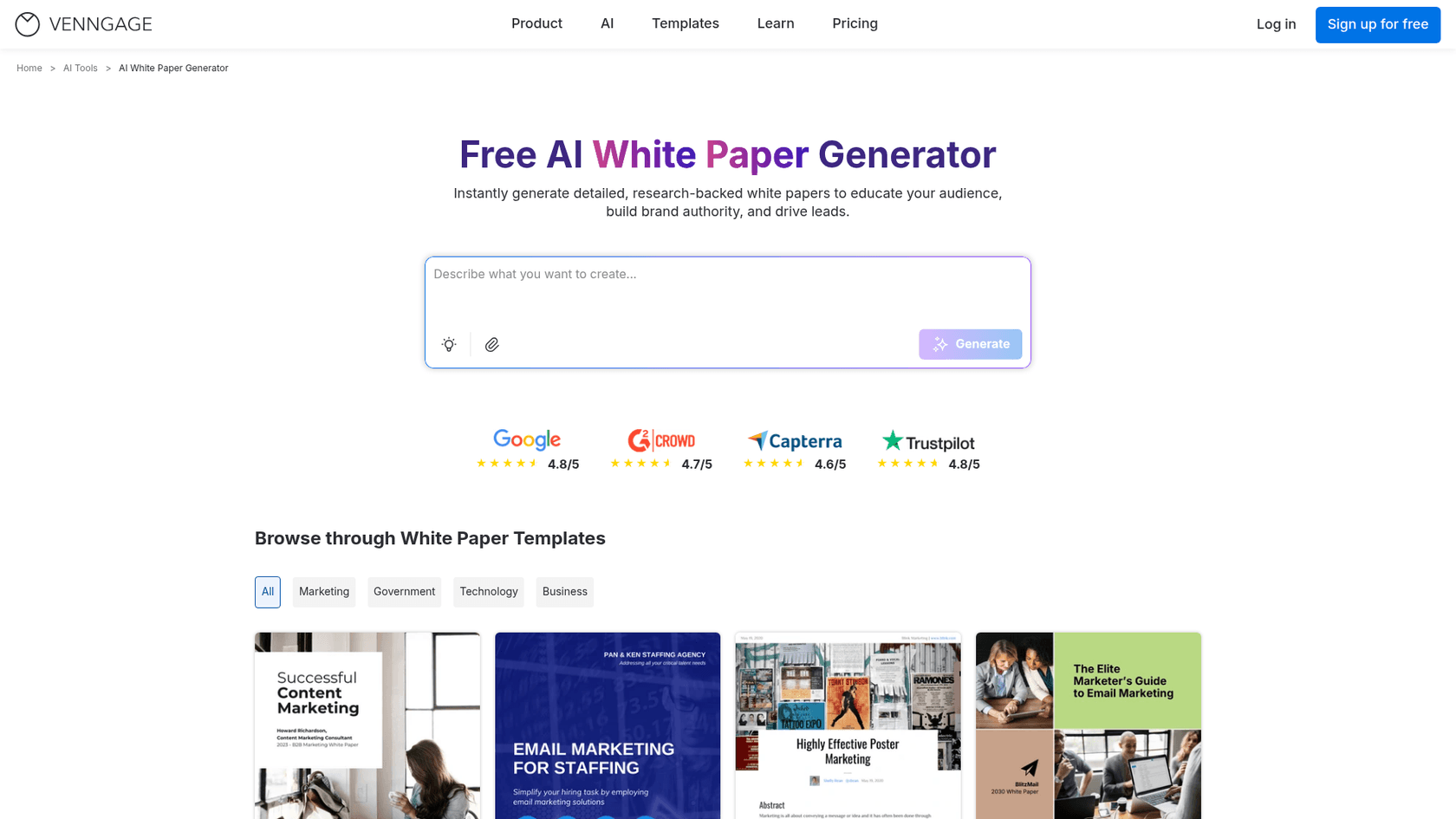
Venngage is a well-known design tool, and their AI generator focuses on creating shareable comparison infographics from text prompts.
Key features: It offers a wide variety of templates, including side-by-side comparisons, pros and cons lists, and tables. You can customize the style and tone, and the AI can generate icons and images to match your content.
Pricing: Venngage has a free plan that lets you try the AI features. For more advanced capabilities, paid plans start at $10 per month (billed annually).
The bottom line: Much like MyMap.AI, this tool is a specialist. It excels at creating one specific asset: the infographic. It does not generate the written blog content, SEO metadata, or any other part of the article. It's a design tool first and foremost.
Brilliant Directories AI post creator: For content within a membership platform

Brilliant Directories is a platform for building membership websites, and they offer an integrated AI tool to help their users create content.
Key features: The "Create Post Wizard" lets you generate various types of content based on a prompt, tone, and desired length. It can create comparison tables and allows you to add images, videos, and links to the post.
Pricing: This AI tool is a feature within the larger Brilliant Directories platform, which has plans starting at $145 per month. The AI writer itself is an add-on that costs an extra $10 per month.
The bottom line: This tool functions as a general writing assistant integrated within the Brilliant Directories platform. It can generate comparison tables and other content elements, suitable for users already working within that ecosystem.
Best practices for optimizing AI-generated comparison posts
AI gives you a significant head start, but a final human touch is what turns a good draft into a great piece of content that builds trust. Once your AI tool has generated the post, here are a few things you should always do.
- Refine the tone and voice: Read through the entire post and tweak the language to make sure it sounds like your brand. While a tool like the eesel AI blog writer is heavily refined to sound human, you might want to add specific industry phrases or inside jokes that resonate with your audience.
- Add personal experience: If you've used the products you're comparing, sprinkle in your own authentic insights. A sentence like, "When I tested this feature, I was really impressed by how..." adds a layer of credibility that AI can't replicate.
- Enhance visuals: AI-generated images are a great starting point, but consider
. Showing the actual interface of a product in action is often more powerful than a stock-style image.I want to send a before/after comparison to a friend, is there a free/simple website that does this? Upload two images, you automatically get a before/after slider, with a link you can send to anyone.
- Check for factual accuracy: This is non-negotiable. Always double-check critical data points like pricing, feature names, and technical specs. This information can change quickly, and your credibility is on the line.
- Strengthen the call to action (CTA): Make sure the conclusion clearly guides the reader on what to do next. Is the goal to get them to sign up for your free trial? Read another related article? Your CTA should be direct, compelling, and aligned with your business goals.
Seeing these principles in action can make the process even clearer. For a practical demonstration of how an AI tool can quickly structure data for a comparison post, the video below shows how to use ChatGPT to generate effective comparison tables, a core component of any "vs." article.
Final thoughts on creating comparison posts with AI
Comparison posts are valuable for SEO. They attract high-intent readers and can build a brand's authority, but they have traditionally been time-consuming to create.
This is a barrier that AI can help overcome. It makes creating this kind of high-value content scalable and efficient. The process is straightforward: understand the key components of a great comparison, choose a powerful AI tool that fits your workflow, and apply a final human touch to make it shine. By letting AI handle much of the initial drafting and research, you can focus your energy on the strategic refinement that adds unique value.
Ready to stop spending hours on research and writing? Try the eesel AI blog writer for free and generate your first publish-ready comparison post in minutes.

Frequently Asked Questions
Share this article

Article by
Katelin Teen
Katelin is an operations specialist at eesel where she uses her psychology training and education experience to optimize B2B SaaS processes. Outside of work, she unwinds with story-driven games, writing, and keeping up with latest tech innovations.