How Zendesk voice to ticket works: A complete guide for 2026

Stevia Putri
Last edited March 5, 2026
Phone support isn't going anywhere. Even with the rise of chat and messaging, customers still want to pick up the phone when something's urgent or complex. The challenge is making sure those voice interactions don't get lost in the shuffle. For teams looking to unify all their support channels, solutions like eesel AI for customer service can complement Zendesk's voice capabilities with intelligent automation.
Zendesk's voice-to-ticket functionality solves this problem. Instead of calls living in a separate system (or worse, a spreadsheet), they become structured tickets that live alongside your email, chat, and social conversations. Let's break down how it actually works and what you need to know to use it effectively.

What is Zendesk voice to ticket?
Zendesk Talk (also called Zendesk Voice) is the platform's built-in call center solution. It turns phone interactions into trackable support tickets automatically. When a customer calls, the system creates a ticket that captures everything: who called, when, how long they waited, what was discussed, and even a recording of the conversation.
If you're exploring AI-powered alternatives to streamline your support workflows, eesel AI integrates with Zendesk to offer intelligent ticket handling that learns from your existing conversations.
The key thing to understand is that this isn't just about logging calls. It's about making voice part of your unified support workflow. Agents see the same interface whether they're handling an email or a phone call. Managers get the same reporting. And customers get consistent service regardless of how they reach out.
Here's the short version: every call becomes a ticket, every ticket has context, and everything lives in one place.
How voice calls become tickets automatically
Zendesk creates tickets from voice interactions in several scenarios. You don't need to manually log anything (though you can add notes during or after the call).
Incoming calls. When an agent accepts a call, a ticket is created immediately. It captures the caller's number, the time, and which agent answered.
Outbound calls. If you place a call from the Zendesk console and someone answers, that creates a ticket too. This is useful for follow-ups or proactive outreach.
Voicemails. When a caller leaves a voicemail, it automatically becomes a ticket with the audio file attached. No more checking a separate voicemail box.
Queue entries. With omnichannel routing enabled, tickets are created when calls enter the queue. This helps with workload management and ensures nothing gets missed.
Overflow calls. If a call routes to an external number after hours or during high volume, a ticket is still created.
Each ticket includes specific call data:
- Source and destination phone numbers
- Call duration (including hold time, transfers, and queue time)
- Caller and agent names
- Caller location (when available)
- Recording link (if enabled)
- Transcription text (if available)
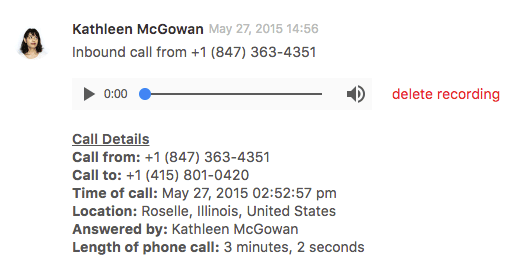
One detail worth noting: you can't disable automatic ticket creation. If you really don't want tickets for certain calls, you'd need to set up a trigger that solves them immediately upon creation. But most teams find the automatic logging useful for reporting and accountability. For more on automating your ticket workflows, see our guide on how to use AI to classify or tag support tickets.
Understanding voice ticket data and user linking
Zendesk links phone numbers to customer profiles in a few different ways. This matters because it determines whether a call gets attached to an existing customer's history or creates a new profile.
Direct lines are unique numbers assigned to specific users. When someone calls from their direct line, Zendesk recognizes them and attaches the ticket to their existing profile.
Shared numbers are linked to multiple user profiles. This happens when the same number is added to different accounts (like a family plan or shared office line). Zendesk handles this by associating the call with the primary owner of that number.
Unknown callers get special treatment. If the number isn't in your system, Zendesk creates a new end-user profile using the phone number as the username. For calls from blocked numbers or digital lines, it creates a unique ID for that specific call. You can later merge these with existing profiles if you identify the caller.
You can add phone numbers to user profiles manually through the Admin Center. Go to Manage > People, select a user, and add their contact information. If you have phone number validation enabled, numbers must be in E.164 format (the international standard that includes country code).
Sometimes you'll get duplicate profiles. Maybe a customer called from a new number you didn't have on file. When this happens, you can merge the new profile with their existing one. All phone numbers from the merged profile transfer over, with one exception: if both profiles have a shared number, the duplicate gets discarded since users can only have one shared number.
There's also ticket merging. If a customer calls about an existing issue, you'll end up with two tickets: the original one and the new call ticket. After the call, you can merge them so everything stays together. The phone number shown on the merged ticket will be from the ticket you merged into (the one you consider the "main" ticket).
AI-powered voice features in Zendesk
Zendesk has been investing heavily in AI for voice support. These features go beyond simple automation to actually assist agents and improve outcomes.
AI agents for voice can handle calls autonomously. They use natural language to support customers and can solve sophisticated interactions without human intervention. When they can't resolve something, they transfer to a human agent with full context.
Voice copilot gives agents live assistance during calls. It offers suggestions, helps find information, and can even draft responses. The goal is to reduce handle time while improving accuracy.
Automatic summarization and transcription eliminate the post-call wrap-up work. Instead of agents spending minutes writing summaries, the AI generates them automatically. Transcriptions make calls searchable and reviewable without listening to recordings.
Quality assurance monitoring uses AI to evaluate 100% of conversations, both human and AI-handled. It identifies churn risks, outliers, dead air, and coaching opportunities. This is a big step up from random sampling.
Zendesk claims their AI can resolve up to 50% of customer interactions without human involvement. A case study with Openly (an insurance company) showed 94% one-touch tickets and 96% average CSAT. They also reported cutting wrap-up time from three minutes to one minute per call.
These features are available across Zendesk's Suite plans, though some advanced capabilities require add-ons or higher tiers. The AI agents feature, for example, comes with an "Essential" plan on Suite Team and above, but the "Advanced" AI agents that can resolve more complex issues require an additional purchase.
Voicemail-to-ticket automation
One of the most practical voice-to-ticket workflows is handling voicemails. Instead of agents checking a separate voicemail system and manually creating tickets, everything happens automatically.
When a caller leaves a voicemail, Zendesk creates a ticket immediately. The audio file is attached to the ticket, and if you have transcription enabled, the text appears in the ticket comment. This means agents can scan voicemail content without listening to the audio, which is much faster for triage.
You can extend this with third-party transcription services for better accuracy or additional features. The classic example is Phonetag (formerly PhoneTag), which specializes in voicemail transcription. LiveAir Networks, a Texas-based ISP, used Phonetag with Zendesk to route transcribed voicemails directly to the appropriate technician groups.
Before this integration, LiveAir's process was manual and slow. Staff had to check voicemail, transcribe by hand, create tickets, and route requests. Many calls weren't discovered by the right personnel until the next day. After implementing automated voicemail-to-ticket, their CEO reported that clients calling in were no longer "falling through the cracks."
The key to making this work is setting up proper routing rules. You want voicemails to reach the right team quickly. This might mean using IVR menus to let callers select a department, or using business hours to route after-hours voicemails to your on-call team.
Integrations and extending voice functionality
While Zendesk's native voice features are robust, integrations can extend what you can do. Here are the main patterns:
Voiceflow lets you build AI agents that create Zendesk tickets. You design conversational flows in Voiceflow's visual builder, and when the conversation reaches a certain point, it can automatically generate a ticket in Zendesk with all the relevant details. This is useful for handling common requests without agent involvement, while still creating a record for complex cases that need human follow-up.
ASAPP GenerativeAgent takes a different approach. It integrates with Zendesk Talk to handle calls before they reach your agents. Calls route through ASAPP's AI, which can resolve issues or gather information, then transfer back to Zendesk with a ticket already created and populated with conversation details. This requires setting up SIP-IN lines and configuring overflow routing.
Talk Partner Edition is Zendesk's API for deeper integrations. If you're building custom telephony solutions or connecting specialized hardware, this lets you create voice comments on tickets programmatically. You can specify call direction (inbound/outbound), duration, recording URLs, and transcription text.
Third-party transcription services like Phonetag can improve voicemail handling beyond Zendesk's built-in transcription. These are worth considering if you need higher accuracy or specialized features like sentiment analysis.
The pattern here is that Zendesk acts as the system of record while specialized tools handle specific parts of the voice experience. This gives you flexibility to build exactly what you need without replacing your entire telephony infrastructure.
Zendesk voice pricing and plans
Voice features are included in Zendesk Suite plans, but the specifics vary by tier. Here's the breakdown:
| Plan | Price (annual) | Voice features |
|---|---|---|
| Support Team | $19/agent/month | Email/ticketing only - voice not included |
| Suite Team | $55/agent/month | Phone support, call routing, voicemail, embedded voice |
| Suite Professional | $115/agent/month | IVR phone trees, skills-based routing, business hours, call recording controls |
| Suite Enterprise | $169/agent/month | Advanced routing, priority numbers, extended queue options |
Source: Zendesk Pricing
Beyond the base plan, you'll pay extra for usage:
- Phone numbers (local and toll-free): Add-on pricing varies by country
- Inbound and outbound minutes: Add-on pricing
- Text messages: Add-on pricing
- Contact Center add-on: $50/agent/month for advanced contact center features
AI voice capabilities have their own pricing structure. The "Essential" AI agents are included in Suite plans, but "Advanced" AI agents that can resolve more complex issues require an add-on. The same goes for Copilot: Suite Professional and Enterprise include 5 uses per agent per month, but unlimited Copilot requires the add-on at $50/agent/month.
If you're considering AI voice bots specifically, be aware that Zendesk's native options are limited. For sophisticated voice automation, you'll likely need a third-party solution like Voiceflow or ASAPP, which adds to your total cost. You might also want to explore eesel AI's agent capabilities as an alternative that learns from your existing support history.
eesel AI: An alternative approach to voice support
If you're looking at Zendesk voice but concerned about the complexity or cost, there's another option worth considering. eesel AI integrates with Zendesk to provide AI-powered support that can handle voice workflows alongside your other channels.

Here's how eesel AI is different. Instead of configuring complex routing rules and IVR menus, you train the AI on your existing tickets, help center, and documentation. It learns your business in minutes, not weeks. Then you start with guidance: the AI drafts responses for your team to review. As it proves itself, you level up to full autonomy where it handles tickets end-to-end.
The key difference is control through plain English. You don't need to build decision trees or workflows. Just tell the AI: "If the refund request is over 30 days, politely decline and offer store credit" or "Always escalate billing disputes to a human." It follows those instructions.
Before going live, you can run simulations on thousands of past tickets to see exactly how the AI would perform. This lets you verify quality before customers see it. And because eesel AI doesn't charge per seat (pricing is by interaction), the math often works out better for growing teams.
The eesel AI Agent can work alongside Zendesk voice or replace it entirely, depending on your needs. If you're already invested in Zendesk but want simpler AI capabilities, eesel plugs right in. If you're starting fresh and want to avoid the per-agent pricing model, eesel can handle voice through integrations while keeping costs predictable.
Getting started with voice-to-ticket workflows
If you're setting up Zendesk voice for the first time, here's a practical approach:
Start with your call volume. Look at how many calls you handle daily, when they peak, and what types of issues drive them. This determines whether you need basic routing or more sophisticated queue management.
Plan your routing strategy. Do callers need to select a department through an IVR menu, or can you route based on their profile or the number they called? Keep it simple at first. You can always add complexity later.
Set up voicemail workflows. Decide what happens to after-hours calls and busy signals. Who gets those tickets? What's the SLA for responding?
Test before full deployment. Use a small group of agents and a dedicated phone number to work out the kinks. Check that tickets are created correctly, recordings are saving, and routing rules work as expected.
Measure what matters. Track first response time, resolution time, and CSAT for voice tickets specifically. Compare them to your other channels to identify gaps.
Voice support doesn't have to be a black box. With the right setup, those phone calls become just as trackable and manageable as your digital channels. The key is making sure the technology serves your workflow, not the other way around.


Frequently Asked Questions
Share this article

Article by
Stevia Putri
Stevia Putri is a marketing generalist at eesel AI, where she helps turn powerful AI tools into stories that resonate. She’s driven by curiosity, clarity, and the human side of technology.



