Zendesk support operations: A practical guide for 2026

Stevia Putri
Last edited March 3, 2026
Support operations are the engine room of any high-performing customer service team. While your agents handle customer conversations, support operations work behind the scenes to ensure those agents have the tools, processes, and structure they need to succeed.
If you're running Zendesk as your help desk platform, understanding how to build effective support operations is essential. This guide covers everything from team structure and responsibilities to scaling efficiently with AI augmentation.

What are Zendesk support operations?
Support operations are the internal systems and teams that enable customer-facing agents to deliver excellent service. Think of them like a pit crew at a race track. While the driver focuses on the track, the pit crew ensures the car runs smoothly, handles refueling, and manages tire changes.
In the Zendesk ecosystem, support operations teams handle the infrastructure that keeps customer service running: configuring ticket workflows, managing agent schedules, maintaining knowledge bases, and analyzing performance data.
The key distinction: support operations teams are not customer-facing. They work with employees, not end customers. Their job is to remove friction so agents can focus on what they do best (helping customers).
Core responsibilities of a Zendesk support operations team
A well-structured support operations team handles four primary areas:
Training and onboarding
Support operations streamline customer service training for new hires. This includes maintaining handbooks, organizing legacy information, and running ongoing training sessions for ethics, skill growth, and customer experience best practices.
At its core, this responsibility ensures every agent starts with the same foundation and continues developing throughout their tenure.
Workforce management
Customer service depends on accurate workforce management to forecast, plan, and adjust schedules. WFM software lets support operations structure schedules based on lulls, peak periods, and worker availability.
Modern teams increasingly use AI-powered WFM tools that automate forecasting and activity tracking, which improves efficiency and reduces the manual overhead of scheduling.
Metrics and reporting
Support operations track and manage KPIs and customer service analytics. They monitor metrics like resolution time, first contact resolution, and customer satisfaction, then report performance data and insights to the broader organization.
This data-driven approach helps identify bottlenecks, coaching opportunities, and areas where processes need improvement.
Cross-team collaboration
One of the most important responsibilities is reducing silos across teams. Support operations connect with product teams to share customer feedback, work with engineering on bug prioritization, and ensure customer insights flow to the right stakeholders.
This cross-functional work ensures customer service is not isolated from the rest of the business.
Key roles in Zendesk support operations
Building a support operations team means hiring for specific expertise. Here are the core roles that make up a mature support operations function:
Systems analyst
Sometimes called the operations specialist, this role handles diverse operational tasks from planning schedules to reassigning cases. Systems analysts develop and maintain internal systems, troubleshoot technical problems, and support system users.
Support trainer
The support trainer develops training materials, runs onboarding sessions, and coordinates with HR to build organization-specific programs. They ensure new employees understand company protocols and products, and they organize ongoing training for product or process updates.
Quality assurance manager
QA managers oversee the systems and solutions that ensure predetermined levels of service quality. They implement QA processes, monitor automated and manual quality checks, and share feedback with agents to reduce customer churn.
Knowledge manager
This role creates and maintains the knowledge base of resources that help agents quickly find answers. Knowledge managers establish systems to collect organizational knowledge, manage resource distribution, and develop knowledge management platforms.
Workflow coordinator
The workflow coordinator allocates tasks and tickets based on individual skill sets, maintains accurate schedules, and utilizes workforce forecasting. They work with QA teams to uphold quality standards and ensure compliance.
Support operations manager
Also known as the head of operations, this role focuses on support strategy. They identify and maintain quality tools, monitor workflows, report on agent performance, and oversee the day-to-day operations of the customer service team.
Support tier structure in Zendesk
Most mature support operations teams organize their customer-facing work into tiered structures. This creates clear escalation paths and ensures the right expertise handles each issue.
Tier 0: Self-service
Tier 0 includes chatbots, FAQ pages, and help centers that customers can use to solve issues independently. Common tasks include password resets, basic billing questions, and simple product inquiries.
The goal is deflection: allowing customers to solve issues without involving a human agent, which frees up your team for more complex work.
Tier 1: General support
Tier 1 agents handle simple and frequently asked inquiries. They interact with the bulk of new tickets and resolve straightforward issues like account setup questions. If an issue requires advanced technical knowledge, they escalate to Tier 2.
This tier acts as the first line of human defense, resolving tickets as quickly as possible.
Tier 2: Technical support
Tier 2 agents have higher levels of technical expertise and product knowledge. They handle tasks like customizing add-ons, walking through product features, and addressing basic bugs or glitches.
When Tier 2 agents encounter issues they cannot solve, they escalate to Tier 3.
Tier 3: Expert support
Tier 3 includes agents with the highest level of technical expertise. These specialists tackle one-off issues that have not been encountered before and may require new product features or improvements.
This team also vets issues that need escalation to the software development team and tests fixes before deploying them to customers.
Tier 4: Third-party support
Not every organization needs Tier 4, but it is useful for companies that rely on external vendors for parts of their product. This tier involves outsourcing technical questions to third-party vendors when issues exceed in-house expertise.
Scaling Zendesk support operations efficiently
As your team grows, your support operations need to evolve. Here is how to scale without creating chaos:
Start with ticket organization. Before you can scale, you need proper routing. Set up triggers that automatically assign tickets based on keywords, customer tiers, or product lines. Start with broad categories and refine as you learn your ticket patterns.
Automate repetitive work. Every manual task you perform today becomes a bottleneck tomorrow. Create macros for common responses, use business rules to escalate urgent issues, and let automation handle spam and routine tagging.
Build a knowledge base that gets used. Track which topics generate the most tickets and prioritize documentation for those areas. Test your articles with real customers and create systems where team members can easily contribute solutions they have discovered.
Structure your team for specialization. Consider implementing tiered support where Level 1 handles standard inquiries and escalates complex issues to specialized agents. Cross-train everyone on basics to prevent bottlenecks during busy periods or absences.
Track metrics that matter. Beyond response time and resolution time, monitor escalation rates, customer satisfaction by ticket type, and repeat contact rates. These metrics reveal where your processes need work.
For teams looking to automate their scaling efforts, customer support automation solutions can handle routine tasks while your team focuses on complex issues.
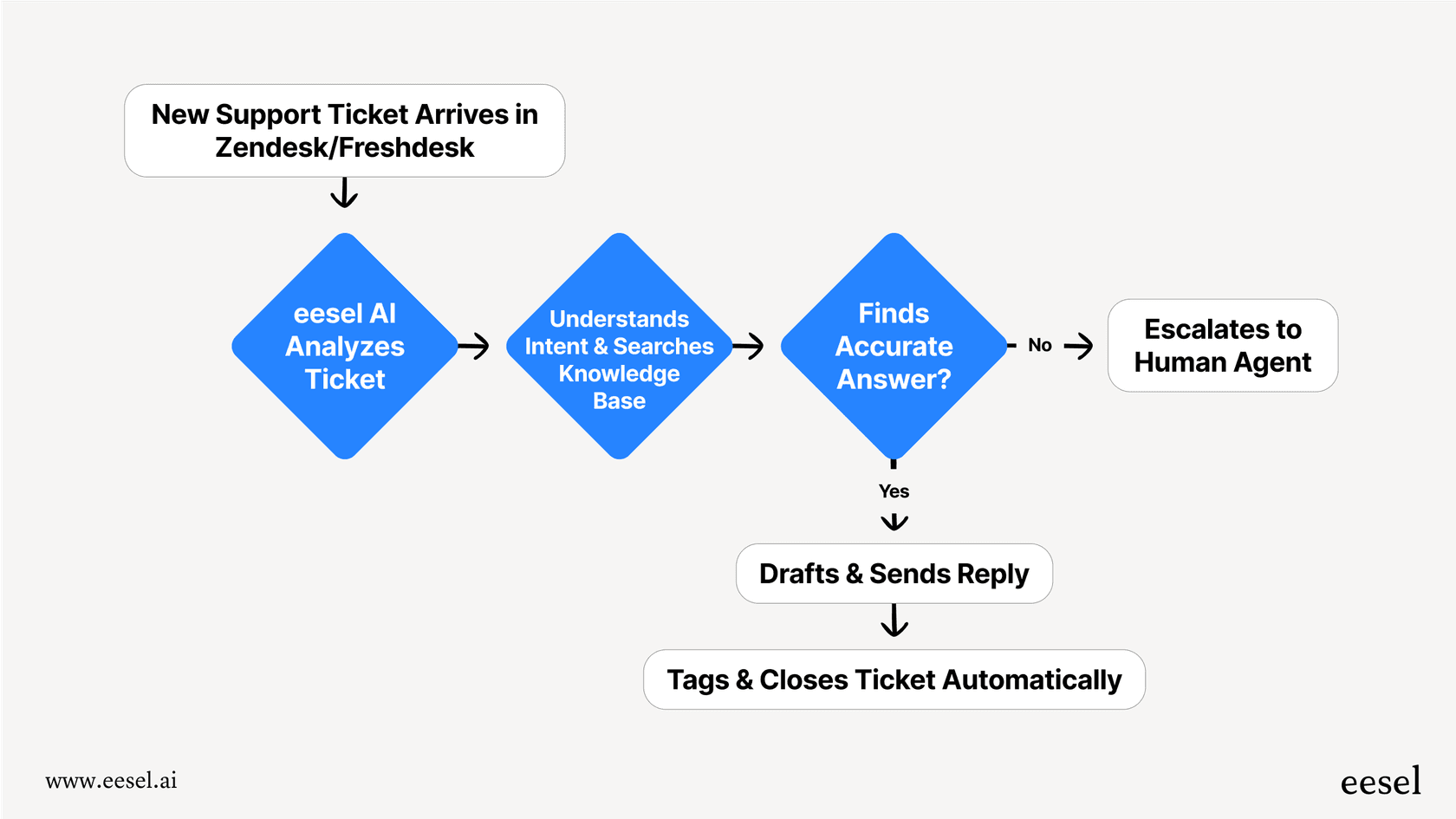
How eesel AI augments Zendesk support operations
Traditional support operations rely heavily on manual work: training agents, routing tickets, updating knowledge bases, and analyzing metrics. AI can reduce this burden significantly.
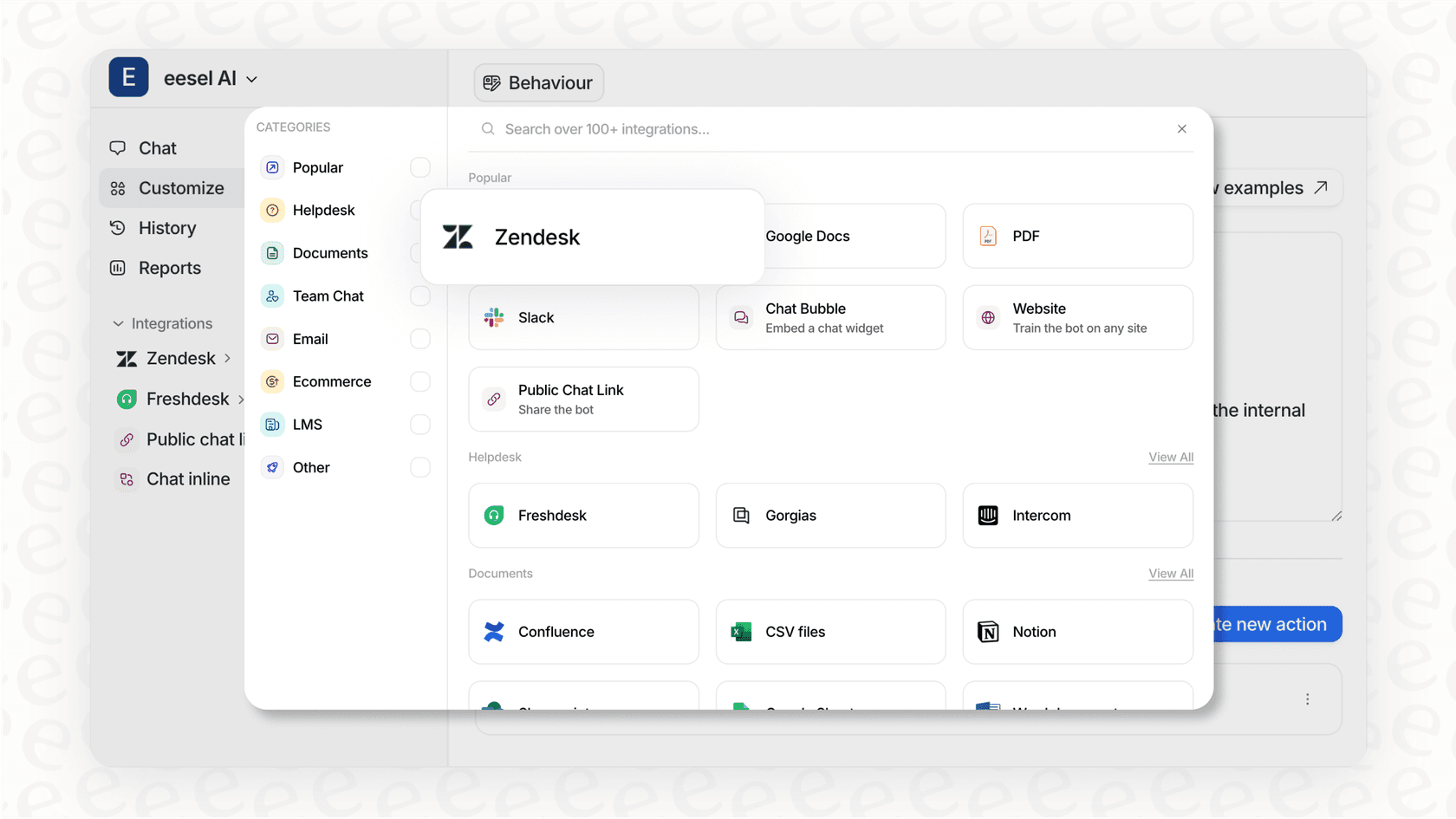
With eesel AI's Zendesk integration, support operations teams can augment their workflows in three key ways:
AI Agent for autonomous resolution. The eesel AI Agent connects to your Zendesk instance and learns from your past tickets, macros, and help center. It can handle frontline support autonomously, resolving up to 81% of tickets in mature deployments. You define escalation rules in plain English, and the AI follows them.
AI Copilot for agent assistance. The eesel AI Copilot gives agents instant draft replies grounded in your knowledge. It learns your team's tone from past replies and connects to external systems like Shopify for real-time order information. Agents review, edit, and send, cutting response time without sacrificing quality.
AI Triage for ticket hygiene. eesel AI Triage runs continuously to tag tickets by topic and sentiment, route them to the right team, merge duplicates, and close spam automatically. This keeps your queue clean without manual effort.
The key advantage is the teammate model. You do not configure eesel like traditional software. You hire it, start with guidance, and level up to autonomy as it proves itself. Run simulations on past tickets before going live, then expand scope based on actual performance.
Pricing starts at $299 per month for 1,000 interactions, with no per-seat fees. This makes it cost-effective for growing teams that want AI augmentation without proportional headcount increases.
Building effective Zendesk support operations
Whether you are starting from scratch or optimizing an existing operation, focus on these fundamentals:
Start with strong foundations. Get your ticket routing, tagging, and basic workflows right before adding complexity. A clean, logical structure scales better than a perfect but fragile system.
Automate what you can. Identify repetitive tasks and eliminate them through triggers, macros, or AI. Every manual task you remove frees up your team for higher-value work.
Focus on sustainable practices. Build processes that can evolve with your needs rather than perfect solutions that become limitations. Document as you go so future team members can understand your decisions.
Consider AI augmentation. Modern AI tools can handle significant portions of support operations work, from ticket triage to response drafting. This does not replace your support operations team; it makes them more effective.
The goal is not to build a perfect system overnight. It is to create an operation that can grow thoughtfully, maintaining quality while increasing capacity. With the right approach to your Zendesk setup, your support team can be a competitive advantage rather than a constraint on growth.
If you are ready to explore how AI can augment your support operations, try eesel AI for free and see how it learns your business in minutes, not weeks.


Frequently Asked Questions
Share this article

Article by
Stevia Putri
Stevia Putri is a marketing generalist at eesel AI, where she helps turn powerful AI tools into stories that resonate. She’s driven by curiosity, clarity, and the human side of technology.