
If you manage a support team using Zendesk, you've probably encountered the frustration of agents skipping tickets without clear accountability. The skip queue feature (also known as Play Mode or Guided Mode) is designed to help agents focus on one ticket at a time, but it comes with a significant blind spot: tracking and reporting on those skips is surprisingly difficult.
Support managers need visibility into skip patterns to identify training gaps, prevent cherry-picking, and ensure fair workload distribution. Without proper reporting, you're left guessing whether agents are skipping tickets for legitimate reasons or simply avoiding difficult work.
This guide breaks down how Zendesk skip queue works, why the reporting limitations exist, and what solutions are available. We'll also explore how eesel AI can help you understand agent behavior patterns without the manual workarounds.
What is Zendesk skip queue (Play Mode)

Zendesk's Guided Mode, formerly called "Play Only" or "Play Mode," is a ticket assignment feature that presents agents with one ticket at a time rather than letting them browse a full queue. When an agent finishes a ticket, they click the Play button to receive the next one in the queue.
The skip functionality allows agents to pass on a ticket they're not qualified to handle or don't feel comfortable working on. When an agent skips, the ticket goes back into the queue for another agent to pick up. Agents can optionally enter a reason for the skip, though this field is optional and many teams find agents leave it blank.
The key difference between skipping and reassigning is ownership. When an agent skips in Guided Mode, the ticket remains unassigned and returns to the general pool. When an agent reassigns a ticket they've already accepted, they're actively transferring ownership to another agent or group. This distinction matters for reporting: Zendesk tracks reassignments in Explore, but skips are handled differently.
Skipping can be legitimate. An agent might lack the technical expertise for a complex bug report, or they might not speak the customer's language. But it becomes problematic when agents use skipping to cherry-pick easy tickets while avoiding difficult or angry customers. The challenge is telling the difference without proper data.
Why agents skip tickets
Understanding why agents skip tickets helps you distinguish between legitimate workflow needs and accountability problems.
Legitimate reasons for skipping include:
- Expertise gaps: The ticket requires specialized knowledge the agent doesn't have
- Language barriers: The customer wrote in a language the agent cannot support
- Complexity: The issue is genuinely above the agent's current skill level
- Escalation needs: The ticket should go to a different tier or department
Problematic reasons that indicate management issues:
- Cherry-picking: Agents skip difficult tickets to grab easier ones
- Avoidance: Agents skip customers who seem angry or demanding
- SLA gaming: Agents skip tickets with tight deadlines to protect their metrics
- Lack of training confidence: Agents skip because they weren't properly trained on common issues
The impact extends beyond individual tickets. When cherry-picking goes unchecked, it creates resentment among team members who end up with the difficult work. Customer experience suffers when complex issues bounce between agents. And you miss valuable training opportunities when you can't identify which topics agents consistently avoid.
Skip patterns often reveal training gaps more clearly than any assessment. If multiple agents skip tickets tagged with a specific product feature, you probably need better documentation or training on that feature. The data is there, but Zendesk doesn't make it easy to access.
Native reporting limitations
Here's the frustrating reality: Zendesk Explore, the platform's native reporting tool, cannot report on skipped tickets in Guided Mode. This isn't a temporary limitation or a feature waiting in the backlog. It's been a known gap since at least 2017, with active community requests going back years.
What Zendesk does provide is a manual workaround. Administrators can navigate to the Team Members page in Admin Center, open an individual agent's profile, and click the "Play only" tab to see a list of tickets that agent has skipped. The list shows skip reasons if the agent entered them. But there's no date filtering, no export option, and no way to aggregate this data across multiple agents or time periods.
The permissions are also restrictive. Only administrators can view skip data for agents. Team leads and supervisors who manage agents day-to-day cannot access this information without being granted full admin rights, which most organizations are understandably reluctant to do.
Zendesk has suggested Omni-Channel Routing as an alternative. This newer feature automatically assigns tickets to agents rather than letting them play through queues. When agents reassign tickets in this model, those reassignments are reportable in Explore. But Omni-Channel Routing doesn't support Department Spaces (as of mid-2025), which many organizations rely on for organizing their support operations. And some teams prefer the agent autonomy that Guided Mode provides.
The community feedback tells the story. One user posted in 2022: "The ability to see skipped tickets is a feature that was emphasized when my company decided on Zendesk. However, only admins or someone with enough expertise to use an API call have that capability." Another noted in 2024: "I know that I can view skipped tickets under the agent 'play only' tab in support but I can't even filter the list by date. I have resorted to scrolling through the list."
Workarounds for tracking skipped tickets
Since native reporting falls short, teams have developed several workarounds. Each has trade-offs between implementation effort and reporting depth.
Using the Ticket Skips API
Zendesk does expose skip data through their REST API. The Ticket Skips endpoint lets you retrieve skip records with details including the ticket ID, agent ID, timestamp, and skip reason.
The API returns skip objects with these key fields:
| Field | Description |
|---|---|
ticket_id | The ID of the skipped ticket |
user_id | The ID of the agent who skipped |
reason | Text reason entered by the agent (if any) |
created_at | When the skip occurred |
ticket | Full ticket object with metadata |
To use this approach, you'll need:
- A developer or technical resource to build the integration
- API credentials with appropriate permissions (agents need "View only" or higher reports permissions)
- A destination for the data (database, spreadsheet, or analytics tool)
- Ongoing maintenance as your needs evolve
The API has limitations. It returns a maximum of 100 records per page, so large teams will need pagination logic. Archived tickets are excluded from results. And you still need to build visualizations and reports on top of the raw data.
Third-party solutions
For teams without development resources, several third-party tools address the skip reporting gap:
Skipper is a Zendesk marketplace app built specifically for this problem. It provides a dashboard showing skip statistics with weekly comparisons, plus the ability to drill down by agent or ticket. The app offers a 7-day free trial and requires agents to have read-only report access or higher. User reviews note it's "exactly what we needed" for basic skip tracking, though some mention limitations like only showing the top 5 agents and lacking data export functionality.
Tymeshift (now Zendesk Workforce Management) includes skip rate reporting as part of its broader workforce management capabilities. It tracks agent activity in real time and generates performance reports. This is a more comprehensive solution if you're also looking for scheduling, forecasting, and adherence monitoring. Pricing is available as a Zendesk add-on.
Playlist takes a different approach entirely. Instead of Guided Mode's skip model, Playlist assigns tickets to agents before they view the contents. Agents can unassign themselves if they're not qualified, which creates a similar workflow but with different reporting capabilities. Playlist provides reporting on unassigned tickets through Zendesk Explore using custom calculated attributes.
| Solution | Best For | Key Limitation |
|---|---|---|
| Ticket Skips API | Teams with dev resources | Requires custom development |
| Skipper | Quick dashboard setup | Limited reporting depth |
| Tymeshift/WFM | Full workforce management | Additional cost, may be overkill |
| Playlist | Different assignment model | Requires changing workflows |
Best practices for managing skip behavior
Technology alone won't solve skip-related issues. You need clear policies and consistent management practices.
Set clear skip policies. Define explicitly when skipping is acceptable and when it isn't. Document examples: skipping a ticket in a language you don't speak is fine; skipping because the customer seems difficult is not. Make sure every agent understands the policy during onboarding.
Train agents on appropriate skipping. Don't assume agents know when to skip. Role-play scenarios in training. Explain how skipping affects team dynamics and customer experience. Agents who understand the "why" behind policies are more likely to follow them.
Use skip data for coaching. When you do have access to skip data (whether through API exports or third-party tools), use it constructively. An agent skipping 20% of tickets needs different coaching than one skipping 2%. Look for patterns: is an agent skipping tickets from a specific product area? That suggests a training need, not a performance problem.
Balance autonomy with accountability. Guided Mode exists because giving agents some choice in their work can improve morale and quality. You don't want to eliminate that entirely. The goal is preventing abuse while preserving the benefits of agent discretion.
Create a culture of transparency. When agents understand that skip data is being monitored for coaching purposes (not punishment), they're more likely to use the feature honestly. Consider sharing aggregate skip rates with the team and celebrating improvements.
Tools like eesel AI Copilot can help by drafting responses for agents who might otherwise skip due to uncertainty about how to handle a ticket. When agents feel confident they can respond effectively, they're less likely to skip.
How eesel AI helps monitor agent workflows
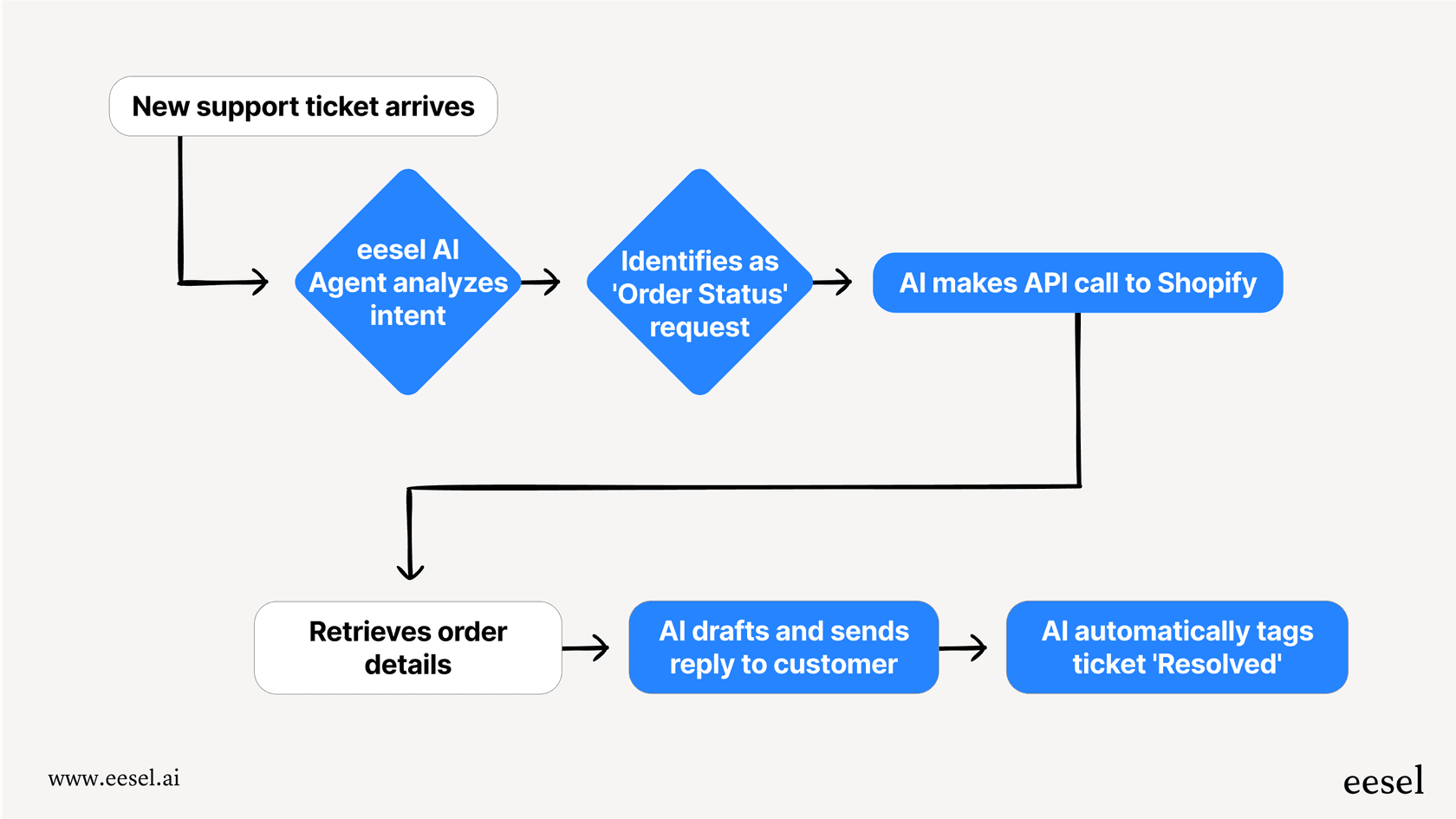
While workarounds exist for tracking skips, they all require manual effort or additional tools. eesel AI offers a different approach: using artificial intelligence to analyze ticket handling patterns and identify potential issues before they become problems.
Our AI Agent integrates directly with Zendesk to monitor how tickets flow through your team. Instead of just counting skips, the AI analyzes patterns like:
- Which ticket types agents consistently avoid
- How long tickets sit before being picked up
- Whether certain agents are disproportionately handling complex issues
- Where knowledge gaps might be causing hesitation
This goes beyond simple skip counting. The AI can identify cherry-picking behavior even when agents aren't formally skipping tickets (for example, by noticing patterns in which tickets get reassigned or how long agents take to accept assignments).
For coaching, eesel AI provides specific insights. Rather than telling a manager "Agent X skips a lot," it might highlight "Agent X skips 80% of tickets tagged with 'billing disputes' but handles other ticket types well." That specificity turns a vague performance issue into an actionable training opportunity.
The integration works within your existing Zendesk workflows. You don't need to replace Guided Mode or change how agents work. The AI observes, learns, and provides insights through dashboards and reports.
We recommend a progressive rollout. Start with the AI analyzing patterns and providing insights to managers. As you validate the accuracy of those insights, you can expand to more proactive interventions like suggesting training modules for agents who struggle with specific ticket types.
Getting the most from your Zendesk skip queue setup
Managing skip behavior in Zendesk requires a combination of the right tools and the right management practices. Let's break down the key takeaways.
First, understand what you're working with. Zendesk's Guided Mode has genuine reporting limitations that aren't likely to change soon. The community has been requesting better skip reporting since 2017, and while Zendesk has suggested Omni-Channel Routing as an alternative, that solution doesn't work for every team.
Second, choose your workaround based on your resources. If you have developers, the Ticket Skips API gives you the most flexibility. If you need something quick, Skipper provides basic dashboard functionality. If you're already investing in workforce management, Tymeshift covers skip reporting along with scheduling and forecasting.
Third, focus on the management layer, not just the technology. Clear policies, training, and coaching matter more than perfect data. Even with excellent skip reporting, you still need to have conversations with agents about their choices and help them develop the skills to handle a broader range of tickets.
Finally, consider whether AI-powered analysis could give you clearer visibility than simple skip counting. Tools like eesel AI can identify patterns that aren't visible in raw skip data, helping you understand not just what's happening but why.
If you're struggling with agent accountability in Zendesk, invite eesel's AI agent for Zendesk to your team. Our AI learns your workflows, identifies patterns in how tickets are handled, and provides actionable insights for coaching and optimization. You can start with AI-assisted insights and progressively expand to more autonomous support as the AI proves its value.


