How to scale customer support with Zendesk in 2026

Stevia Putri
Last edited March 3, 2026
Growth is good. But growth also means more support tickets, more complex inquiries, and more pressure on your team to maintain the same level of service. If you're using Zendesk as your help desk platform, you've got a strong foundation. The question is how to scale without simply hiring more agents every time your customer base expands.
Scaling support isn't about working harder. It's about building systems that handle increased volume without linear cost increases. Here's how to do that with Zendesk, from foundational structures to AI-powered automation that can change how your team works.

What does scaling support actually mean?
Scaling customer support means adapting your operations to accommodate a growing customer base while maintaining (or improving) service quality. The challenge is balancing two competing pressures: customers expect faster, more personalized help, but your budget doesn't grow as fast as your ticket volume.
Here's the reality most support leaders face: hiring one new agent for every 500 new customers isn't sustainable. At some point, you need systems that multiply your team's effectiveness rather than just adding more people to the queue.
Zendesk provides the infrastructure for this scaling journey. But the platform is just a tool. The strategy you build on top of it determines whether you'll handle growth gracefully or constantly feel behind.
The key insight: scaling isn't just about tools or headcount. It's about creating tiered systems where the right issues get to the right people (or systems) at the right time.
Build your foundation: the tiered support structure
Before you add automation or AI, you need clear escalation paths. Support tiers are how you ensure simple questions don't tie up your most experienced (and expensive) agents.
Here's how the five-tier structure works in practice:
Tier 0: Self-service This is your first line of defense. Chatbots, knowledge bases, FAQs, and community forums handle the repetitive questions that don't need a human touch. Think password resets, order status lookups, and basic how-to questions. According to Zendesk's research, 67% of customers prefer self-service over speaking to a representative.
Tier 1: General support Your frontline agents handle common inquiries, account questions, and basic troubleshooting. These are issues that need a human but don't require deep product knowledge.
Tier 2: Technical support When customers hit product bugs or need detailed troubleshooting, tickets escalate to agents with technical expertise. These folks know your product inside and out.
Tier 3: Expert support Engineering issues, complex integrations, and new feature requests go to your most senior team members or specialized engineers.
Tier 4: Third-party/vendor support For issues requiring coordination with external vendors or partners.
The magic of tiers is that most tickets should resolve at Tier 0 or Tier 1. When you set this up correctly in Zendesk, you reduce escalation rates dramatically. Agents know exactly what they own, and customers get faster answers because issues route to the right expertise immediately.
A practical note: once you hit 10+ agents, consider a dedicated Zendesk administrator. Someone who owns the configuration, workflows, and optimization rather than having each agent figure it out ad-hoc.
Automation: your first line of defense
With your tier structure in place, automation becomes the force multiplier that keeps tickets flowing to the right place without manual intervention.
Zendesk's built-in automation handles the operational work that used to clog support queues. Here's what to implement first:
Triggers for routing and tagging Set up rules that automatically categorize tickets based on keywords, requester type, or channel. A ticket containing "refund" gets tagged and routed to your billing team. A VIP customer's inquiry gets flagged for priority handling.
Macros for common responses Your agents shouldn't be typing the same explanations repeatedly. Build a library of pre-written responses for common scenarios. The best teams have macros for everything from standard troubleshooting steps to policy explanations. Learn more about Zendesk macros.
Business rules for escalation Define clear conditions for when tickets escalate. If a Tier 1 agent hasn't resolved an issue within 4 hours, it automatically bumps to Tier 2. If a customer mentions "cancel" or "competitor," it alerts a retention specialist.
Knowledge base that actually gets used Here's a hard truth: most help centers are graveyards of outdated articles. The ones that work are actively maintained, searchable, and integrated into your support workflow. Zendesk's Knowledge Builder helps identify gaps where customers are asking questions that should be covered by self-service content.
Metrics to track:
- Deflection rate: What percentage of inquiries never reach a human because self-service handled them?
- First contact resolution: How often do you solve issues on the first try?
- Escalation rate: What percentage of tickets need to move up tiers?
One common pitfall: over-automating the human touch. Customers can tell when they're stuck in an automation loop with no escape hatch. Always provide clear paths to human help.
For more on getting the most from your help desk, see our guide to AI help desk software.
The AI scaling advantage
Automation handles rules-based workflows. AI handles understanding. The difference is significant.
Zendesk AI brings several capabilities that change how scaling works:
AI agents for autonomous resolution Zendesk's AI agents can resolve 80%+ of customer interactions across any channel without human intervention. These aren't simple chatbots following decision trees. They're powered by agentic AI that reasons, adapts, and takes action independently.
Intelligent triage Instead of keyword-based routing, AI understands intent and sentiment. It knows that "this is broken" and "product isn't working" are the same issue, even with different wording. It can detect frustrated customers and prioritize accordingly. Learn more about Zendesk's intelligent triage capabilities.
Generative AI for agent assistance Zendesk Copilot increases team productivity by 20% according to their data. It provides agents with customer context, suggested replies, and recommended next steps right in their workflow.
Real-world results:
- Next achieved 66% one-touch resolution and 92% decrease in email handle time
- UrbanStems hit 39% automated resolution rate with $100K savings in three months
- Lush reached 60% first contact resolution with $434K annual cost savings
But here's where the approach matters. Traditional AI implementation means configuring workflows, building decision trees, and continuously tweaking rules. It's effective but time-intensive.
There's another way: hiring an AI teammate.
eesel AI takes a different approach to scaling with Zendesk. Instead of configuring an AI tool, you invite an AI teammate that learns your business like a new hire would. The eesel AI Zendesk integration connects directly to your existing setup in minutes.
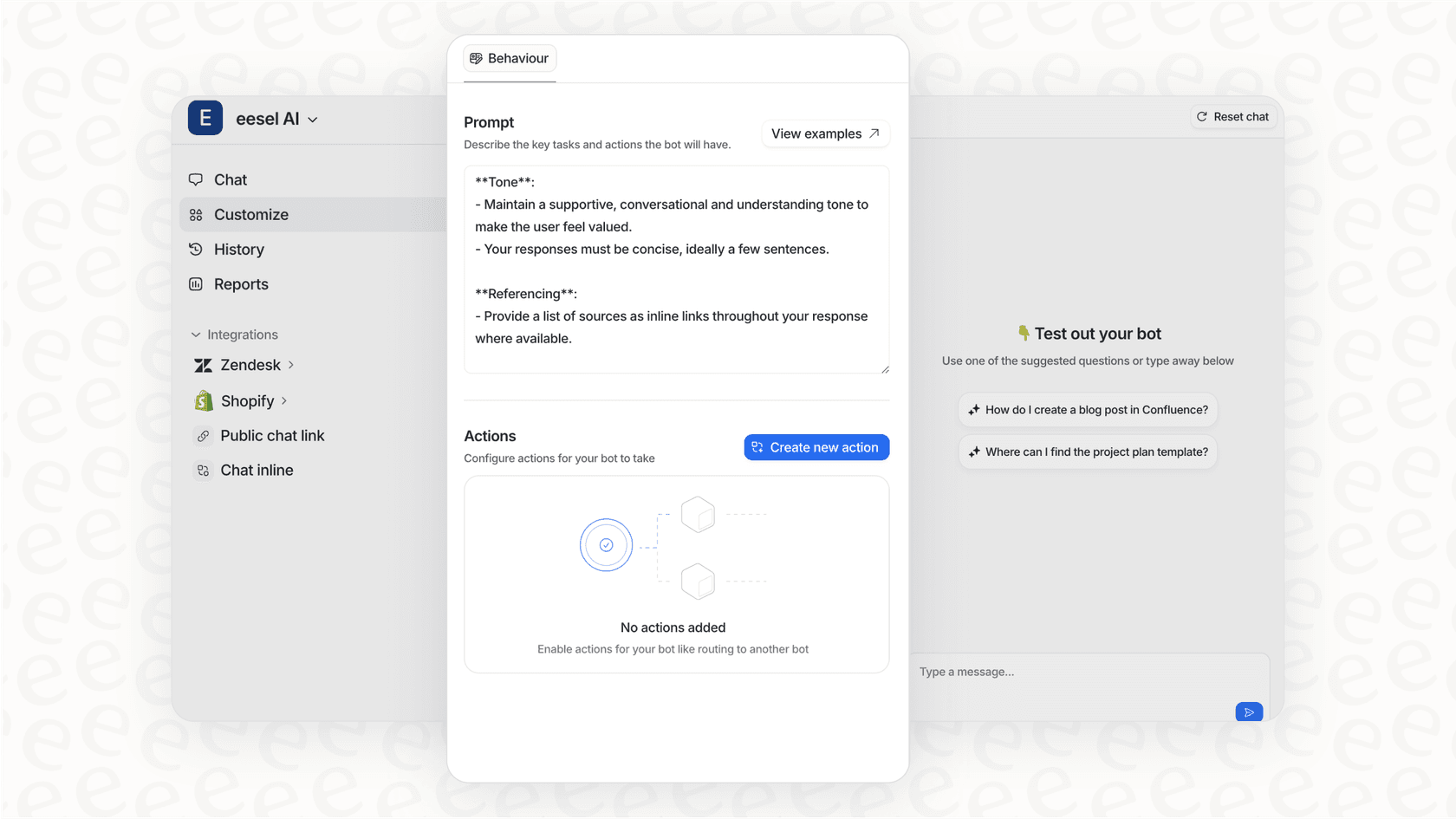
Here's how it works:
Onboards in minutes, not weeks Connect eesel AI to your Zendesk instance and it immediately learns from your past tickets, help center articles, macros, and any connected documentation. It understands your tone, policies, and common issues from day one.
Starts with guidance Like any new hire, eesel begins with oversight. You can have it draft replies that agents review before sending, limiting it to specific ticket types or queues. This lets you verify it understands your business before expanding its role.
Plain-English control Instead of complex workflow configurations, you describe behavior in natural language: "If the refund request is over 30 days, politely decline and offer store credit." "Always escalate billing disputes to a human." No code required.
Pre-go-live simulation Before eesel touches real customers, you can run it on thousands of past tickets to see exactly how it would respond. Measure resolution rates, identify gaps, tune prompts. Gain confidence before going live.
Progressive autonomy As eesel proves itself, you expand its scope. Start with drafting replies for review. Level up to sending replies directly. Eventually handle full frontline support while escalating only the edge cases you define.
Continuous learning Edit a response, and eesel learns from it. Message it on Slack with policy updates. Leave notes on tickets. The AI improves through use rather than requiring retraining cycles.
The pricing model is different too. Instead of per-agent fees that scale with your team size, eesel charges per interaction. This means your costs align with actual usage, not headcount. See our eesel AI pricing page for details.
| Plan | Monthly Price | Interactions | Best For |
|---|---|---|---|
| Team | $299 | 1,000 | Small teams needing Copilot for docs/website |
| Business | $799 | 3,000 | Teams wanting full AI Agent with auto-replies |
| Custom | Contact sales | Unlimited | High-volume teams with custom needs |
When does Zendesk's native AI make sense versus an integrated AI teammate like eesel? If you're all-in on Zendesk and want everything in one ecosystem, native AI keeps things simple. If you want more flexibility in how the AI learns, responds, and scales, or if you work across multiple help desks, an AI teammate approach gives you more control.
Learn more about AI options for Zendesk in our best AI chatbots for Zendesk comparison.
Measuring what matters
Scaling without metrics is just guessing. Here's what to track as you grow:
First response time How quickly do customers get an initial reply? This sets expectations for the entire interaction.
Resolution time How long from ticket creation to closure? Watch this trend as you add automation and AI.
CSAT (Customer Satisfaction) Are customers happy with the help they received? This is your quality check against speed.
Escalation rates What percentage of tickets need to move up tiers? High escalation might mean your tier boundaries need adjustment.
One-touch resolution percentage Issues solved in a single interaction are your most efficient. Industry leaders hit 60-80% here.
Cost per contact Total support costs divided by total tickets. This is the metric that matters most to finance.
Zendesk Explore gives you dashboards for all of this, but the key is using the data to identify bottlenecks. If you see CSAT dropping on tickets handled by specific macros, those macros need revision. If tickets spike at 9 AM every day, you have a staffing optimization opportunity.
One warning: don't optimize for speed at the expense of quality. A fast wrong answer is worse than a slow right one. For more on support metrics, see Zendesk's guide to customer service metrics.
Scaling support without the growing pains
Let's bring this together. Sustainable scaling with Zendesk follows a clear progression:
-
Start with the basics. Get your tier structure right before adding complexity. Make sure your knowledge base actually helps customers self-serve.
-
Automate repetitive work before hiring. Triggers, macros, and business rules should handle the operational load that doesn't need human judgment.
-
Consider AI as a teammate, not just a tool. Whether you use Zendesk's native AI or integrate an AI teammate like eesel, think in terms of hiring and leveling up rather than configuring and maintaining.
-
Test before going live. Run simulations on past tickets. Verify quality before customers see AI-generated responses.
-
Keep humans central. AI handles scale. Humans handle nuance, empathy, and complex problem-solving. The goal is giving your team more time for the work that actually needs them.

If you're looking to accelerate your Zendesk scaling with AI, eesel AI integrates directly with your existing setup. It learns from your specific tickets and tone, scales from Copilot drafting to full AI Agent autonomy, and uses flat pricing per interaction rather than per seat. You can try it free or book a demo to see how it fits your workflow.
The bottom line? Scaling support isn't about choosing between quality and efficiency. With the right structure, automation, and AI, you can have both.


Frequently Asked Questions
Share this article

Article by
Stevia Putri
Stevia Putri is a marketing generalist at eesel AI, where she helps turn powerful AI tools into stories that resonate. She’s driven by curiosity, clarity, and the human side of technology.