Zendesk Agent Workspace: The complete guide for 2026

Stevia Putri
Last edited March 3, 2026
If you're managing customer support through Zendesk, you've probably heard about the Agent Workspace. It's a significant change to how agents handle tickets, and whether you're already using it or considering the switch, understanding what it does (and doesn't do) matters.
Let's break down what Zendesk Agent Workspace actually is, how it changes your support operations, and what you should know before migrating.

What is Zendesk Agent Workspace?
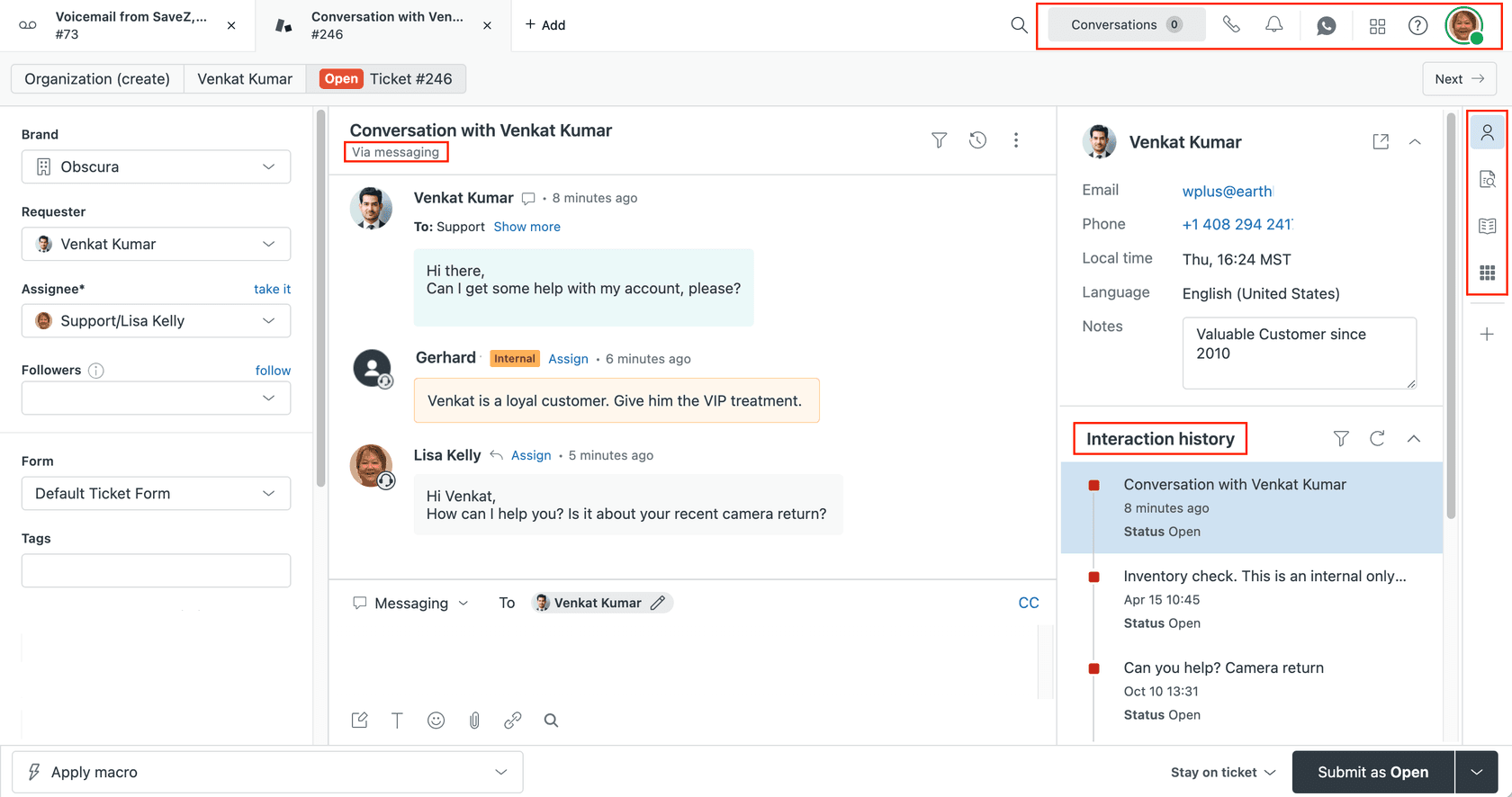
The Zendesk Agent Workspace is a unified interface that brings all your support channels into a single ticket view. Instead of switching between the Support dashboard, Chat dashboard, and phone systems, agents handle everything from one screen.
Here's what that means in practice. A customer might start with a chat about a refund, then follow up via email with documentation, and finally call for clarification. In the old setup, an agent would need to check three different places to piece together that conversation. In the Agent Workspace, it's all visible in one ticket thread.
The workspace is available on all Zendesk Suite plans (Team, Growth, Professional, Enterprise, Enterprise Plus) and Support plans (Team, Professional, Enterprise). If you're on one of these plans, you can activate it through your admin settings.
The core idea is reducing context switching. Agents see the full customer interaction history regardless of channel, which theoretically means faster responses and more personalized service.
That said, it's not the only approach to unified support. Some teams are looking at AI-native solutions like eesel AI that handle the entire frontline autonomously rather than just organizing the interface. We'll get into that comparison later.
Key features of Zendesk Agent Workspace
The workspace packs several features designed to streamline agent workflows. Let's look at what actually changes day-to-day.
Omnichannel ticket management
This is the headline feature. Email, chat, voice, social messages, and web messaging all feed into the same ticket interface. Agents can reply using whatever channel makes sense for the situation, not just the one the customer originally used.
The conversation view arranges comments from oldest to newest, with the newest at the bottom. This matches how messaging apps work, but it's a shift if your team is used to the traditional email-style view with newest first.
Context panel and customer insights
The right-side panel shows customer context without agents leaving the ticket. This includes:
- Customer profile and interaction history
- Third-party app data (if integrated)
- Knowledge panel for searching help center articles
- Side conversations (if activated)
- Custom object records (if configured)
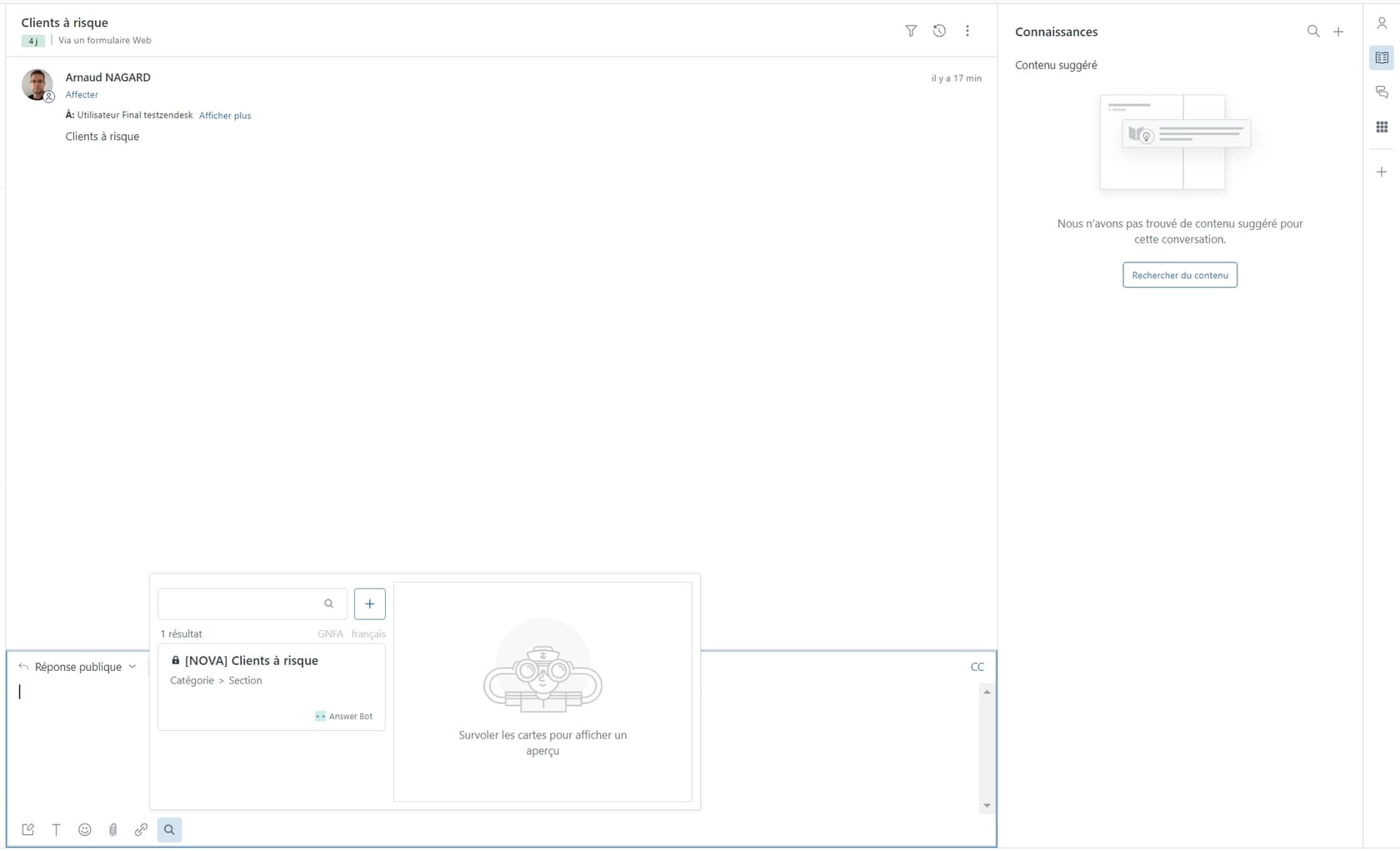
The knowledge panel is particularly useful. Agents can search your help center, link articles directly into replies, or quote content without switching tabs.
Composer and messaging capabilities
The composer uses CKEditor, which handles both rich text and Markdown. It maintains separate text buffers for different conversation types, so agents can draft an email reply while simultaneously handling a chat without losing either draft.
Quick replies and macros work as before, though the interface is streamlined for the omnichannel context.
AI-powered features (Agent Copilot)
For teams with the Copilot add-on, the workspace includes AI assistance:
- Ticket summaries for quick context
- Suggested first replies
- Suggested macros
- Auto-assist capabilities
Copilot costs an additional $50 per agent per month for unlimited access, or comes with limited uses on Professional plans. It's worth noting this is an add-on, not core functionality. Teams looking for built-in AI might consider alternatives where AI is the foundation rather than an extra.
Migrating to Zendesk Agent Workspace
Migration is where things get serious. This isn't a flip-a-switch change. There are structural implications for your account.
Before you migrate
Here's what you need to know before starting:
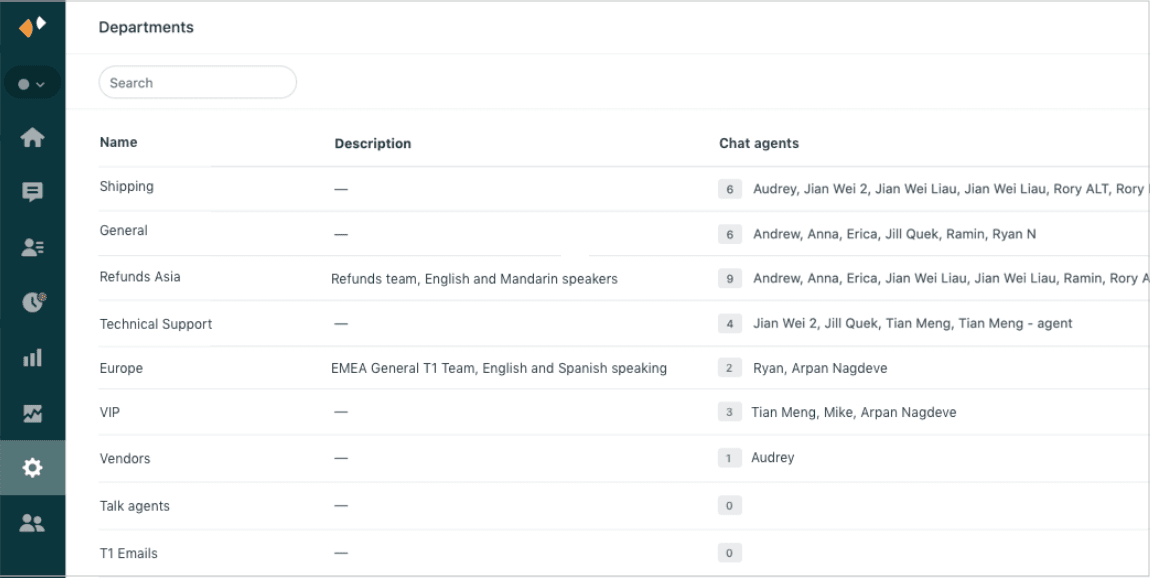
Chat departments become Support groups. This is irreversible. If you have carefully structured Chat departments, they'll merge into Support groups. Your routing and assignment logic will need updating.
Account-wide activation. You can't roll this out to a test group first. Once activated, it applies to your entire account.
Trigger compatibility. Both Support triggers AND Chat triggers can affect messaging in the workspace. Zendesk recommends auditing your triggers before migration to avoid unexpected behavior.
Sandbox testing. If you're on an Enterprise plan, test the migration in your sandbox first. This is strongly recommended given the account-wide nature of the change.
Timing. You must migrate when Chat traffic is stopped. No ongoing chats can be active during the migration window.
Migration process
The actual migration uses a step-by-step wizard that guides you through:
- Mapping Chat departments to Support groups
- Handling any duplicate names between departments and groups
- Confirming trigger compatibility
- Activating the workspace
Timeline expectations vary by account complexity. Simple setups might complete in minutes. Larger accounts with extensive department structures and custom triggers should plan for longer, especially if cleanup is needed post-migration.
After migration
Once live, plan for agent retraining. The interface changes are significant:
- Conversation order is bottom-up (newest last) rather than top-down
- The composer location and behavior differs from legacy views
- Internal notes require an extra click to access
- Group management replaces department management
Some agents adapt quickly. Others find the new layout disrupts their workflow, particularly if they primarily handle email tickets rather than chat.
Limitations to know before migrating
The Agent Workspace solves some problems but creates others. Here are the limitations Zendesk documents (and some users have complained about):
| Limitation | Impact |
|---|---|
| Multi-agent chats not supported | Only transfers allowed, no joint chat sessions |
| Chat visitor path limited | Only visible during active live chat |
| Mobile app restrictions | Chat tickets can't be updated via Support mobile app |
| Legacy formatting changes | Markdown conventions may affect older ticket comments |
| API script compatibility | Some custom scripts may need updates for new composer |
| Data Center Location | Some features don't support DCL configurations |
User feedback from the Zendesk help center reveals additional friction points:
- "No way to remove the green-blue box behind customer text"
- "Response editor at bottom is bad for posture/neck"
- "Switching to Internal Note is now 2 clicks instead of one"
- "New layout makes reading threads more difficult"
These aren't dealbreakers for everyone, but they're worth considering if your team has established workflows or accessibility needs.
Zendesk Agent Workspace vs AI alternatives
Here's where we need to distinguish between interface unification and actual automation.
The Agent Workspace unifies your channels into one view. But agents are still doing the work. They're reading tickets, drafting replies, and deciding when to escalate. The workspace organizes the work; it doesn't do the work.
AI-native approaches flip this. Instead of giving agents a better interface for manual work, AI handles the frontline entirely and escalates only what it can't resolve.
At eesel AI, we take this approach. Rather than configuring workflows and rules, you train an AI teammate on your past tickets, help center, and documentation. It learns your tone and policies, then starts handling tickets autonomously.

Here's how the approaches differ:
| Aspect | Zendesk Agent Workspace | AI-native (eesel AI) |
|---|---|---|
| Setup | Migration required, configuration-heavy | One-click integration, learns from existing data |
| Training | Manual configuration of rules and workflows | Automatic learning from past replies and docs |
| Pricing | Per agent/month ($55-$219+ for Suite) | Per interaction ($239-$799/month, unlimited agents) |
| Testing | Limited pre-go-live testing | Bulk simulation over thousands of past tickets |
| Escalation | Rule-based workflows | Plain English instructions |
| Resolution | Agents handle everything | Up to 81% autonomous resolution |
The eesel AI Zendesk integration works directly with your existing Zendesk account. You don't replace Zendesk; you augment it with AI that handles the repetitive tickets while your human agents focus on complex issues.
Which approach makes sense depends on your situation. If you want to keep full manual control and just need better organization, the Agent Workspace delivers. If you're looking to actually reduce ticket volume and agent workload, AI-native solutions are worth exploring.
Getting started with smarter support
Let's recap the key decisions around Zendesk Agent Workspace:
Consider migrating if:
- Your agents constantly switch between Support, Chat, and phone systems
- You want unified conversation history across channels
- Your team is comfortable with change and retraining
- You primarily need better organization, not automation
Think twice if:
- Your agents mainly handle email (the workspace is optimized for chat/messaging)
- You have complex Chat department structures you'd lose
- Your team has accessibility needs the new interface might conflict with
- You're looking for AI automation (Copilot is an expensive add-on)
For teams wanting to go beyond interface improvements and actually automate support, eesel AI offers a different path. Instead of configuring a workspace for humans to use, you hire an AI that learns your business and handles tickets end-to-end.

The choice isn't just about features. It's about whether you want to make manual work more efficient or eliminate the manual work entirely.


Frequently Asked Questions
Share this article

Article by
Stevia Putri
Stevia Putri is a marketing generalist at eesel AI, where she helps turn powerful AI tools into stories that resonate. She’s driven by curiosity, clarity, and the human side of technology.



