If you've been hunting for an AI writing tool, you've probably stumbled across Rytr. It's a well-known name in the game, often praised as a budget-friendly assistant for whipping up short-form content like social media posts, quick emails, and product descriptions. It’s designed to be simple, fast, and easy on the wallet.
But is it the right tool for your needs? In this article, we’re giving you a straight-up, balanced look at Rytr. We'll cover its main features and pricing, but more importantly, we’ll dig into its biggest drawbacks and the past controversies you should know about before signing up. Let's get into it.
What is Rytr?
So, what exactly is Rytr? It's an AI writing assistant built to help you with all sorts of short-form copy. The main idea is to help you bust through writer's block and speed up the initial drafting process, which can often be a real drag. Think of it less as a ghostwriter for your next novel and more as a partner to get the ideas flowing.
It’s mostly for content creators, marketers, and entrepreneurs who need a hand with everyday writing. We're talking about things like coming up with catchy social media captions, writing ad copy that actually works, or just getting a solid outline down for a blog post.
Rytr's main appeal has always been its simplicity and low cost. It offers over 40 different templates and more than 20 tones of voice, giving you plenty of options to generate ideas without a complicated setup or a scary price tag.
A breakdown of Rytr's core features
So, what can you actually do with this thing? Let's break down the main tools Rytr offers to give you a clear idea of what it can handle and where it really does a good job.
AI writer with 40+ templates and 20+ tones
The heart of Rytr is its AI writer. You kick things off by choosing from over 40 pre-built use cases, which are just templates for specific content types. They cover everything from practical stuff like "Blog Idea & Outline" and "Email" to more creative options like "Song Lyrics" and "Story Plot."
After you pick a use case, you can tweak the output. Rytr can write in over 30 languages and lets you select from more than 20 tones of voice. You can ask it to sound "Convincing", "Urgent", or even "Funny", depending on your goal. This flexibility is pretty handy for making sure the AI's output fits your brand.
Honestly, this is where Rytr is at its best. It's great for brainstorming ideas, creating a structured outline, or writing a few decent paragraphs to get you moving.
Rich text editor with content improvement tools
Once the AI spits out your text, you can work on it right inside Rytr’s built-in rich text editor. It’s a clean, no-fuss interface that feels similar to a standard document editor.
The neat part is the set of AI-powered editing tools you can use just by highlighting some text. Here’s what you can do:
-
Improve: This function tries to polish your text by fixing grammar and making it flow a little better.
-
Rephrase: If a sentence just isn't landing right, this tool will rewrite it in a few different ways to give you some options.
-
Expand/Continue Ryting: When you need to flesh out a point, this feature will try to build on what you've written. (We'll get into how well this actually works later on).
-
Shorten: This does exactly what it says on the tin, trimming your text to be more concise.
AI image generation for original visuals
For anyone creating content, finding the right images can feel like a full-time job. Rytr includes an AI image generator to help with this, letting you create unique visuals without scrolling through endless stock photo sites.
You just write a description of what you want to see, and the AI generates an image based on your prompt. It's a nice feature to have baked right into your writing tool.
That said, the quality can be a bit of a gamble. While it can produce some cool results, it doesn't always hit the mark. For instance, a review from Search Endurance mentioned that a prompt for a "dragon atop a mountain peak" turned out great, but more complex requests might not work as well. Still, it's a useful addition for quickly creating blog banners or social media graphics.
Built-in plagiarism checker
To give you some peace of mind that your content is original, Rytr has a plagiarism checker powered by Copyscape, which is a pretty well-known service.
It's simple to use. You just highlight text in the editor, click the plagiarism check button, and it scans the web for any matches. While it’s helpful for a quick check, it's a basic integration. It might not be as rigorous as a dedicated plagiarism tool, but it's a decent first line of defense.
Rytr pricing plans
Rytr's pricing is definitely one of its main attractions. It’s very affordable, which makes it a go-to for freelancers, solo creators, and small teams on a tight budget. Here’s a quick look at their plans.
| Plan | Monthly Price | Key Features & Limits |
|---|---|---|
| Free | $0 | Generate 10,000 characters/month, access 40+ use cases, 5 AI images/month, built-in plagiarism checker. |
| Saver | $9 | Generate unlimited characters/month, 20 AI images/month, create custom use cases. |
| Unlimited | $29 | All Saver features plus 100 AI images/month, a dedicated account manager, and priority support. |
Key limitations and controversies of Rytr
Alright, here's the part you really need to pay attention to. To make a smart choice, you need the whole story. This section covers Rytr’s known weaknesses and its history, based on user reports and official records.
Challenges with long-form content generation
While Rytr is effective for short-form text, a commonly cited limitation is its performance with high-quality, long-form content like complete blog posts or articles.
A detailed review from Search Endurance noted that when asked to expand on paragraphs, the result often became "very odd, repetitive, and often nonsensical." This suggests Rytr is more suitable for starting posts than for finishing them. Users may receive a viable outline and introductory paragraphs but will likely need to perform significant manual writing and editing.
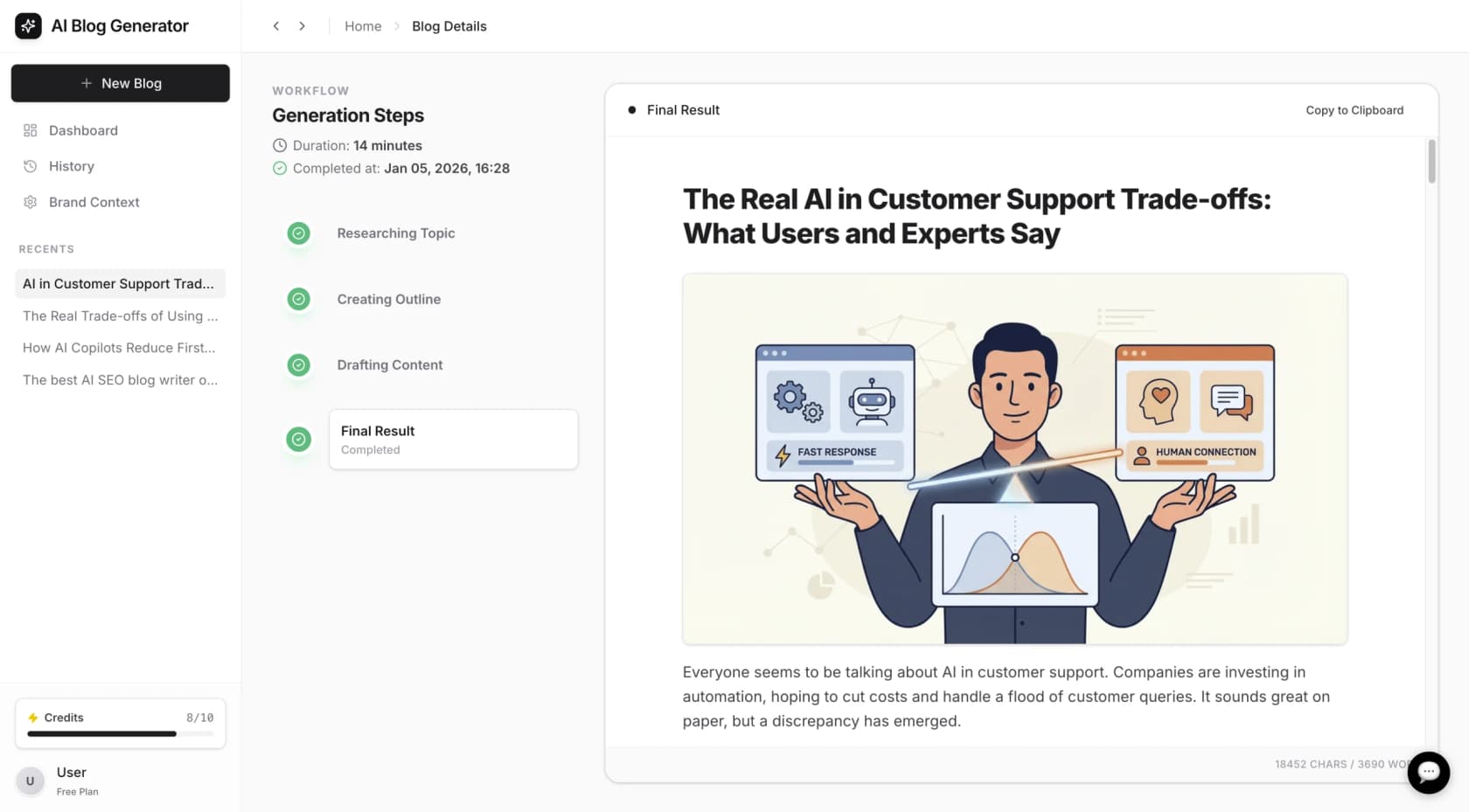
For teams that need to create publish-ready articles efficiently, this paragraph-by-paragraph approach can be a drawback. In contrast, other platforms, such as the eesel AI blog writer, are designed for end-to-end long-form content creation, aiming to turn a single keyword into a fully structured and media-rich article.
Basic SEO tools without key metrics
Rytr has a few SEO-related features, like a keyword generator and SERP analysis, but they are relatively basic. The keyword tool can give you some ideas, but as a detailed 2025 review points out, it's missing crucial data like search volume or keyword difficulty. Without that information, it can be challenging to build a comprehensive SEO strategy.
Similarly, the SERP analysis feature, which is supposed to give you insights from top-ranking pages, isn't really integrated into the writing process. You have to manually apply what you learn, which adds manual work and can reduce the efficiency of using an AI assistant.
The 2026 FTC complaint and its 2026 reversal
In 2026, the Federal Trade Commission (FTC) filed a complaint against Rytr. The agency claimed that the platform's "Testimonial & Review" feature was basically a tool for subscribers to generate fake online reviews, which is prohibited under the FTC Act.
However, the consent order was reopened and set aside in December 2025. The new FTC leadership argued that penalizing a technology just because it could be misused was bad for innovation and against the public interest. It's a complicated situation, but it's definitely part of Rytr's history.
User complaints about lifetime deals and account issues
A quick look at user feedback on sites like AppSumo shows some common problems that aren't just about the software. A number of users on AppSumo said they bought lifetime deals, only to be bumped down to the free plan later with much lower character limits, which significantly devalued their purchase.
I liked Rytr in pre-chatgpt era. Now I don't use it. And customer support sucks with its 'dark patterns' when it comes to your subscription annual fee. They got my annual subscription fee in advance and when were asked ro a refund THE NEXT day, they just like: 'we don't refund, it's a company's policy... blah-blah-blah-...' Given my previous pre-paid year I didn't use the service almot entirely. Meaning they got 2-year subscription fee almost for nothing...

Other frequent complaints include the plagiarism checker flagging its own AI-generated text as unoriginal and users having a hard time getting a response from customer support to fix these problems.
Is Rytr the right AI tool for you?
Rytr is an affordable and simple tool for those who need an AI assistant for short-form content ideas, outlines, and first drafts. For freelancers, social media managers, or anyone on a budget who needs help overcoming the blank page, it can be a suitable choice.
However, its limitations in creating quality long-form content, its basic SEO tools, and past user account issues are important factors for businesses to consider, particularly those aiming to scale their content marketing and grow organic traffic.
For teams that need to publish high-quality, SEO-optimized blog content consistently, an alternative like the eesel AI blog writer may be a better fit. It is built for a different purpose: creating publish-ready posts, not just rough drafts.
Here's how it's different:
-
From Keyword to Complete Post: You give it a topic, and eesel AI generates a full article with an intro, conclusion, logical headings, and even an FAQ section.
-
Automatic Assets Included: Every article comes with AI-generated images, tables, and infographics, saving time on visual creation.
-
Optimized for SEO & AEO: The content is structured to rank on search engines and is also optimized for AI Answer Engines like Google's AI Overview.
-
Credible and Engaging: It finds and includes real Reddit quotes and relevant YouTube videos to add authentic human context and social proof, making the content more interesting and trustworthy.
The eesel AI blog writer was developed to support content growth, contributing to an increase from 700 to 750,000 daily impressions over three months. If you are looking for a purpose-built blog generator, you can generate a free SEO-optimized post to evaluate its quality.
To see Rytr in action and get a visual walkthrough of its features and limitations, check out this detailed video review. It provides an updated look at the tool for 2026, helping you see if it truly meets the mark for your writing needs.
Frequently asked questions
What is Rytr best used for?
Rytr is at its best when used for short-form content. Think social media captions, product descriptions, ad copy, and generating ideas or outlines for blog posts. It's a great tool for overcoming writer's block and quickly drafting short pieces of text.
Can Rytr write a full blog post?
While you can piece together a blog post with Rytr, it's not its strong suit. User reviews and tests show that it struggles to generate high-quality, coherent long-form content. It's more effective for creating outlines and initial paragraphs that you'll need to expand and edit heavily yourself.
Is the plagiarism checker in Rytr reliable?
The plagiarism checker in Rytr is powered by Copyscape and is useful for a quick, basic scan. However, it's not as thorough as dedicated plagiarism software, and some users have reported that it occasionally flags its own AI-generated content. It's best used as a first-pass check.
What was the FTC complaint against Rytr about?
In 2026, the FTC filed a complaint alleging that Rytr's "Testimonial & Review" feature enabled users to generate fake and deceptive online reviews. However, this order was later set aside in 2026 by new FTC leadership, who argued against penalizing a technology for potential misuse.
Are there better alternatives to Rytr for long-form content?
Yes. For teams focused on creating complete, SEO-optimized blog posts efficiently, tools like the eesel AI blog writer are a better fit. These platforms are specifically designed to turn a single keyword into a full, publish-ready article with images, tables, and other assets included.