A complete guide to reader-friendly blog writing

Stevia Putri

Stanley Nicholas
Last edited January 20, 2026
Expert Verified

Here's a hard truth: most blog posts don't get read from start to finish. In a world packed with content, your readers are busy, get distracted easily, and have become masters of scanning. They don't really read; they hunt for information. If they can't find what they need in a few seconds, they're gone.
The answer isn't just to write more content, but to write smarter. This is where reader-friendly blog writing comes into play. It’s an approach that respects your audience's time by focusing on clarity, scannability, and genuine value above all else.
In this guide, we'll walk through the main parts of this approach: how to structure your content for scanners, how to develop a tone that connects with people, and how to use visuals to make your points stick. The tricky part, of course, is doing this consistently, especially when you're trying to grow. At eesel AI, we faced this exact problem and used our own eesel AI blog writer to automate these best practices. It helped us grow our blog from 70k to over 750k impressions in just three months.
What exactly is reader-friendly blog writing?
Reader-friendly blog writing isn't about simplifying your content to the point of being basic. It’s a method of writing and formatting that puts the reader's experience at the heart of everything you do. The aim is to make your content as clear, scannable, and easy to digest as possible.
So, why is this so important?
- It improves engagement: When people can easily find what they're looking for, they stick around longer. This leads to lower bounce rates and gives your message more time to sink in.
- It boosts your SEO: Search engines are getting smarter. They recognize when users have a good experience on a page and reward content that keeps people engaged. Reader-friendly content is user-friendly content, and Google appreciates that.
- It builds trust: When you offer clear, helpful, and easy-to-digest information, you establish yourself as a credible authority. People trust sources that don't make them work hard for an answer.
At its core, reader-friendly writing is made up of a few key components:
- Structure: A logical flow that guides the reader from one point to the next.
- Readability: Simple language, short sentences, and a conversational tone.
- Scannability: Making it super easy for readers to find key information at a glance.
- Visual Appeal: Using images, formatting, and white space to break up text and make the content more inviting.
To make this clearer, here’s a visual breakdown of these four key elements.
The three pillars of reader-friendly blog writing
Getting this style of writing right really comes down to three main areas. If you can nail these, you'll be creating content that people not only find but actually enjoy reading.
Pillar 1: How to structure your content
Most people who land on your blog are searching for a specific answer. They aren't there to read a novel. Your job is to set up your content so they can find that answer as quickly as possible. This means designing for the scanner, not the deep reader.
-
Use clear headings and subheadings: Think of headings as signposts. They create a logical outline that lets a reader understand the entire article's structure in seconds. As some experts say, this simple trick makes even a very long post feel manageable and easy to navigate.
-
Write short paragraphs: No one wants to be greeted by a massive wall of text. It's intimidating and makes your content feel like a chore. A good rule is to keep your paragraphs to just 2-3 sentences. This is especially important for the many people reading on their phones, where long paragraphs can seem to go on forever.
-
Incorporate bullet points and numbered lists: Lists are a scanner's best friend. They're great for summarizing key takeaways, outlining steps, or listing features. They naturally draw the eye and make complex information much easier to process.
-
Embrace white space: White space is the empty area around your text and images. It's not wasted space; it's a powerful design tool. Plenty of white space makes your page feel less cluttered and more organized, giving your content room to breathe and improving the reading experience.
Pillar 2: Crafting the right tone
Structure gets your readers in the door, but your tone is what convinces them to stay. Your writing should feel approachable and human, not like it was generated by a robot or pulled from a dusty textbook.
-
Write a compelling introduction: Your introduction is your elevator pitch for the article. If it doesn't grab your reader's attention right away, they're gone. A great intro usually has three parts:
- The Hook: Start with a relatable problem, a surprising fact, or a question that sparks their curiosity.
- The Transition: Briefly connect that hook to the reader's problem and explain why it matters.
- The Thesis: Clearly state what the article is about and what the reader will learn.
-
Write conversationally: Use a friendly, direct tone. Imagine you're explaining something to a friend. Use contractions like "you're" or "it's," speak directly to the reader as "you," and don't hesitate to ask questions to keep them engaged.
-
Avoid jargon: Unless your audience is highly technical and specialized, steer clear of industry jargon. Your goal is to be clear, not to sound overly smart. If you must use a technical term, be sure to explain it simply.
-
Use bolding and italics strategically: Formatting isn't just for appearances. Bolding and italics are visual cues that help scanners identify the most important phrases and takeaways. Use them to highlight key terms, important stats, or crucial advice so someone can get the main idea of a section without reading every single word.
Pillar 3: Using visuals effectively
Visuals are more than just decoration; they're powerful communication tools. They break up text, illustrate complicated ideas, and make your content much more engaging and memorable.
-
Break up text with images and screenshots: A good habit is to include a relevant visual every 200-300 words. This maintains the reader's interest and provides a visual anchor for the points you're making. Screenshots are particularly effective for how-to guides or product reviews.
-
Use tables for comparisons: When you need to compare data, features, or pricing, a table is the most straightforward way to present it. It organizes complex information in a format that's easy to understand at a glance.
-
Incorporate infographics and charts: Have some interesting stats or a complex process to explain? Turn it into an infographic. Visuals like these can simplify complicated topics and are highly shareable. Free tools like Draw.io or Excalidraw make creating custom diagrams surprisingly easy.
-
Embed relevant media for social proof: Sometimes, the best way to make a point is to let someone else do it for you. Embedding a YouTube video can offer deeper context or a helpful tutorial. Including quotes from real people on platforms like Reddit can add a layer of authenticity and social proof to your claims.
This kind of authentic feedback is invaluable. For example, writers on Reddit often discuss the right way to use tools without losing a human touch:

How to scale your reader-friendly blog writing efforts with AI
Applying all of these principles to every single blog post is a lot of work. It takes time, requires a keen eye for detail, and can easily become a bottleneck for any content team trying to scale up. This is where AI can really help.
The eesel AI blog writer is a platform we built to automate the creation of high-quality, reader-friendly content that's designed to rank. It takes the principles we just covered and handles them for you.
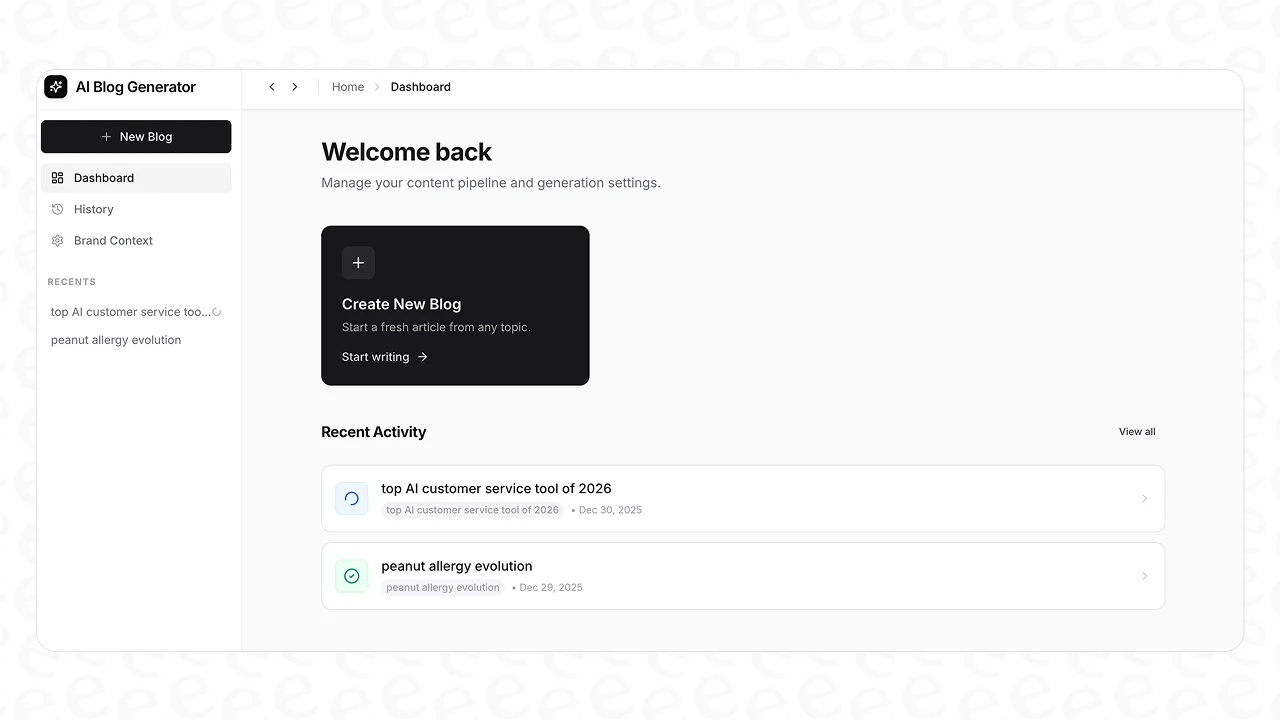
Here’s how it works:
- Automated Structure and Research: You give it a single keyword, and it generates a complete blog post with a logical structure, clear headings, an engaging intro, and a solid conclusion. Its context-aware research digs deep into the topic, so you get valuable, in-depth content.
- Human-Centric Tone: It analyzes your website to learn your brand context and voice. This allows it to write in a way that sounds like you and even make natural, subtle mentions of your own products.
- Automatic Rich Media: A key feature is its ability to create a complete, publish-ready post with AI-generated images, infographics, and tables. It even finds and embeds relevant YouTube videos and authentic Reddit quotes to add that crucial layer of social proof, all automatically.
- Optimized for Modern Search: The content isn't just optimized for traditional SEO. It's also built for Answer Engine Optimization (AEO), making sure your content is ready to be featured in new search formats like Google's AI Overviews.
Visual learners might find it helpful to see these formatting principles in action. The video below offers a great step-by-step guide to structuring your posts for maximum readability, reinforcing many of the tips we've discussed.
A video tutorial on reader-friendly blog writing, explaining how to format posts so people will actually read them.
Putting your reader first
Ultimately, reader-friendly blog writing is all about creating a positive user experience. It’s a mix of smart structure, a human-centric tone, and engaging visuals that respects your reader's time and attention.
The principles themselves are simple, but consistent execution is what separates the blogs that get read from those that get ignored. While it takes effort, the good news is that powerful AI blog writing tools can now be your ally, helping you achieve that consistency and scale your content without sacrificing quality.
Start creating reader-friendly content today
Writing for your audience doesn't have to be a slow, manual process that holds back your content strategy. The right tools can help you scale your efforts while ensuring every post you publish is high-quality, engaging, and designed to perform.
The eesel AI blog writer can turn a single keyword into a complete, media-rich, and publish-ready blog post in just a few minutes. If you're ready to see how it can transform your content workflow, you can try it for free.
Frequently Asked Questions

Share this post
Article by
Stevia Putri
Stevia Putri is a marketing generalist at eesel AI, where she helps turn powerful AI tools into stories that resonate. She’s driven by curiosity, clarity, and the human side of technology.


