
Getting your content to rank consistently on Google can feel like an uphill battle. Marketing teams are constantly trying to figure out search intent, keep an eye on competitors, and tweak every little detail for better visibility. Tools like NEURONwriter are designed to help with this by offering data-backed suggestions to boost a content's SEO score. It helps writers fine-tune their articles to what search engines want to see.
But what if you need to create content from scratch and at scale? That's a different challenge that goes beyond just editing a draft. Some AI content platforms now manage the entire process, taking you from a keyword to a finished blog post.
In this guide, we will walk through what NEURONwriter is all about, including its features, pricing, and whether it is the right tool for your team.
What is NEURONwriter?
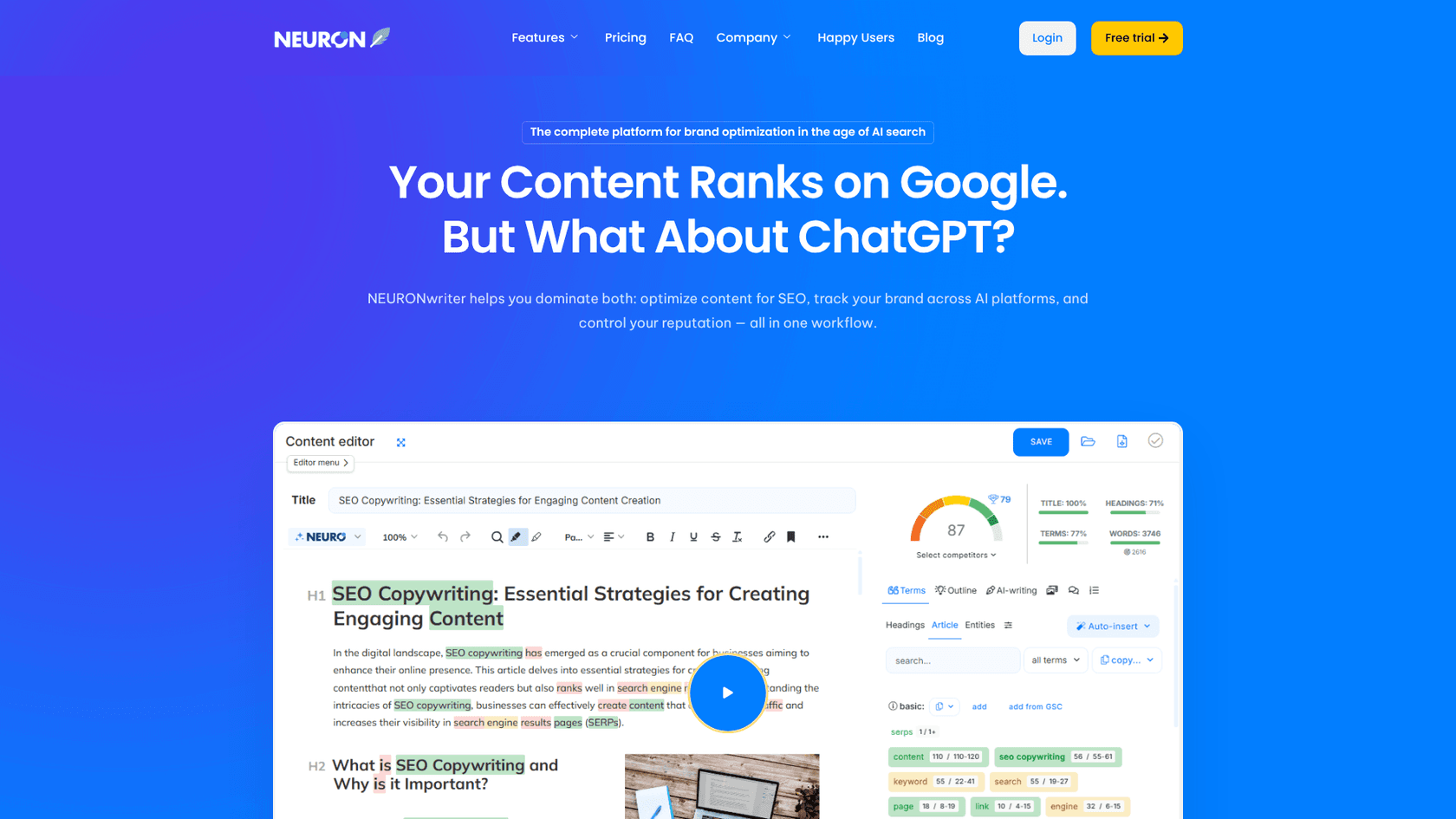
NEURONwriter is a content optimization tool built for SEOs, marketers, and writers who want their work to rank higher in search results. It uses natural language processing (NLP) and competitor analysis to give you practical tips for improving your articles for Google and newer AI search tools.
Its main job is to look at the top-ranking pages for your target keyword and give you a clear plan for making your content more thorough and relevant. As you write in its editor, a real-time score updates, showing you which terms to include and how to structure your article based on what's already performing well.
It’s mainly for people who are already writing but want data-driven guidance to refine their drafts or create new, highly optimized pieces.
Been using it for a couple of months and I find it very powerful if you know how to use it well. Take time to learn it and tweak some results and you should be good.

Key features of NEURONwriter
NEURONwriter comes with a set of tools focused on analyzing, writing, and optimizing content. Here’s a look at its main features.
Content writing and optimization tools
The Content Writer is where most of the action happens in NEURONwriter. After you enter a target keyword, it analyzes the top SERP results and opens an editor for you to write or paste your article. The editor gives you a real-time content score, showing how well your piece is optimized compared to what's already ranking.
The platform suggests NLP-based terms and key entities (like people or places) to include, helping you cover the topic in detail. It supports this for 19 languages. You can also dig into your competitors' content structure and keywords to find gaps in their strategy. For originality, a plagiarism checker powered by PlagiaShield is available on the Gold plan and higher.
Generative AI and content designer
NEURONwriter also has generative AI tools that use models from OpenAI, Anthropic, and Gemini to help create content.
The platform provides templates to generate outlines, paragraphs, or even one-click full articles. Its Content Designer feature can create a full article outline, complete with a title, meta description, and headings, based on your keywords. It can even pull facts from competitor pages to give you a starting point. Other functions include automatically adding relevant keywords to your text and generating images from text descriptions right inside the platform.
Content planning and team management
To help teams stay organized, NEURONwriter includes features for managing your content strategy.
The platform can suggest new topics by analyzing trends and competitor research, which is useful for building out content clusters. For teamwork, you can manage tasks, set deadlines, and assign articles to different people, all tracked in a content calendar. Team sharing is an option on the Gold plan and higher.
Available integrations
NEURONwriter connects with other platforms to make publishing and analysis a bit smoother. Most of these integrations are only available on the Gold plan or higher.
You can connect your Google Search Console account to track how your content is doing in terms of impressions, clicks, and rankings. For publishing, a WordPress plugin and Chrome extension let you export content directly to your site or Shopify store. The Chrome extension also works with Google Docs. For more complex needs, NEURONwriter offers Zapier integration and API access.
NEURONwriter pricing
NEURONwriter has five subscription plans, and you can get a discount if you pay annually. They also offer a 7-day free trial of the Gold plan, which is a good way to test the more advanced features. It's worth noting that many key tools, like the plagiarism checker and integrations, are only available from the Gold plan onwards.
| Plan | Monthly Price | Content Analyses | AI Credits | Key Features |
|---|---|---|---|---|
| Bronze | $23 | 25 | 15,000 | 2 projects, Standard AI templates, Content plan |
| Silver | $45 | 50 | 30,000 | 5 projects, Standard AI templates, Content plan |
| Gold | $69 | 75 | 45,000 | Plagiarism checks, Integrations, Content Designer, Advanced AI templates |
| Platinum | $93 | 100 | 60,000 | All Gold features with higher limits |
| Diamond | $117 | 150 | 75,000 | All Gold features with higher limits |
According to their pricing page, the plans are aimed at different users, from individual business owners with the Bronze plan to large SEO agencies with the Diamond plan.
A NEURONwriter alternative for creating complete blog posts: eesel AI

Instead of giving you a draft that needs work, eesel AI provides a fully structured article with everything you need to rank. This includes:
- Automatic assets: It creates and places AI-generated images, infographics, and tables directly into the content.
- Social proof: The tool finds and embeds relevant YouTube videos and real quotes from Reddit to make the content more credible.
- AEO optimization: Content is optimized for search engines (SEO) and AI Answer Engines like Google AI Overviews.
- Human-like tone: The writing is designed to sound natural and authoritative, not like generic AI content.
At eesel, we used this exact tool to take our blog from 700 to 750,000 impressions a day in three months by publishing over 1,000 posts. For teams that need to scale content without getting stuck on manual optimization and asset creation, it offers an alternative solution focused on end-to-end content creation. You can also try it for free.
Limitations and considerations of NEURONwriter
While NEURONwriter is a solid tool, there are a few things to keep in mind.
First, many of the best features are reserved for the more expensive plans. Important tools like the plagiarism checker, WordPress integration, and the "one-click article" feature are only available on the Gold plan and above, which starts at $69 per month. This can make the cheaper plans feel a bit limited for teams needing a complete workflow.
Just purchased 1 code in NeuronWriter to give a try. What are the benefits of the GSC integration? I am in doubt if I should purchase 2 codes more to have it.
Second, it's more of an optimization tool than a full-scale content creator. It guides you in writing better content, but you're still responsible for things like finding images and embedding media. This can slow things down if you're trying to publish a lot of content.
Lastly, the AI features run on a credit system. You start with 15,000 credits on the Bronze plan, but if your team creates a lot of content, you might find yourself needing to upgrade to avoid running out.
For a more detailed walkthrough, you can watch this tutorial that covers how to use NEURONwriter to create highly optimized blog posts from start to finish.
Our final thoughts on NEURONwriter
So, is NEURONwriter the right tool for you? It’s a strong option for SEOs and writers who like to be hands-on and want detailed data to guide their optimization efforts. Its competitor analysis and real-time scoring give you a clear roadmap for improving your on-page SEO.
But if your main challenge is producing complete articles, from research and writing to adding visuals and media, you might find a more automated tool to be a better fit. Platforms like the eesel AI blog writer are designed to manage the entire workflow, delivering finished, media-rich articles that are ready to go.
If you want to see how AI can generate a complete blog post for you, give the eesel AI blog writer a try for free.