Choosing between Kustomer and Front feels like comparing two different philosophies of customer service. One is built as a CRM with support capabilities. The other is a shared inbox with modern collaboration features. Both have evolved significantly with AI, but they serve different teams with different priorities.
Let's break down what each platform actually does, how they compare on features and pricing, and which one makes sense for your specific situation.
What this Kustomer vs Front comparison covers
This comparison focuses on the practical differences between these two platforms as they exist today. Both have added significant AI capabilities recently, so we'll look at how their approaches to automation differ.
Kustomer and Front often end up on the same shortlist because they both target teams moving beyond basic email support. But their core architectures are fundamentally different. Kustomer treats every customer interaction as part of a unified timeline. Front treats every conversation as a collaborative email thread with modern tooling.
By the end of this comparison, you'll understand which platform fits your team size, workflow complexity, and budget. We'll also look at whether a newer alternative might solve the problems both platforms are trying to address.
What is Kustomer?
Kustomer is a CRM-first customer service platform. It was built with the premise that support agents need complete customer context, not just ticket history. When you open a customer record in Kustomer, you see every interaction across every channel in a single chronological timeline.
This approach works well for high-volume operations where customers interact through multiple touchpoints. An e-commerce customer might browse your site, send a chat message, email later about an order, then call about a return. In Kustomer, all of that appears in one continuous thread.
The platform targets mid-market to enterprise teams, with pricing starting at $89 per user per month. It's not the cheapest option, but you're paying for the CRM foundation and the ability to handle complex customer journeys without losing context.
Kustomer's recent focus has been on AI. Their AI Assistants include specialized tools for data exploration, workflow building, knowledge base management, and AI agent deployment. The company claims customers achieve 45% reduction in handle time and 20+ point CSAT improvements with their AI features.
What is Front?
Front takes a different approach. It starts with the shared inbox concept and layers on modern collaboration and AI features. If Kustomer feels like a CRM with support capabilities, Front feels like Gmail evolved for business teams.
The interface is immediately familiar to anyone who has used email. Messages appear in threads. You can assign conversations to teammates, leave internal comments, and collaborate on drafts before sending. But underneath the familiar surface is a powerful platform with omnichannel capabilities and AI automation.
Front targets SMB to mid-market teams, with over 9,000 customers using the platform. Pricing starts at $25 per user per month for the Starter plan, making it significantly more accessible than Kustomer for smaller teams.
Front's AI capabilities are organized into three categories: Analyze (Topics, Smart QA, Smart CSAT), Assist (Copilot, Compose, Summarize), and Automate (Autopilot). The company claims up to 70% of requests can be resolved with their AI, and customer stories cite 60% faster first response times and 97% CSAT scores.
Kustomer vs Front AI: Feature comparison
Both platforms have invested heavily in AI, but their approaches reflect their underlying philosophies.
AI capabilities
Kustomer offers eight purpose-built AI Assistants, each designed for a specific CX function:
- Data Explorer: Natural language queries for customer data analysis
- Workflow Assistant: Build automations using plain English
- Knowledge Base Assistant: Draft and optimize help content
- Search Assistant: Find insights from past interactions
- AI Agent Team Assistant: Deploy AI agents for specific tasks
- Observability Assistant: Monitor and improve AI performance
- Automations Assistant: Visualize and optimize workflows
- Setup Assistant: Validate configuration before scaling
Front organizes AI into three functional areas under Front AI:
- Analyze: Topics (auto-categorization), Smart QA (automated quality assurance), Smart CSAT (AI-inferred satisfaction scores)
- Assist: Copilot (AI-drafted responses), Compose (writing assistance), Summarize (conversation overviews), Translate
- Automate: Autopilot (AI agent for resolutions), Playbooks (custom workflows)
The key difference is control. Kustomer's AI Assistants are specialized tools you use for specific jobs. Front's AI is designed to keep humans in control, with AI Autopilot available as an add-on for teams ready to automate resolutions.
Collaboration and workflow
Kustomer's collaboration happens within the customer timeline. When multiple agents work on a customer issue, they see the full context of that customer's history. This works well for complex cases where past interactions matter.
Front's collaboration is more immediate. Internal comments appear inline with customer messages. Shared drafts let multiple teammates contribute to a response before it goes out. @mentions loop in colleagues without leaving the inbox. This feels more natural for teams used to working in email.
For workflow automation, Kustomer offers sophisticated routing and escalation based on customer data and conversation context. Front provides rules and macros that are easier to set up but may hit limits for complex enterprise workflows.
Reporting and analytics
Kustomer provides enterprise-grade dashboards with deep customization. The Data Explorer AI Assistant lets you ask questions in natural language and get insights without building reports manually.
Front offers solid analytics with reply time tracking, workload distribution, and conversation metrics. Smart QA and Smart CSAT add AI-powered quality insights without manual review. For most mid-market teams, Front's reporting is sufficient. Enterprise teams with complex analytics needs may prefer Kustomer's depth.
Pricing comparison
Let's look at the actual numbers, because this is where the differences become stark.
Front pricing
| Plan | Monthly Price | Annual Price | Key Features |
|---|---|---|---|
| Starter | $25/seat/month | $19/seat/month | Single channel, shared inbox, basic AI Topics |
| Professional | $65/seat/month | $49/seat/month | Omnichannel, up to 20 rules, SSO |
| Enterprise | $105/seat/month | $79/seat/month | Unlimited rules, AI Copilot included, Smart QA included |
AI Add-ons:
- Copilot (unlimited): $20/seat/month (included in Enterprise)
- Smart QA: $20/seat/month (included in Enterprise)
- Smart CSAT: $10/seat/month (included in Enterprise)
- Autopilot: Contact sales
Front offers a 14-day free trial with no credit card required.
Source: Front Pricing
Kustomer pricing
| Plan | Monthly Price | Annual Price | Key Features |
|---|---|---|---|
| Enterprise | $89/user/month | Contact sales | Core CRM, omni-channel, basic AI |
| Ultimate | $139/user/month | Contact sales | Advanced AI, custom workflows, premium support |
Kustomer doesn't offer a public free trial. Pricing requires contact with their sales team.
Source: Kustomer Pricing
Total cost considerations
The pricing gap is significant. A 10-person team would pay:
- Front Starter: $250/month ($190/month annual)
- Kustomer Enterprise: $890/month
That's nearly 4x the cost for Kustomer's entry tier. But the comparison isn't quite that simple. Kustomer's Enterprise plan includes features that require Front's Professional or Enterprise plans plus add-ons.
Implementation costs also differ. Front emphasizes fast setup and claims you can "go live in weeks, not quarters." Kustomer's CRM foundation requires more configuration and typically longer onboarding.
Training time is another factor. Front's email-like interface means less training for most teams. Kustomer's unified timeline concept is powerful but takes time to learn and configure properly.
Use case recommendations
Choose Kustomer if
- You run high-volume support operations with thousands of tickets daily
- You need a unified customer CRM view that spans marketing, sales, and support
- You have complex automation requirements involving customer data and multi-step workflows
- You're in e-commerce or multi-channel retail where customer journey tracking matters
- You have the budget for a premium platform and the resources to implement it properly
Kustomer shines when customer context is everything. If your agents need to see a complete picture of each customer's history across every channel, the CRM-first approach pays off.
Choose Front if
- Team collaboration is your priority and you want an email-like experience
- You have email-heavy workflows with lots of internal back-and-forth
- You need quick setup without lengthy implementation projects
- You're B2B focused with complex conversations that need human coordination
- You're budget-conscious but still want modern AI capabilities
Front works best for teams that need to collaborate on customer conversations without the overhead of a full CRM. The shared inbox model is intuitive and the AI features add value without requiring massive configuration.
eesel AI: A modern alternative to Kustomer and Front
Here's the thing about both Kustomer and Front: they're platforms you configure. You buy the software, set up the workflows, train the AI, and hope you got it right. If you didn't, you'll discover that through customer complaints.
We take a different approach. Instead of configuring a platform, you hire an AI teammate.
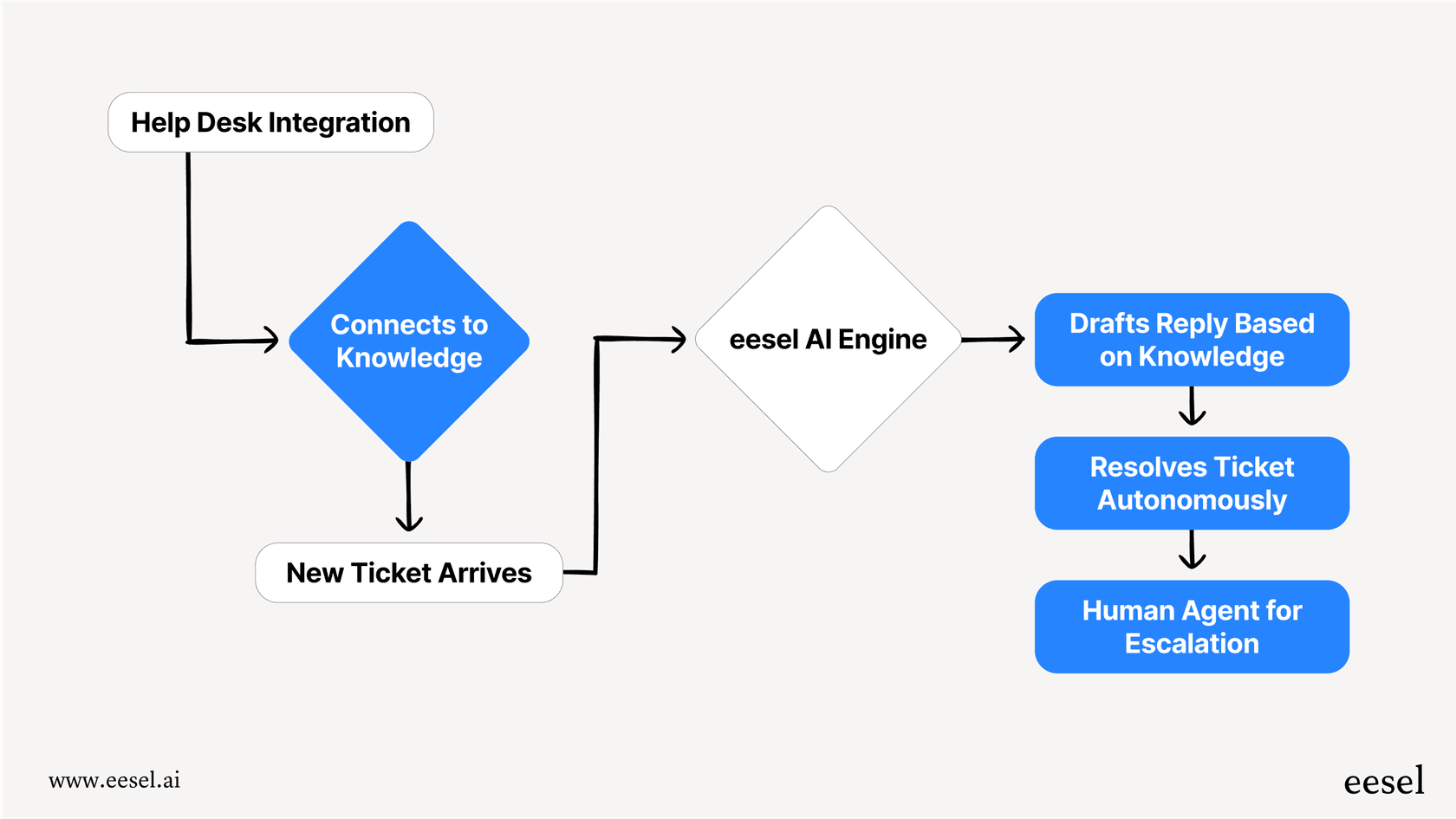
eesel AI connects to your existing help desk (including Zendesk, Freshdesk, and others) and learns your business from your past tickets, help center, and connected docs. No manual training. No documentation uploads. It reads your existing data and understands your tone, policies, and common issues from day one.
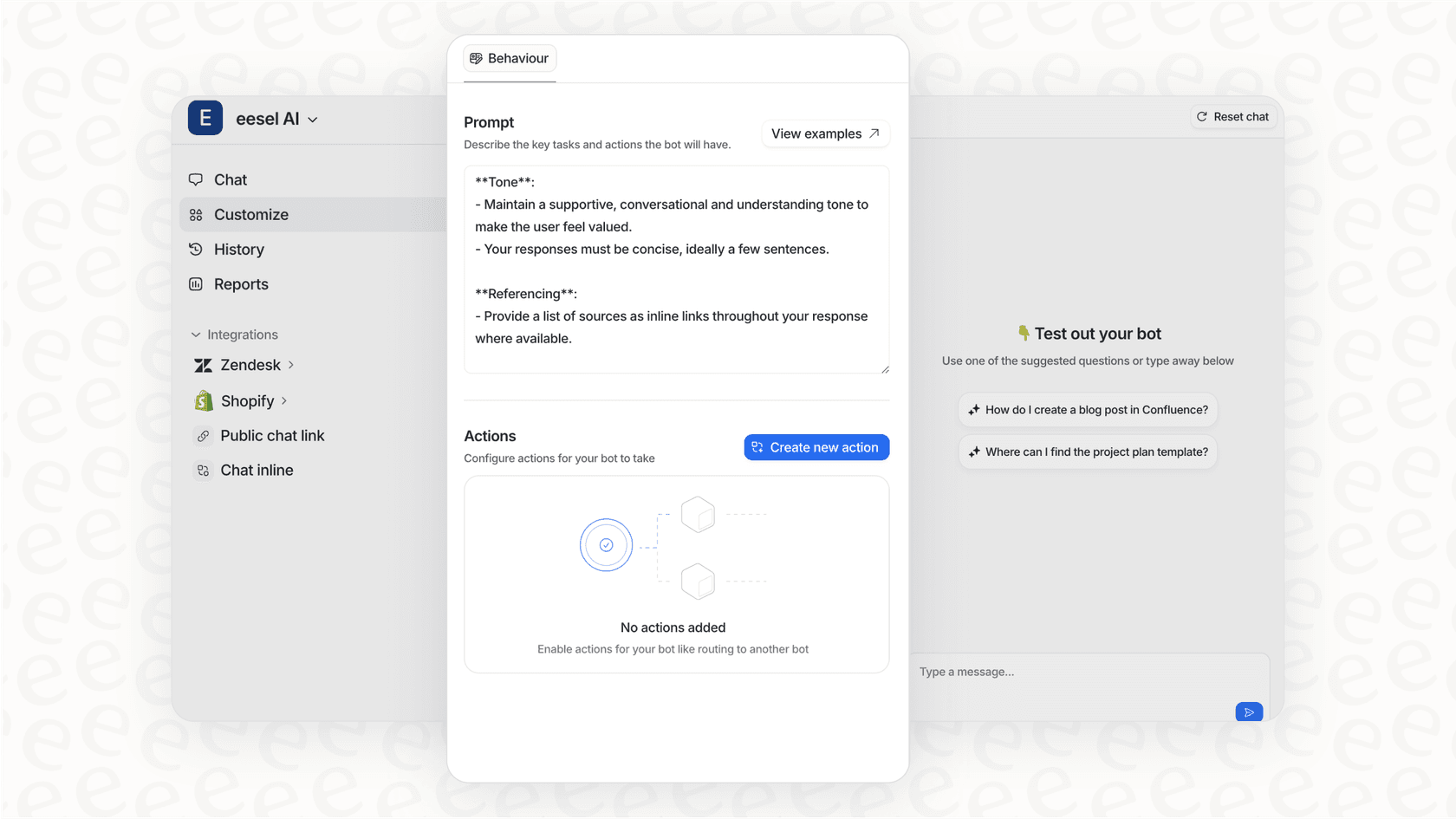
Like any new hire, eesel starts with guidance. You can have it draft replies for agent review, limit it to specific ticket types, or set business hours when it can respond. As it proves itself, you'll expand its scope until it's handling full frontline support.
The key difference is control in plain English. Instead of building complex workflows, you tell eesel things like "If the refund request is over 30 days, politely decline and offer store credit" or "Always escalate billing disputes to a human." No code. No rigid decision trees.
Before eesel touches real customers, you can run simulations on thousands of past tickets to see exactly how it would respond. Measure resolution rates. Identify gaps. Tune instructions. This beats the "turn it on and hope" approach.
Mature deployments achieve up to 81% autonomous resolution with a typical payback period under 2 months. All core products (AI Agent, AI Copilot, AI Triage, AI Internal Chat) are included in every plan, with pricing starting at $299/month for up to 3 bots and 1,000 interactions.
If you're comparing Kustomer vs Front because you need better customer service, it might be worth asking whether you need a new platform at all, or just a better way to handle the one you have.

Frequently Asked Questions
Share this article

Article by
Stevia Putri
Stevia Putri is a marketing generalist at eesel AI, where she helps turn powerful AI tools into stories that resonate. She’s driven by curiosity, clarity, and the human side of technology.