Confluence vs Bloomfire: Which knowledge platform fits your team in 2026?

Stevia Putri
Last edited March 24, 2026
Choosing the right knowledge management platform can feel like comparing apples to oranges. Confluence and Bloomfire both promise to help teams organize and share information, but they approach the problem from entirely different angles. One grew out of software development workflows. The other emerged from a focus on enterprise-wide knowledge discovery.
Let's break down what each platform actually does, how they compare on features and pricing, and which one makes sense for your specific situation.
What is Confluence?
Confluence is Atlassian's workspace for team collaboration and documentation. Think of it as a digital headquarters where teams create, organize, and share knowledge through pages, whiteboards, and databases.
The platform centers around a few core content types:
- Pages for living documents like project plans, meeting notes, and policies
- Whiteboards for brainstorming and visual collaboration
- Databases for structured, organized content that syncs across tools
- Spaces for organizing related content into logical groups
Confluence shines when you're already in the Atlassian ecosystem. Its native integration with Jira, Trello, and Bitbucket creates a seamless flow from documentation to execution. The company claims 76% of customers ship projects faster when connecting Confluence with Jira.
The platform recently added Rovo, Atlassian's AI solution that helps draft content, summarize pages, and search across connected tools. You get 25 Rovo credits per user monthly on the Standard plan, 70 on Premium, and 150 on Enterprise. Learn more about Confluence's AI features.
What is Bloomfire?
Bloomfire takes a different approach. Instead of starting with collaboration, it starts with discovery. The platform positions itself as an "Enterprise Intelligence layer" that makes organizational knowledge accessible across formats and departments.
Bloomfire's core philosophy centers on AI-powered search. The platform deep-indexes content across 25+ file types, including video and audio transcription. You can search inside video clips and jump directly to the relevant moment. The AI also auto-tags content, generates summaries, and suggests relevant information based on what you're viewing.
Key capabilities include:
- Self-healing knowledge base that flags outdated content and prompts updates
- AI-powered enterprise search across documents, videos, and connected repositories
- Q&A knowledge engine that answers questions using existing content
- Analytics suite for tracking engagement and identifying knowledge gaps
The platform emphasizes implementation services. Every deployment includes a four-phase process (Plan, Configure, Prepare, Launch) with a dedicated Implementation Lead. This reflects Bloomfire's focus on enterprise deployments where adoption and change management matter as much as features.
Feature comparison: Confluence vs Bloomfire
Search and discovery
Here's where the two platforms diverge most clearly.
Bloomfire built its platform around AI search from the ground up. The semantic search understands context, not just keywords. It indexes video and audio content so you can find information in recorded meetings or training videos. The system learns from searches and suggests related content automatically.
Confluence search improved significantly with Rovo, but it still operates primarily as a keyword-based system with filters. You can search by spaces, contributors, content types, and date ranges. The AI enhancements help, but the underlying architecture remains page-and-hierarchy focused rather than discovery-focused.
Content management
Both platforms handle the basics well: version control, permissions, and collaborative editing. The difference lies in philosophy.
Confluence organizes content into spaces and pages with a wiki-style hierarchy. This works great for structured documentation like product requirements or technical specs. The real-time collaborative editing lets multiple people work on the same page simultaneously.
Bloomfire takes a more fluid approach. Content exists in a unified searchable layer rather than a strict hierarchy. The platform emphasizes breaking down silos between departments. Updates to a document automatically propagate across all published versions, maintaining a single source of truth.
Integrations
Confluence's integration story centers on the Atlassian suite. The connection with Jira is particularly deep, letting you link documentation directly to issues and epics. Beyond Atlassian, you'll find integrations with Microsoft Teams, Slack, Google Drive, Figma, Miro, GitHub, and Zoom through the Atlassian Marketplace.
Bloomfire integrates with Microsoft Teams, Slack, Salesforce, Zendesk, Microsoft Dynamics, SharePoint, Google Drive, and Box. The platform also offers enterprise search connectors that let you search across external repositories without migrating content.
Analytics and insights
Bloomfire provides detailed analytics as a core feature. You get visualizations of search trends, content engagement, and knowledge gaps. The platform helps identify which content needs updating and which topics lack coverage.
Confluence offers page insights (views and viewers) on Standard plans and above. Premium adds site-level analytics, mission control dashboards, and more detailed reporting. The analytics are solid but focused more on engagement than knowledge management insights.
Pricing comparison
Confluence pricing
| Plan | Monthly Price | Annual Price | Key Features |
|---|---|---|---|
| Free | $0 | $0 | Up to 10 users, 2 GB storage, 3 whiteboards/user, Community support |
| Standard | $5.42/user/month | ~$4.52/user/month | 250 GB storage, 10 whiteboards/user, Business hours support, 25 Rovo credits |
| Premium | $10.44/user/month | ~$8.70/user/month | Unlimited storage, unlimited whiteboards, 24/7 support, 99.9% SLA, 70 Rovo credits |
| Enterprise | Custom | Custom | Up to 150 sites, Atlassian Guard included, 99.95% SLA, 150 Rovo credits |
Confluence offers a 7-day free trial for Standard and Premium plans. Annual billing saves up to 17%. You can also add up to 5 guests per paid user at no extra cost on Standard and above. See Confluence pricing details.
Bloomfire pricing
| Plan | Pricing Model | Key Features |
|---|---|---|
| Team | Contact sales | For teams starting with knowledge management |
| Department | Contact sales | For departments building robust knowledge programs |
| Enterprise | Contact sales | Company-wide access for all employees |
Bloomfire does not publish specific prices. The company uses scope-based pricing rather than per-user pricing, which means you won't get penalized for adding users mid-contract. All plans include unlimited storage, AI search, SSO, and integrations.
The platform requires multi-year contracts. Implementation services come standard, supporting up to 3,000 content uploads with options for premium add-ons like advanced migrations and custom integrations.
Bottom line? Confluence offers transparent, predictable pricing that scales with headcount. Bloomfire requires a conversation but potentially offers better value for large-scale deployments where per-seat costs would otherwise balloon.
User experience and adoption
The numbers tell a clear story here. According to user reviews on TrustRadius, Bloomfire scores 9.0 for usability compared to Confluence's 8.0. Bloomfire also edges ahead on likelihood to recommend (9.2 vs 8.2) and support rating (9.0 vs 5.4).
Bloomfire's interface prioritizes finding information quickly. The search bar dominates the experience. Content creation happens through AI-assisted authoring that auto-tags and summarizes as you upload.
Confluence feels more like a traditional document editor with wiki features. The page-based structure requires more upfront organization. Teams already using Atlassian products will feel at home immediately. Others may face a learning curve, especially when navigating space permissions and page hierarchies.
Implementation data favors Bloomfire significantly. According to TrustRadius, 99% of Bloomfire users say implementation went as expected versus 89% for Confluence. This likely reflects Bloomfire's dedicated implementation services versus Confluence's self-service approach.
Support and customer success
Support represents one of the biggest differences between these platforms.
Bloomfire assigns dedicated change management experts who help drive adoption. The company scores well for customer support in third-party evaluations on G2. You get strategic consultation, not just technical troubleshooting.
Confluence follows a tiered support model. Free plans get community support only. Standard includes business hours support. Premium adds 24/7 support with 1-hour response times for critical issues. Enterprise gets dedicated phone support with 30-minute response times.
The self-service model works well for technical issues, but Confluence users report less strategic guidance compared to Bloomfire's hands-on approach.
Who should choose Confluence?
Confluence makes the most sense for:
- Software development teams who need tight Jira integration for linking documentation to code and issues
- Organizations already using Atlassian products who want a unified ecosystem
- Teams needing structured documentation hierarchies for technical specs, API docs, or product requirements
- Project management-focused workflows where documentation ties directly to execution
The platform works best when you have someone willing to maintain the information architecture. Without that organizational discipline, Confluence sites become difficult to navigate.
Who should choose Bloomfire?
Bloomfire fits better for:
- Enterprise-wide knowledge initiatives spanning multiple departments
- Organizations prioritizing AI-powered search and discovery over structured documentation
- Teams with diverse content types including video libraries, recorded meetings, and multimedia training
- Companies wanting dedicated implementation support and ongoing success management
- Breaking down information silos between sales, support, marketing, and operations
The platform excels when finding information matters more than how that information is organized. If your team spends significant time searching for answers across scattered systems, Bloomfire's unified search layer delivers immediate value.
An alternative worth considering: eesel AI
Before you commit to either platform, consider whether you need a traditional knowledge base at all. eesel AI takes a different approach: instead of building a new repository, it learns from the tools you already use.
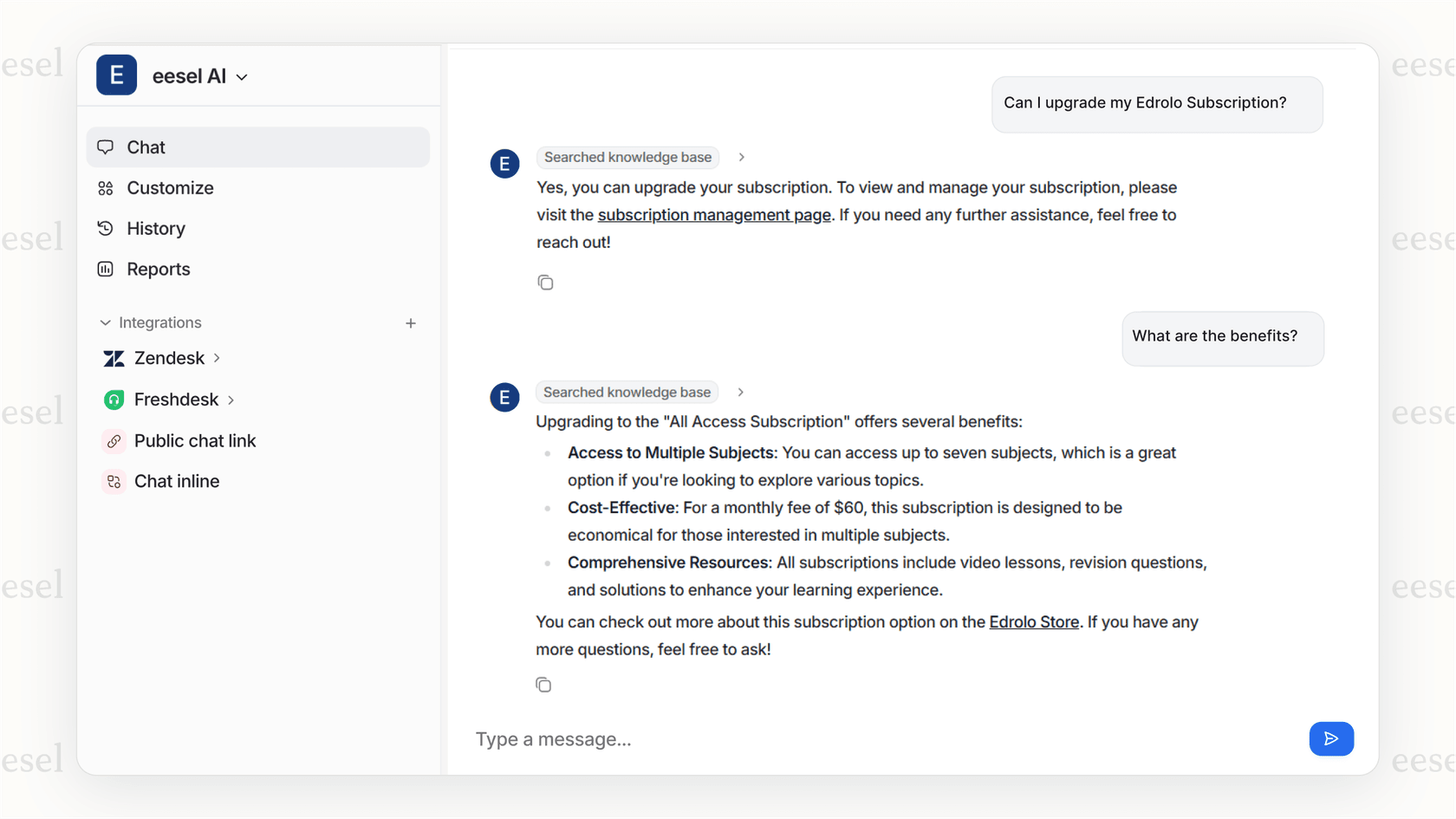
Here's how it works. You connect eesel AI to your existing help desk, knowledge bases, and documentation (Confluence, Zendesk, Freshdesk, Google Docs, Notion, whatever you have). It reads your past tickets, help center articles, and conversations to understand your business. Within minutes, it can answer questions using your existing knowledge, complete with citations back to source documents. Learn more about how eesel AI works.
The key difference? You don't migrate anything. You don't reorganize content. You don't train the system with manual inputs. eesel AI learns from what you already have.
For teams comparing Confluence vs Bloomfire specifically for support or internal knowledge use cases, eesel AI offers a compelling middle path. You get AI-powered answers without the implementation overhead of either platform. It integrates with Slack and Microsoft Teams so employees can ask questions where they already work.
Pricing starts at $299/month for the Team plan with up to 3 bots and 1,000 monthly AI interactions. That's often less than the cost of implementing and maintaining either Confluence or Bloomfire at scale. View eesel AI pricing.
Making your choice: Confluence vs Bloomfire
Let's simplify this decision.
Choose Confluence if: You're a technical team (especially software development), you already use Jira or other Atlassian tools, and you value structured documentation with deep project integration. The pricing is transparent and predictable, though costs scale linearly with headcount.
Choose Bloomfire if: You need enterprise-wide knowledge discovery, you have diverse content types including video, and you want AI-powered search that works across formats. The implementation services and dedicated support justify the higher touch sales process for complex deployments.
Consider eesel AI if: You want AI-powered knowledge access without migrating to a new platform or rebuilding your knowledge base. It complements or replaces traditional knowledge management depending on your needs.
The right choice depends on whether you prioritize documentation structure (Confluence), knowledge discovery (Bloomfire), or instant AI access without the migration headache (eesel AI).

Frequently Asked Questions
Share this article

Article by
Stevia Putri
Stevia Putri is a marketing generalist at eesel AI, where she helps turn powerful AI tools into stories that resonate. She’s driven by curiosity, clarity, and the human side of technology.