SaaS customer support is at a breaking point. Ticket volumes grow faster than headcount. Customers expect instant answers at 2 AM on a Sunday. And every delayed response is a churn risk.
This is why AI support has moved from "nice to have" to essential infrastructure. The AI SaaS market is projected to grow from $20.01 billion in 2025 to $85.7 billion by 2032. Companies aren't just experimenting with AI anymore. They're building their entire support strategy around it.
But here's the thing: not all AI support is the same. The difference between a chatbot that frustrates customers and an AI agent that actually resolves issues comes down to approach. At eesel AI, we think of it as hiring a teammate, not configuring a tool. The AI learns your business, starts with guidance, and levels up to work autonomously.
Let's break down what AI support actually means for SaaS companies and how to implement it without breaking your customer experience.
Why SaaS companies need AI support now
The math is simple but brutal. As your SaaS grows, support volume grows with it. If you're doubling customers annually, you're doubling tickets too. Hiring linearly to match that growth isn't sustainable.
According to HubSpot, acquiring a new customer costs 5-25x more than retaining an existing one. Every support failure is expensive.
Here's what teams are dealing with:
- Volume vs. quality tradeoffs. Ticket surges overwhelm agents. Response times slip. CSAT drops.
- 24/7 pressure. Your customers are global. They expect answers when they're working, not when your team's online.
- Repetitive burden. 80% of tickets are repeat questions. Your agents are copy-pasting the same answers instead of solving interesting problems.
- Escalating costs. Every support failure is expensive when you consider the true cost of customer acquisition.
The companies winning at support aren't throwing more humans at the problem. They're using AI to handle the repetitive work and freeing their people for the complex, high-value conversations.
And customers actually prefer it. 60% of customers choose one brand over another based on service expectations. Fast, consistent support is a competitive advantage.
Understanding your AI support options
Before you pick a tool, you need to understand the four main approaches to AI support. Each solves different problems.
AI agents
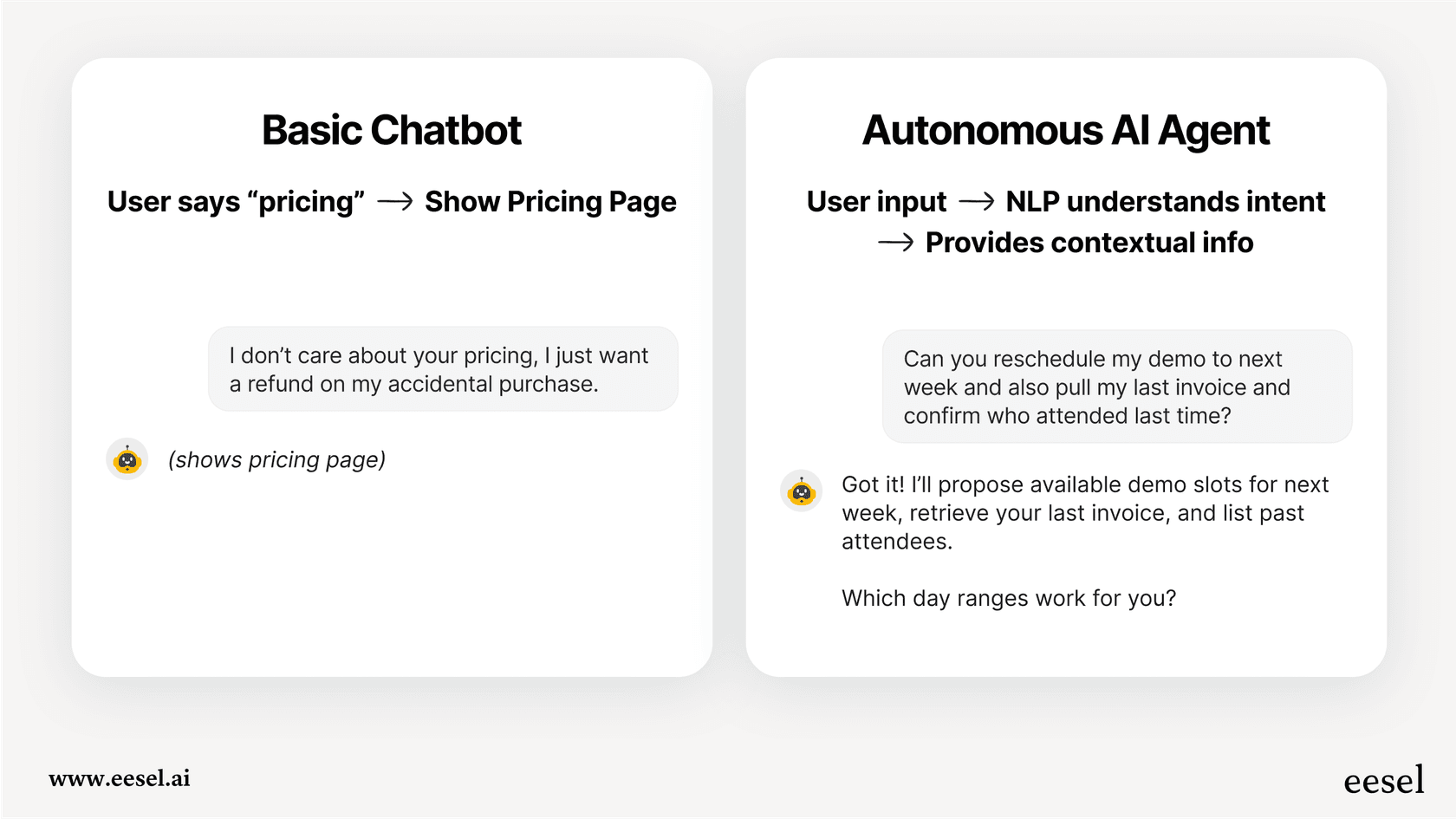
AI agents are autonomous systems that resolve tickets end-to-end. They don't just answer questions. They take actions.
An AI agent can process a refund, update an account, check order status, and trigger workflows in your other tools. It reads the ticket, understands the context, takes the appropriate action, and closes the conversation.
The key distinction: AI agents act. Chatbots just answer.
Resolution rates vary by maturity. New deployments might handle 40-50% of tickets autonomously. Mature deployments with good training data can hit 80% or higher. At eesel AI, we see up to 81% autonomous resolution for teams that've fully leveled up their AI.
Best for: High-volume, repetitive queries where the resolution path is clear.
AI copilots
AI copilots draft replies for human agents to review and send. The human maintains control. The AI provides speed.
Here's how it works: An agent opens a ticket. The AI has already drafted a response based on your knowledge base, past tickets, and the customer's specific situation. The agent reviews it, edits if needed, and sends. What used to take 10 minutes now takes 2.
79% of support agents say having AI as a copilot boosts their abilities. It helps them deliver better, faster service where it matters most.
Best for: Complex products where human judgment matters, but speed is still important. Learn more about eesel AI's AI Copilot.
AI triage
AI triage handles the operational work that clogs support queues. It runs continuously, keeping your help desk clean without manual effort.
Specifically, it can:
- Auto-tag tickets by topic, sentiment, and urgency
- Route tickets to the right team or agent
- Detect and close spam or thank-you messages
- Merge duplicate tickets
- Update custom fields automatically
Learn more about eesel AI's AI Triage capabilities.
Best for: Teams drowning in ticket volume before they even start responding.
AI chatbots
AI chatbots are customer-facing interfaces for your website or app. They answer questions instantly, deflect common issues, and escalate when needed.
The key difference from old-school chatbots: Modern AI chatbots understand context. They're trained on your actual help center, past tickets, and documentation. They respond with your knowledge, not generic AI answers.
Zendesk research shows that AI-powered chatbots can reduce response times by up to 50% while maintaining quality.
Best for: 24/7 coverage, self-service deflection, and handling common questions before they become tickets. Explore eesel AI's AI Chatbot for your website.
Building your AI support strategy
Choosing the right approach is only half the battle. You need a strategy for implementation.
Audit your current state
Start by understanding what you're dealing with. Map your ticket categories and volumes. What percentage are password resets? Billing questions? Technical issues? Feature requests?
Identify the repetitive vs. complex queries. The repetitive ones are your AI candidates. The complex ones stay with humans.
Benchmark your current metrics:
- Average first response time
- Average resolution time
- First contact resolution rate
- CSAT and NPS scores
- Ticket backlog
You'll need these baselines to measure improvement.
Define success metrics
Be specific about what success looks like. Targets might include:
- First response time: Under 1 hour for email, under 2 minutes for chat
- Resolution rate: 70%+ handled without human intervention
- CSAT: Maintain or improve current scores (don't sacrifice quality for speed)
- Cost per ticket: 30-50% reduction through automation
Gartner predicts that by 2027, 40% of GenAI tools will be multimodal, making these efficiency gains even more achievable.
Choose your starting point
We recommend starting with guidance, not full autonomy. Have your AI draft replies that agents review before sending. This lets you verify the AI understands your business before expanding its scope.
Once you're confident, progressively roll out by ticket type. Maybe AI handles password resets and billing questions first. Then expands to technical troubleshooting. Then onboarding questions.
The key: Level up to autonomy based on actual performance, not a predetermined timeline.
Prepare your knowledge base
AI is only as good as its training data. Document your FAQs and common issues. Train the AI on past tickets and conversations. Connect your help center articles, macros, and saved replies.
With eesel AI, this happens automatically when you connect your help desk. We read your existing data and understand your business context, tone, and common issues from day one. No manual training. No documentation uploads. See all eesel AI integrations.
Implementation roadmap: From pilot to scale
Here's a practical timeline for rolling out AI support:
Phase 1: Foundation (Weeks 1-2)
Connect your AI to your help desk. Import your knowledge sources. Configure basic responses.
This is mostly technical setup. You're establishing the plumbing.
Phase 2: Supervised mode (Weeks 3-4)
Turn on AI drafting. Every reply gets drafted by AI, reviewed by a human, edited if needed, then sent.
This phase builds trust. Agents see the AI getting better. You collect feedback on what's working and what isn't.
Phase 3: Limited autonomy (Weeks 5-8)
Let AI handle specific ticket types directly. Password resets. Billing inquiries. Common how-to questions.
Humans handle escalation for edge cases. You monitor quality continuously.
Phase 4: Full deployment (Month 3+)
Expand to all frontline support. 24/7 autonomous operation. Humans focus on complex issues, escalations, and relationship-building.
The typical payback period for AI support is under 2 months. Once you're in full deployment, you're seeing meaningful cost savings and efficiency gains.
Measuring success: The metrics that matter
Track three categories of metrics:
Efficiency metrics
| Metric | What it measures |
|---|---|
| Ticket deflection rate | % of inquiries resolved without human intervention |
| Average resolution time | How long from ticket creation to resolution |
| First contact resolution | % resolved in the first interaction |
| Agent productivity | Tickets handled per agent per hour |
Quality metrics
| Metric | What it measures |
|---|---|
| CSAT | Customer satisfaction with support experience |
| NPS | Likelihood to recommend your product |
| CES | How easy it was to get help |
Business impact
| Metric | What it measures |
|---|---|
| Cost per ticket | Total support cost divided by ticket volume |
| Support-driven NRR | How support contributes to revenue retention |
| Churn reduction | Customers saved through proactive support |
The goal isn't just to cut costs. It's to deliver better support more efficiently.
Common pitfalls and how to avoid them
Going fully autonomous too quickly
Teams get excited and turn AI loose on everything. Customers get bad experiences. Trust erodes.
Fix: Start supervised. Run simulations on past tickets before going live. Earn trust gradually.
Research from MIT Technology Review shows that gradual AI rollouts have 3x higher success rates than immediate full deployments.
Insufficient knowledge base
AI trained on thin documentation gives thin answers. It hallucinates or gives generic responses.
Fix: Invest in documentation. The AI is only as good as its training data. Continuously update with new information.
Ignoring the human element
Agents worry about job security. They resist the AI. Implementation stalls.
Fix: Communicate the vision clearly. Position AI as a teammate, not a replacement. Redeploy humans to high-value work where they can have more impact.
Set-and-forget mentality
Teams deploy AI and move on. Performance drifts. Edge cases accumulate.
Fix: Treat AI like any team member. It needs ongoing training, correction, and performance reviews. Monitor for drift. Update policies as your product evolves.
Getting started with AI support for your SaaS
The path to AI support success is straightforward: Start with clear goals. Choose the right approach for your situation. Measure everything. Iterate based on data.
Think of it as hiring a new team member. You wouldn't throw a new hire into complex customer conversations on day one. You'd start with guidance, verify they understand your business, and gradually give them more responsibility.
At eesel AI, we've built our entire platform around this teammate mindset. You don't configure eesel. You hire it. Connect your help desk, and eesel learns your business in minutes. Start with drafts for review. Level up to autonomy as eesel proves itself. Define escalation rules in plain English.
The result? Up to 81% autonomous resolution. Under 2 month payback period. And support teams that can finally focus on the work that matters.
Ready to see how AI support works for your SaaS? Try eesel AI free or book a demo to see it in action.

Frequently Asked Questions
Share this article

Article by
Stevia Putri
Stevia Putri is a marketing generalist at eesel AI, where she helps turn powerful AI tools into stories that resonate. She’s driven by curiosity, clarity, and the human side of technology.