7 Best AI tools for HubSpot Service Hub in 2026

Stevia Putri
Last edited March 16, 2026
HubSpot Service Hub has become a central hub for customer support teams, but the AI landscape around it is evolving fast. While HubSpot's native Breeze AI offers solid capabilities, many teams find they need more specialized AI to handle complex workflows, achieve higher automation rates, or integrate with existing help desk setups.
If you're looking to augment HubSpot Service Hub with AI that can actually resolve tickets end-to-end not just draft replies this guide breaks down the seven best options for 2026. We'll cover native solutions, third-party integrations, and standalone AI agents that work alongside your HubSpot setup.
Quick comparison: AI tools for HubSpot Service Hub
| Tool | Best for | Pricing | AI resolution rate | Standout feature |
|---|---|---|---|---|
| eesel AI | Teams wanting an AI teammate that learns fast | From $239/mo | Up to 81% | Progressive autonomy: start with guidance, level up to full automation |
| HubSpot Breeze | Teams already committed to HubSpot ecosystem | From $90/mo/seat | 65%+ | Native integration, no setup required |
| Zendesk AI | Teams using Zendesk alongside HubSpot | From $55/agent/mo | Varies | Strong workforce management features |
| Tidio Lyro | Small teams, simple use cases | From $49/mo + AI add-on | Up to 70% | Affordable entry point for AI chat |
| Kustomer IQ | Teams wanting AI-powered CRM and support together | From $89/user/mo | Not specified | Unified customer view with AI insights |
| Freshdesk Freddy | Teams on a budget using Freshdesk | From $15/agent/mo | Not specified | Good value for basic AI features |
| Ada | Enterprise teams with complex needs | Custom pricing | Up to 83% | Most sophisticated reasoning engine |
What is HubSpot Service Hub AI?
HubSpot Service Hub AI refers to the artificial intelligence capabilities available within HubSpot's customer service platform. The primary AI offering is Breeze, HubSpot's collection of AI tools integrated throughout the customer platform.
HubSpot Breeze AI components
Breeze Customer Agent is the core AI for Service Hub. It resolves customer inquiries with fast, accurate responses and escalates when needed. Key capabilities include:
- Autonomous resolution: Handles common support inquiries without human intervention
- Knowledge base grounding: Responses based on your help center articles and documentation
- Smart escalation: Knows when to hand off to human agents
- CRM integration: Access to customer context from HubSpot's unified database
Breeze Customer Agent uses a credit-based system: 100 HubSpot Credits per conversation on Professional and Enterprise plans. HubSpot claims 65%+ of conversations are resolved automatically, with 39% faster ticket resolution compared to teams not using the AI agent.
HubSpot Service Hub pricing with AI
| Plan | Price | AI features |
|---|---|---|
| Free | $0 | Basic AI content generation |
| Starter | $9/mo/seat | Limited AI features, 500 credits |
| Professional | $90/mo/seat | Full Breeze Customer Agent, 3,000 credits |
| Enterprise | $150/mo/seat | Advanced routing, 5,000 credits |
The native integration is the obvious advantage: no setup, no data syncing issues, and unified reporting. But there are limitations. Breeze is relatively new (launched in late 2024), and teams with complex workflows or high ticket volumes often find they need more specialized AI.
How to choose the right AI for HubSpot Service Hub
Before diving into the individual tools, here are the key factors to consider:
Integration depth: Does the AI plug directly into HubSpot, or does it require middleware? Native integrations typically offer better reliability and easier setup.
Resolution vs. assistance: Do you need AI that resolves tickets autonomously, or AI that helps human agents work faster? Some tools focus on one, others offer both.
Pricing model: Per-seat, per-interaction, and per-resolution are the most common. For high-volume teams, per-resolution pricing often works out cheaper.
Learning curve: How long does it take to train the AI on your business? Tools that learn from existing tickets and docs are faster to deploy.
Progressive rollout: Can you start with AI drafting replies for review, then gradually expand to full automation? This reduces risk and builds team confidence.
1. eesel AI
Best for: Teams wanting an AI teammate that learns their business in minutes and can progressively level up from assisted to fully autonomous support.
What is eesel AI?
eesel AI is an AI teammate for customer service, sales, and internal knowledge. The key difference from traditional AI tools: you don't configure eesel, you hire it. Like a new team member, eesel learns your business from existing data, starts with guidance, and levels up to work autonomously based on performance.
For HubSpot Service Hub users, eesel offers native integration that lets the AI operate directly within your existing workflows handling tickets, drafting replies, or managing triage based on your preferences.
Key features
AI Agent: Autonomous frontline support that handles tickets end-to-end. eesel reads tickets, drafts responses grounded in your knowledge, sends them, handles follow-ups, and closes resolved conversations. It can look up orders, process refunds, update ticket fields, and connect to any system via API.
AI Copilot: For teams not ready for full automation, eesel drafts replies that agents review before sending. This lets you verify quality before expanding scope.
AI Triage: Automated ticket hygiene including auto-tagging, intelligent routing, auto-close for spam, and duplicate merging.
Progressive autonomy: Start with eesel drafting for review, then expand to handling specific ticket types, then full frontline support. You control when to "promote" eesel based on actual performance.
HubSpot integration
eesel connects natively to HubSpot Service Hub and learns from:
- Past tickets and conversations
- Help center articles
- Macros and saved replies
- Connected docs (Confluence, Google Docs, Notion)
Setup takes minutes, not weeks. eesel reads your existing data and understands your business context, tone, and common issues from day one.
eesel AI pricing
| Plan | Monthly | Annual | Interactions/mo | Best for |
|---|---|---|---|---|
| Team | $299 | $239/mo | 1,000 | Small teams getting started with AI |
| Business | $799 | $639/mo | 3,000 | Growing teams needing more volume |
| Custom | Contact sales | Custom | Unlimited | Enterprises with complex requirements |
Key pricing advantages:
- Pay per interaction, not per resolution (predictable costs)
- No per-agent or per-seat fees
- Month-to-month available, cancel anytime
- 20% discount on annual plans
Why choose eesel AI for HubSpot Service Hub?
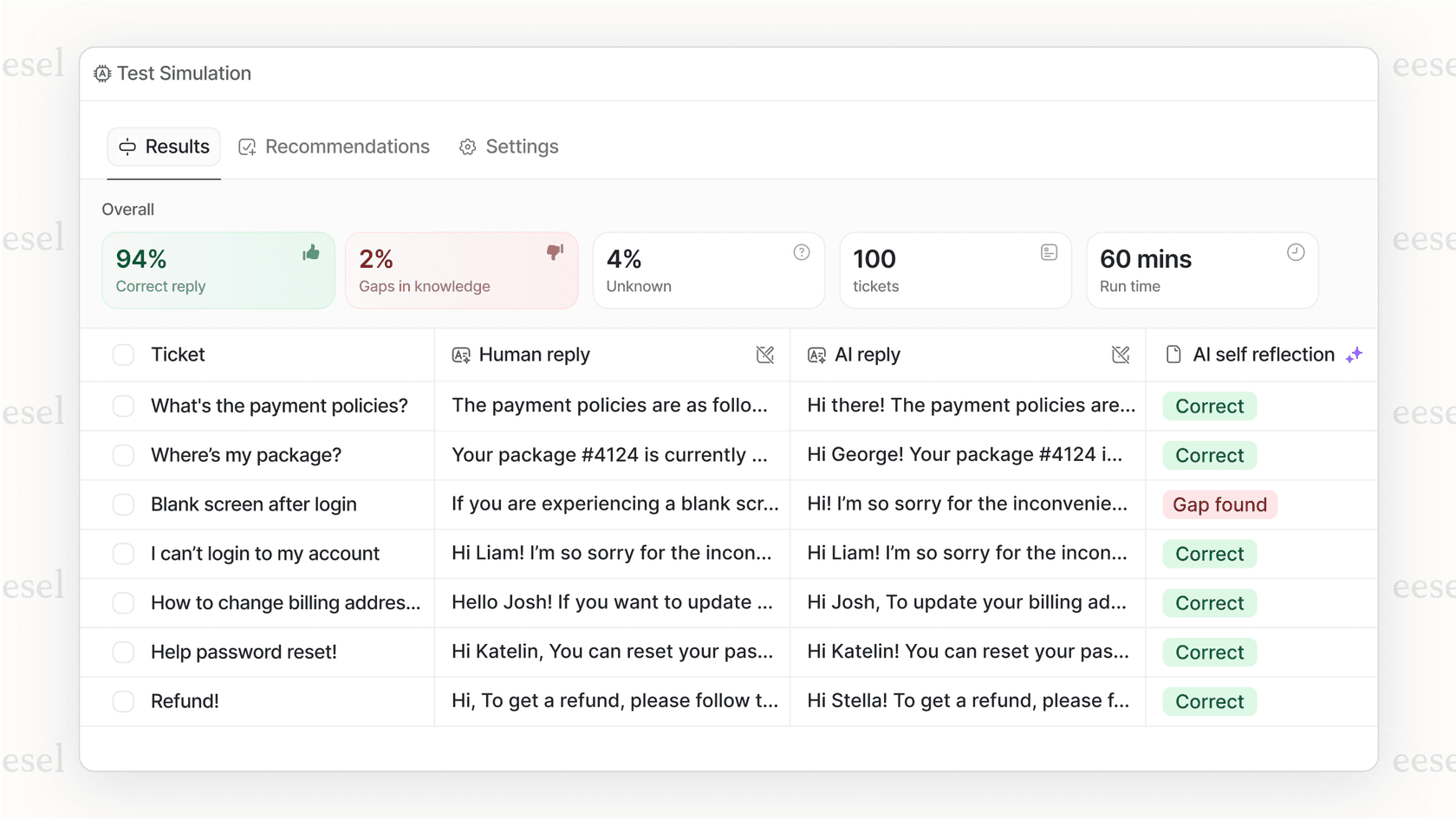
The teammate model is eesel's core differentiator. Most AI tools are black boxes: you turn them on and hope for the best. With eesel, you see exactly how it performs before it's customer-facing through simulations on past tickets. You control the pace of adoption, and eesel keeps improving through corrections and feedback.
For HubSpot teams specifically, eesel offers deeper AI capabilities than Breeze's current feature set, with the flexibility to start assisted and graduate to full automation as you gain confidence.
Results: Mature deployments achieve up to 81% autonomous resolution with typical payback periods under 2 months.
2. HubSpot Breeze AI
Best for: Teams already committed to the HubSpot ecosystem who want native AI without additional integrations.
What is HubSpot Breeze AI?
Breeze is HubSpot's collection of AI tools, seamlessly integrated throughout the entire customer platform. For Service Hub users, the key component is Breeze Customer Agent, an AI that resolves customer service inquiries with fast, accurate responses.
As a native solution, Breeze has immediate access to your HubSpot CRM data, making it genuinely contextual from the start. There's no setup, no data syncing, and no separate platform to manage.
Key features
Breeze Customer Agent:
- Resolves inquiries with fast, accurate responses
- Escalates when needed so your team can focus on complex cases
- Grounded in your knowledge base and help center content
- 65%+ of conversations resolved automatically (per HubSpot)
- 39% faster ticket resolution vs. teams not using Customer Agent
Breeze Assistant: A personal AI companion that understands your business and works where you do, helping with meeting prep, content creation, and strategic analysis.
Omnichannel support: Works across email, chat, and messaging within the HubSpot platform.
HubSpot Service Hub pricing with Breeze
| Plan | Price | Credits | Key AI features |
|---|---|---|---|
| Starter | $9/mo/seat | 500 | Basic AI features |
| Professional | $90/mo/seat | 3,000 | Full Breeze Customer Agent |
| Enterprise | $150/mo/seat | 5,000 | Advanced routing, conditional SLAs |
Breeze Customer Agent: 100 HubSpot Credits per conversation on Professional and Enterprise plans.
Onboarding fees: Professional requires $1,500 one-time onboarding; Enterprise requires $3,500.
Limitations to consider
Breeze is relatively new to the market (launched late 2024), and while it covers the basics well, teams with complex needs may find it lacking in areas like:
- Sophisticated multi-step workflow automation
- Deep customization of escalation logic
- Advanced triage and ticket hygiene automation
- Pre-deployment simulation and testing
Why choose Breeze for HubSpot Service Hub?
If you're already invested in HubSpot and your needs are straightforward, Breeze offers the path of least resistance. No integration work, unified reporting, and predictable pricing. For teams just starting with AI in customer service, it's a solid entry point.
3. Zendesk AI
Best for: Teams using Zendesk as their primary help desk who need HubSpot integration for CRM sync.
What is Zendesk AI?
Zendesk AI is the artificial intelligence layer built into Zendesk Suite, offering automated responses, intent detection, sentiment analysis, and intelligent routing. While primarily designed for Zendesk's own platform, it can work alongside HubSpot through bi-directional integrations.
This setup makes sense for teams that want Zendesk's mature AI capabilities for support operations while using HubSpot for CRM and marketing.
Key features
AI-powered routing: Intent detection and sentiment analysis automatically route tickets to the right team or agent.
Automated responses: AI suggests responses based on knowledge base content and past interactions.
Workforce management: Forecasting and scheduling tools to optimize agent allocation.
Quality assurance: AI monitors conversations for quality and compliance.
Zendesk AI pricing
| Plan | Price | AI features |
|---|---|---|
| Suite Team | $55/agent/mo | Foundational AI features |
| Suite Growth | $89/agent/mo | Advanced AI capabilities |
| Suite Professional | $115/agent/mo | Full AI suite, workforce management |
| Suite Enterprise | $169/agent/mo | Advanced AI, sandbox, HIPAA compliance |
AI Agent add-ons are available for automated resolutions with usage-based pricing.
HubSpot integration
Zendesk offers a native HubSpot integration through the Zendesk Marketplace:
- Bi-directional sync between Zendesk and HubSpot CRM
- Ticket creation from HubSpot contacts
- Customer data sync between platforms
- Unified customer view across both systems
Why choose Zendesk AI with HubSpot?
If your support team lives in Zendesk but your CRM is HubSpot, this integration lets you get Zendesk's AI benefits while maintaining data sync. It's a hybrid approach that works well for larger teams with established Zendesk workflows they don't want to disrupt.
4. Tidio Lyro AI
Best for: Small teams and simple use cases looking for an affordable entry point into AI customer service.
What is Tidio Lyro?
Tidio is a customer experience platform offering live chat, chatbots, and AI-powered automation. Lyro is Tidio's AI chatbot that handles customer conversations autonomously, learning from your website content and help center.
For smaller HubSpot users, Tidio offers a lightweight way to add AI chat to your website with HubSpot CRM sync.
Key features
Lyro AI Agent: Handles FAQs and common inquiries automatically, with handoff to human agents when needed. Multi-language support included.
Visual chatbot builder: Create rule-based and AI-powered bots without coding.
Live chat: Real-time visitor insights and typing preview.
Multichannel: Messenger, Instagram, WhatsApp, and email support.
Tidio Lyro pricing
| Plan | Monthly | Features |
|---|---|---|
| Free | $0 | 3 operators, 500 conversations |
| Starter | $24.17 | 3 operators, unlimited conversations |
| Growth | $49.17 | Unlimited operators, 5 chatbots, Lyro AI (50 convos) |
| Plus | $749 | Unlimited everything, 5,000 Lyro conversations |
Lyro AI add-on: Starts at $32.50/mo for 50 conversations.
HubSpot integration
Tidio offers native HubSpot integration:
- Sync chat conversations to HubSpot CRM
- Create contacts and deals from chats
- Track chat-generated revenue
- View chat history in HubSpot contact records
Why choose Tidio Lyro for HubSpot?
If you're a small team with straightforward support needs and a tight budget, Tidio Lyro offers the most affordable path to AI-powered support. The HubSpot integration is solid for basic use cases, though it may not scale for complex enterprise workflows.
5. Kustomer IQ
Best for: Teams wanting AI-powered CRM and support together with a unified customer view.
What is Kustomer IQ?
Kustomer IQ is an AI-powered customer service CRM that combines support functionality with customer data management. Now part of Meta, Kustomer offers AI features integrated directly into its CRM platform, giving support teams a complete view of each customer's history alongside AI-assisted responses.
Unlike standalone help desks, Kustomer treats support as part of the broader customer relationship, with AI that leverages CRM data for more contextual responses.
Key features
AI-assisted responses: Suggested replies based on customer history, previous interactions, and knowledge base content.
Intelligent routing: AI routes conversations to the most appropriate agent based on customer data, sentiment, and issue complexity.
Unified customer timeline: All customer interactions across channels in one view, with AI highlighting important context.
Automated workflows: Trigger actions based on AI-detected intent and sentiment.
Kustomer IQ pricing
| Plan | Price | Features |
|---|---|---|
| Lite | $89/user/mo | Core CRM, basic AI features, 3 channels |
| Enterprise | Custom | Advanced AI, unlimited channels, custom workflows |
Note: Kustomer has shifted focus since the Meta acquisition. New customer onboarding may be limited. Check current availability.
HubSpot integration
Kustomer offers HubSpot integration through:
- Native CRM sync between Kustomer and HubSpot
- Bi-directional contact and company data flow
- Ticket synchronization
- Unified reporting across platforms
Why choose Kustomer IQ for HubSpot?
If you view support as part of a broader customer relationship strategy and want AI that leverages CRM data for context, Kustomer IQ offers a unique approach. The unified timeline gives agents full context without switching between tools. However, since the Meta acquisition, the product roadmap has been less clear, so verify current capabilities and support before committing.
6. Freshdesk Freddy AI
Best for: Teams on a budget using Freshdesk who want basic AI features without premium pricing.
What is Freshdesk Freddy AI?
Freshdesk is a cloud-based customer support software by Freshworks. Freddy AI is Freshworks' AI assistant that helps automate customer support and improve agent productivity through response suggestions, auto-ticketing, and knowledge base article writing.
Key features
Freddy AI Copilot: Suggests responses based on knowledge base content, with ticket field suggestions and canned response recommendations.
Freddy AI Agent: Chatbot for handling common queries with intent detection.
Knowledge base article writer: AI helps create help center content.
Freshdesk pricing
| Plan | Price | Features |
|---|---|---|
| Free | $0 | Basic ticketing, knowledge base |
| Growth | $15/agent/mo | Automation, custom fields |
| Pro | $49/agent/mo | Multiple SLAs, custom roles |
| Enterprise | $79/agent/mo | Skill-based routing, sandbox |
Freddy AI add-on: Available on paid plans; pricing requires contacting sales.
HubSpot integration
Freshworks Marketplace offers HubSpot integration apps for bi-directional sync between Freshdesk and HubSpot. Visit the Freshworks Marketplace to explore available integration options.
Why choose Freshdesk Freddy for HubSpot?
If you're already using Freshdesk and want to add basic AI capabilities without breaking the budget, Freddy AI is worth considering. However, for teams primarily using HubSpot Service Hub, the integration path is less direct than other options on this list.
7. Ada
Best for: Enterprise teams with complex needs, high security requirements, and budget for custom solutions.
What is Ada?
Ada is an AI-powered customer service automation platform built for enterprise clients. The ACX (Automated Customer Experience) Platform deploys, orchestrates, and improves AI agents across every channel and language.
Ada focuses on large enterprises with sophisticated requirements, offering the most advanced reasoning engine and comprehensive security certifications in this comparison.
Key features
Reasoning Engine™: A unified intelligence layer that powers AI agents across all channels with autonomous decision making, multi-layer safeguards, and adaptive reasoning.
Conversation Hub: Omnichannel deployment across voice, email, chat, messenger, WhatsApp, SMS, Instagram, and custom channels.
Performance Center: Tools for monitoring and improving AI agent effectiveness, including Playbooks for structured workflows and Coaching for continuous improvement.
Developer Toolkit: Robust APIs and SDKs for custom integrations.
Ada pricing
Ada operates on custom pricing based on conversation volume, channels, integration complexity, and enterprise requirements. Contact sales for pricing information.
Security and compliance
- HIPAA, SOC2, GDPR, AIUC-1 compliance
- Built-in safeguards to minimize hallucinations
- Privacy-by-design with zero data retention policies
- Enterprise-grade security with annual penetration testing
HubSpot integration
Ada integrates with major CRMs including HubSpot:
- Sync customer data for personalized responses
- Create and update tickets in HubSpot
- Bi-directional data flow
- Enterprise-grade integration support
Performance claims
- Up to 83% automated resolution rate
- 2X more productive than human agents
- 100% increase in CSAT scores
- 200% ROI on AI investment
Customer case studies
- Tilt: 84% automated resolution rate on chat
- Cebu Pacific: 34%+ higher automated resolution vs previous chatbot
- IPSY: $2.7M estimated annual savings
- Monday.com: 42% reduction in agent average handle time
Why choose Ada for HubSpot Service Hub?
If you're an enterprise with complex requirements, strict security needs, and the budget for a custom solution, Ada offers the most sophisticated AI customer service platform available. For smaller teams or those with simpler needs, the custom pricing and enterprise focus may be overkill.
Which AI tool should you choose for HubSpot Service Hub?
The right choice depends on your team size, budget, and complexity of support needs:
Choose eesel AI if: You want an AI teammate that learns your business fast, offers progressive autonomy from assisted to fully automated, and provides predictable per-interaction pricing without seat fees.
Choose HubSpot Breeze if: You're already committed to HubSpot, have straightforward support needs, and want the simplest setup with no integration work.
Choose Zendesk AI if: Your support team primarily uses Zendesk and you need HubSpot integration for CRM sync rather than full platform consolidation.
Choose Tidio Lyro if: You're a small team with simple needs, tight budget, and want an affordable entry point into AI customer service.
Choose Kustomer IQ if: You want AI-powered support combined with CRM capabilities and a unified customer view across all interactions.
Choose Freshdesk Freddy if: You're already using Freshdesk, have basic AI needs, and want to keep costs minimal.
Choose Ada if: You're an enterprise with complex requirements, high security needs, and budget for a custom AI solution.
Getting started with AI for HubSpot Service Hub
Adding AI to your HubSpot Service Hub setup doesn't have to be complicated. Here's a practical approach:
-
Start with your goals: Are you trying to reduce response times, handle after-hours support, or deflect common questions? Your goals determine the right AI approach.
-
Assess your data: AI learns from your existing tickets, help center, and macros. The quality and organization of this content affects AI performance.
-
Choose your integration path: Native HubSpot AI (Breeze) for simplicity, or third-party AI (eesel, Kustomer, etc.) for more advanced capabilities.
-
Start assisted, then automate: Most teams see better results starting with AI drafting replies for review, then expanding to full automation as confidence builds.
-
Measure and iterate: Track resolution rates, CSAT, and time saved. Use these metrics to expand AI scope strategically.
The best AI for HubSpot Service Hub is the one that fits your team's workflow, meets your customers' needs, and delivers measurable results. Whether that's HubSpot's native Breeze or a specialized third-party solution, the key is starting with a clear understanding of what you want AI to accomplish.

Frequently Asked Questions
Share this article

Article by
Stevia Putri
Stevia Putri is a marketing generalist at eesel AI, where she helps turn powerful AI tools into stories that resonate. She’s driven by curiosity, clarity, and the human side of technology.
