Zendesk SaaS support: A complete guide for 2026

Stevia Putri
Last edited March 3, 2026
SaaS companies live and die by their customer support. When your product is software that customers rely on daily, every support interaction is a moment of truth. Get it right, and you build loyalty that lasts for years. Get it wrong, and customers churn faster than you can say "annual contract."
Here's the challenge: SaaS support isn't like retail or e-commerce. Your customers aren't asking about shipping times or return policies. They're dealing with technical issues, feature questions, and integration problems that require deep product knowledge. And as you grow, the volume and complexity only increase.
This is where Zendesk comes in. It's the dominant player in the SaaS support space for good reason. But is it the right choice for your business? Let's break down what Zendesk offers, how it compares to alternatives, and whether it fits your specific needs.
What makes SaaS customer support different
Before diving into Zendesk specifically, it's worth understanding why SaaS support is its own beast.
Unlike traditional businesses where the sale is the end of the journey, SaaS companies are in it for the long haul. Your relationship with customers starts at signup and continues through onboarding, daily usage, troubleshooting, and renewal. Support isn't just about fixing problems; it's about ensuring customers get continuous value from your product.
This creates unique demands:
- Technical depth: Support agents need to understand your product inside and out. A customer asking about API rate limits or webhook configurations needs an agent who speaks their language.
- Speed expectations: SaaS customers expect near-instant responses. When their business depends on your software being up, "we'll get back to you in 24 hours" doesn't cut it.
- Scale unpredictability: One viral feature launch or a major outage can flood your support queue overnight. Your system needs to handle 10x volume spikes without breaking.
- Multi-channel complexity: Customers want to reach you via email, in-app chat, Slack, or phone, often switching mid-conversation. They expect you to remember everything they've already told you.
The stakes are high. According to Zendesk's own research, 61% of customers would switch to a competitor after just one bad support experience. For SaaS companies where switching costs are relatively low, that number is probably conservative.
Key features of Zendesk for SaaS support
Zendesk has built a comprehensive platform that addresses these SaaS-specific challenges. Here's what you actually get:

Omnichannel ticketing that actually works
Most platforms claim omnichannel support. Zendesk delivers it in a way that matters for SaaS teams.
The core idea is simple: whether a customer emails you, starts a chat, sends a tweet, or calls your support line, everything lands in one unified workspace. Agents see the full conversation history across every channel. No more "I already told the chat agent this" frustration.
For SaaS companies, this matters because your customers actually do use multiple channels. A developer might email a detailed technical question, follow up in chat when they need a quick clarification, then call when things get urgent. Zendesk keeps all of that context in one place.
The platform supports email, live chat, voice, SMS, WhatsApp, Facebook Messenger, and pretty much any other channel your customers use. You can add or remove channels as your strategy evolves.
AI and automation that handles real volume
Here's where Zendesk has pulled ahead of the pack in recent years. Their AI capabilities aren't just bolted-on features; they're woven throughout the platform.
AI agents can resolve over 80% of common interactions without human intervention. These aren't simple chatbots that follow decision trees. They're powered by agentic AI that reasons, adapts, and acts independently. For SaaS companies dealing with repetitive questions about password resets, feature availability, or basic troubleshooting, this is a game changer.
Agent copilot gives your human agents an AI assistant that suggests replies, expands brief responses into complete messages, and can even adjust tone from formal to friendly. Zendesk claims this increases agent productivity by 20%, which aligns with what we've seen in practice.
Intelligent triage uses AI to route tickets to the right team automatically. Instead of manual assignment or simple rule-based routing, the system understands the content and intent of each request.
The AI features come pre-trained for common SaaS industries including software, financial services, retail, and education. You can also add custom intents for your specific product terminology.
Self-service that deflects tickets
SaaS customers prefer to solve problems themselves when possible. Zendesk's knowledge base and help center tools let you build comprehensive self-service resources.
The platform includes:
- Help center: A branded, searchable knowledge base where customers can find answers
- Community forums: Let customers help each other with peer support
- AI-powered suggestions: The system can suggest relevant help articles based on the customer's question
The data backs this up: 89% of customers will spend more with companies that let them find answers online without contacting support. For SaaS companies, a well-built help center can deflect 30-50% of potential tickets.
Analytics that drive decisions
Zendesk provides real-time dashboards and reporting that go beyond basic metrics. You get:
- SLA monitoring: Track whether you're meeting your service level agreements
- Customer satisfaction (CSAT) tracking: Direct feedback after every interaction
- First reply time and resolution time: The metrics that matter most for SaaS support
- AI performance metrics: See how your AI agents are performing and where they need improvement
The platform also includes pre-built dashboards for common SaaS use cases, plus the ability to build custom reports.
Integration ecosystem
SaaS companies run on a stack of tools. Zendesk integrates with 1,000+ apps including:
- CRM: Salesforce, HubSpot, Microsoft Dynamics
- Communication: Slack, Microsoft Teams, Discord
- E-commerce: Shopify, WooCommerce, Magento
- Productivity: Jira, Asana, Trello, Monday
- Analytics: Tableau, Looker, Power BI
These aren't just simple connections. The Salesforce integration, for example, pulls customer data directly into the agent workspace so agents see account history, subscription tier, and health scores without switching tools.
Zendesk pricing for SaaS companies
Let's talk numbers. Zendesk's pricing is straightforward but not cheap:
| Plan | Annual Price | Monthly Price | Best For |
|---|---|---|---|
| Suite Team | $55/agent/mo | $69/agent/mo | Small teams getting started |
| Suite Growth | $79/agent/mo | $99/agent/mo | Growing SaaS companies |
| Suite Professional | $99/agent/mo | $125/agent/mo | Teams needing advanced AI |
| Suite Enterprise | $150/agent/mo | $199/agent/mo | Large organizations |
| Custom Enterprise | Contact sales | Contact sales | Complex multi-brand needs |
Key pricing notes:
- AI agents and basic AI features are included in Professional and Enterprise plans
- Annual billing saves about 20% compared to monthly
- There's no free tier, just a 14-day trial
- Per-agent pricing means costs scale linearly with team growth
For context, a 10-person support team on the Professional plan costs about $990 per month on annual billing. That's not pocket change, but it's in line with what serious SaaS support operations typically spend.
Zendesk alternatives worth considering
Zendesk isn't the only option. Depending on your situation, these alternatives might be a better fit:
Freshdesk: The budget-friendly option
Freshdesk offers similar core features at a lower price point. Their Growth plan starts at $19 per agent per month, less than half of Zendesk's entry price.
Freshdesk includes their "Freddy AI" capabilities even on lower tiers, though with session limits. The platform is solid for mid-market SaaS companies that don't need Zendesk's enterprise features.
The trade-off: Freshdesk has fewer integrations and less brand recognition in the enterprise space. But if budget is tight and you need functional ticketing, it's worth evaluating.
Help Scout: Built for smaller teams
Help Scout takes a different approach. Instead of trying to be everything to everyone, they focus on delivering an excellent experience for small to mid-sized teams.
Their Standard plan is $20 per user per month (annual), and they offer a genuine free tier for up to 5 users. The interface is cleaner and easier to learn than Zendesk, which matters when you're onboarding new agents quickly.
Help Scout works best for SaaS companies with simpler support needs. If you're not dealing with complex enterprise workflows or need extensive customization, the simplicity is refreshing.
eesel AI: An AI-first alternative
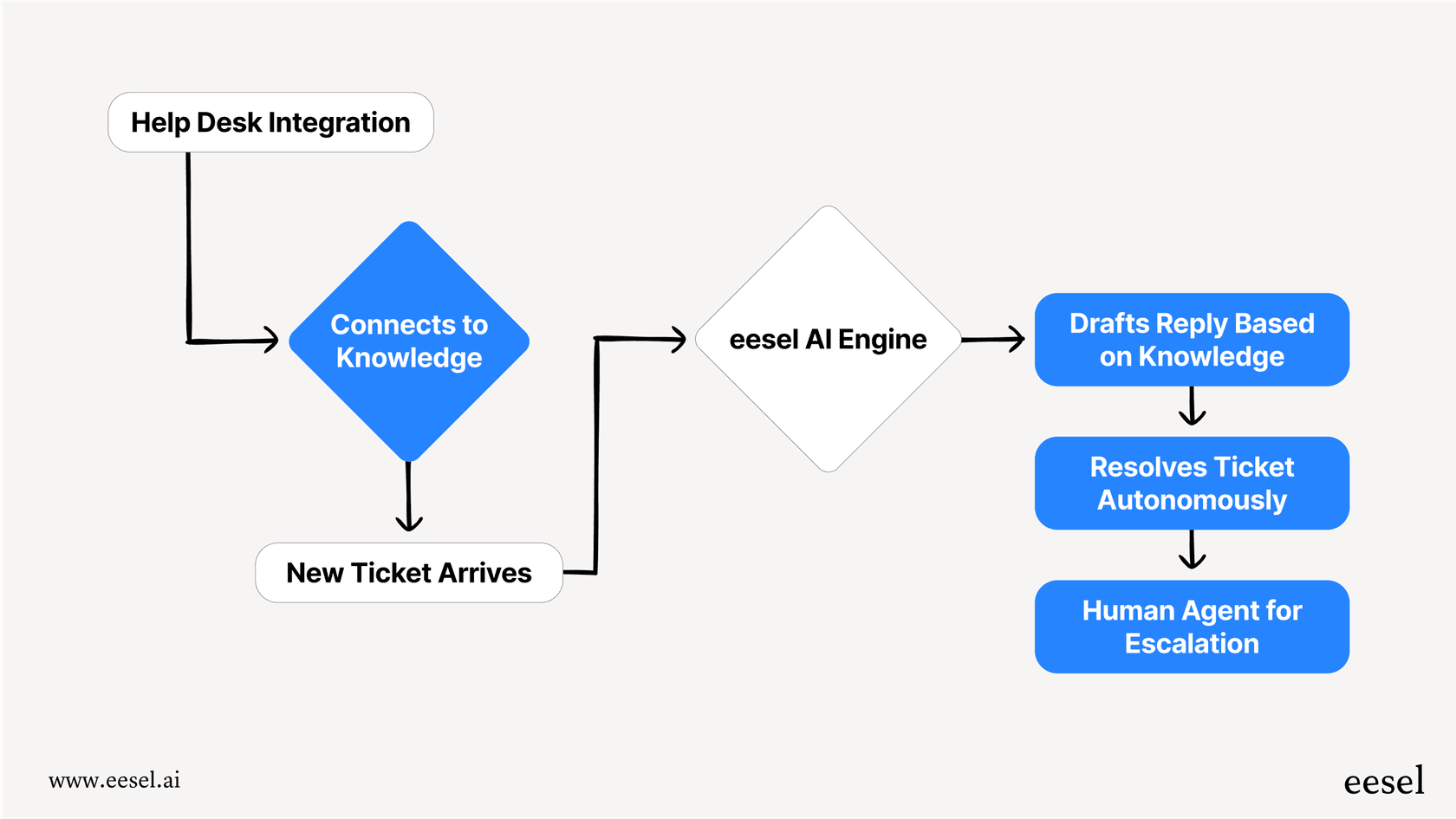
For SaaS companies that want to lead with AI rather than add it later, we offer a different approach. Our AI agent learns from your existing tickets, help center, and connected docs to handle support autonomously.
Instead of configuring workflows and rules, you hire eesel like a new team member. It learns your business in minutes, not weeks, and can resolve up to 81% of tickets without human intervention. You start with oversight (drafts for review) and level up to full autonomy as it proves itself.
The key difference: Zendesk gives you tools to build support processes. We give you an AI teammate that handles the work. Both approaches work; it depends on whether you want to manage a system or partner with AI.

Implementation best practices for SaaS teams
If you decide to go with Zendesk, here's how to set yourself up for success:
Start with core channels. Don't try to launch email, chat, phone, and social all at once. Pick the two channels your customers use most (usually email and chat), get those working smoothly, then expand.
Build your knowledge base early. The sooner you have self-service resources, the sooner you can deflect tickets. Aim to document answers to your top 20 most common questions before launch.
Set up automation rules immediately. Create triggers for common scenarios: auto-reply confirmations, routing rules based on keywords, and SLA timers. This prevents manual work from day one.
Integrate with your product stack. Connect Zendesk to your CRM, product analytics, and engineering tools from the start. Agents need context to provide good support.
Establish clear SLAs. Define response times based on ticket priority and customer tier. Make these visible to both agents and customers.
Plan for growth. Structure your ticket categories, tags, and custom fields so they scale. What works for 100 tickets per week might break at 1,000.
Measuring success: KPIs for SaaS support
Once you're up and running, track these metrics:
| Metric | What It Measures | Good Benchmark |
|---|---|---|
| First reply time | How quickly customers get initial response | Under 1 hour for urgent tickets |
| Average resolution time | Total time to solve issues | Varies by complexity; track trends |
| First contact resolution | Tickets solved without escalation | 60%+ for SaaS companies |
| CSAT | Customer satisfaction with interactions | 90%+ is excellent |
| Ticket volume trends | Growth in support requests | Should grow slower than customer base |
| Self-service deflection | Issues resolved without agent contact | 30-50% is typical |
Zendesk customers report impressive results. NEXT achieved a 66% one-touch resolution rate and reduced email handle time by 92%. UrbanStems saw a 39% automated resolution rate and $100K in savings within three months.
Is Zendesk right for your SaaS business?
After all this, the question remains: should you choose Zendesk?
Zendesk is probably right for you if:
- You need enterprise-grade features and security
- You have complex workflows or multiple brands to support
- You want the most comprehensive integration ecosystem
- You're planning to scale significantly and need a platform that grows with you
- You value the credibility of working with a market leader
Consider alternatives if:
- Budget is your primary constraint (Freshdesk or Help Scout are cheaper)
- Your team is small and you want something simpler to set up
- You want an AI-first approach rather than adding AI to traditional ticketing
- You don't need the full feature set and want to avoid paying for complexity you won't use
The honest truth: Zendesk is expensive, but for many SaaS companies, it's worth it. The platform is reliable, the feature set is comprehensive, and the AI capabilities are genuinely useful. You're paying for peace of mind and a solution that won't become a bottleneck as you grow.
That said, the per-agent pricing model can get painful as you scale. A 50-person support team costs over $4,000 per month on the Professional plan. Make sure you're budgeting for that growth.
Getting started with Zendesk SaaS support
If Zendesk sounds like the right fit, here's your path forward:
Start with a free trial to test the platform with your actual data. The trial gives you access to Enterprise features for 14 days, which is enough time to evaluate whether the advanced capabilities justify the cost.
Plan for a 2-4 week implementation timeline for basic setup. If you're migrating from another platform or have complex workflows, consider working with a Zendesk implementation partner.
Alternatively, if you want to explore an AI-first approach to SaaS support, you can see how eesel works. We integrate with Zendesk and other platforms, learning from your existing tickets and docs to handle autonomous resolution. It's a different model: instead of configuring a system, you're hiring an AI teammate that levels up over time.
Either way, the key is choosing a solution that fits your current needs while giving you room to grow. SaaS support isn't a place to cut corners. Your customers will thank you for investing in their experience.


Frequently Asked Questions
Share this article

Article by
Stevia Putri
Stevia Putri is a marketing generalist at eesel AI, where she helps turn powerful AI tools into stories that resonate. She’s driven by curiosity, clarity, and the human side of technology.



