How to handle gift card customer support in Zendesk

Stevia Putri
Last edited March 3, 2026
Gift cards drive revenue for e-commerce businesses, especially during holiday seasons. But they also create a steady stream of support tickets. Balance inquiries, redemption problems, and lost card requests can overwhelm your team if you don't have a system in place.
This guide covers how to handle gift card support efficiently using Zendesk. You'll learn how to organize tickets, create response templates, and automate repetitive inquiries so your team can focus on complex issues that need a human touch.
If you're looking to reduce the manual work involved in gift card support, eesel AI can help automate many of these repetitive inquiries directly within your Zendesk workspace.
What are Zendesk gift cards?
Let's clear up a common point of confusion: Zendesk doesn't sell gift cards for its own services. When people search for "Zendesk gift cards," they're usually looking for one of two things:
- Gift card support within Zendesk: How to handle customer inquiries about gift cards using Zendesk as your help desk platform
- Gift card functionality: How to integrate gift card systems with Zendesk for better support workflows
Gift card support tickets typically fall into these categories:
- Balance inquiries: Customers checking how much remains on their card
- Redemption problems: Cards not working at checkout, error messages, or partial redemption failures
- Lost or stolen cards: Replacement requests requiring verification
- Expiration questions: Policy clarifications and grace period requests
- Refund requests: Returns where the original payment was a gift card
These tickets share a key characteristic: they're repetitive and follow predictable patterns. A customer provides a card number, you look up information in your gift card system, and you respond with a standard answer. This makes gift card support an ideal candidate for automation.
The stakes are higher than they might seem. A frustrated customer who can't redeem a gift card for a time-sensitive purchase (think holiday gifts or birthday presents) can quickly become a vocal critic. Handling these tickets efficiently isn't just about operational efficiency; it's about protecting customer loyalty.
Setting up Zendesk for gift card support
Before you can streamline gift card support, you'll need to configure Zendesk to capture and organize these tickets properly.

Custom fields for gift card tracking
Create custom ticket fields to capture structured data from gift card inquiries.
| Field Name | Field Type | Purpose |
|---|---|---|
| Gift Card Number | Text | Store the card number for reference |
| Issue Type | Dropdown | Balance check, redemption, lost, expired, refund |
| Card Value | Numeric | Original denomination of the card |
| Remaining Balance | Numeric | Current balance (for balance inquiries) |
| Gift Card System | Dropdown | Which processor (STS, Factor4, custom) |
Tags for organization
Implement a consistent tagging system to categorize gift card tickets:
gift_card_balancefor balance inquiriesgift_card_redeemfor redemption issuesgift_card_lostfor lost or stolen card reportsgift_card_expiredfor expiration-related questionsgift_card_refundfor refund processing
Views and triggers
Set up dedicated views to isolate gift card tickets from your general queue. This lets specialized agents focus on these inquiries without distractions.
Create triggers to automate routing:
- Auto-assign gift card tickets to your specialized team
- Apply priority tags for high-value cards (if your system tracks denominations)
- Set specific SLAs for gift card issues (these often have time sensitivity)
Integration options
If you use a third-party gift card processor, check if they offer a Zendesk integration. Common options include:
- STS (Smart Transaction Systems): Direct API integration for balance lookups
- Factor4: Third-party app in the Zendesk Marketplace
- agnoStack: Advanced gift card management for Shopify merchants
- Custom integrations: Build via the Zendesk API if you have a proprietary gift card system
Common gift card support workflows
Documented workflows ensure consistent handling and make training new agents easier. Here are the most common scenarios:
Balance inquiry workflow
- Customer submits request: They provide the gift card number (usually 16-19 digits)
- Agent verifies card: Look up the balance in your gift card system or integrated tool
- Check expiration: Note any expiration dates or fees
- Respond with details: Include current balance, expiration date, and any relevant policies
Response template elements:
- Current balance
- Expiration date (if applicable)
- Where the card can be used (online, in-store, specific categories)
- Instructions for checking balance themselves in the future
Redemption issue workflow
- Identify the error type: Common issues include "card already used," "invalid number," "expired," or "system error"
- Verify in gift card system: Check the actual status of the card
- Troubleshoot: For technical errors, try the transaction in a different way (different browser, POS terminal)
- Escalate if needed: Technical failures that aren't resolved by standard troubleshooting go to your technical team
Lost or stolen card workflow
- Verify ownership: Require proof of purchase (receipt, order confirmation) and ID
- Place security hold: Freeze the card to prevent unauthorized use
- Issue replacement: Create a new card with the remaining balance
- Document the incident: For fraud prevention and reporting
This workflow requires extra care. You'll want clearly defined replacement policies that are consistently applied to prevent fraud while maintaining good customer service.
Refund involving gift cards
- Determine refund method: Original payment method vs. store credit vs. new gift card
- Check gift card regulations: Some jurisdictions have specific rules about gift card refunds
- Process the refund: In your e-commerce platform and gift card system
- Confirm with customer: Provide confirmation numbers and timelines
Response templates and macros for gift cards
Zendesk macros let you insert pre-written responses with a few clicks. This saves time and ensures consistency.
Balance check response template
Hi {{ticket.requester.first_name}},

Thanks for reaching out about your gift card.

Current balance: ${{ticket.ticket_field_123456789}}
Expiration date: {{ticket.ticket_field_987654321}}

You can check your balance anytime at [balance check URL] or by calling [phone number].

Let me know if you need anything else!

Best,
{{current_user.name}}
Redemption troubleshooting template
Hi {{ticket.requester.first_name}},

I'm sorry you're having trouble using your gift card. Let me help resolve this.

I've checked your card ending in {{ticket.ticket_field_gift_card_last4}} and it shows as active with a balance of ${{ticket.ticket_field_balance}}.

Here are a few things to try:
1. Enter the card number without spaces or dashes
2. Make sure you're entering the PIN correctly (if applicable)
3. Try using the card on a different browser or device

If you're still having trouble, please send me a screenshot of the error message and I'll investigate further.

Best,
{{current_user.name}}
Lost card replacement request template
Hi {{ticket.requester.first_name}},

I'm sorry to hear your gift card was lost. I can help you with a replacement.

To process this, I'll need:
1. Proof of purchase (receipt or order confirmation)
2. A photo ID

Once I receive these, I'll place a hold on the original card and issue a replacement with the remaining balance of ${{ticket.ticket_field_balance}}.

Please reply with the requested documents and I'll get this sorted out for you right away.

Best,
{{current_user.name}}
Tips for effective templates
- Use placeholders for personalization (customer name, specific values)
- Include next steps so customers know what to expect
- Add links to self-service options where available
- Keep tone friendly but professional
- Review and update templates quarterly based on common follow-up questions
Automating gift card support with AI
Gift card inquiries are perfect candidates for AI automation. They're repetitive, follow predictable patterns, and involve structured data like card numbers and specific issue types. That's where eesel AI comes in.
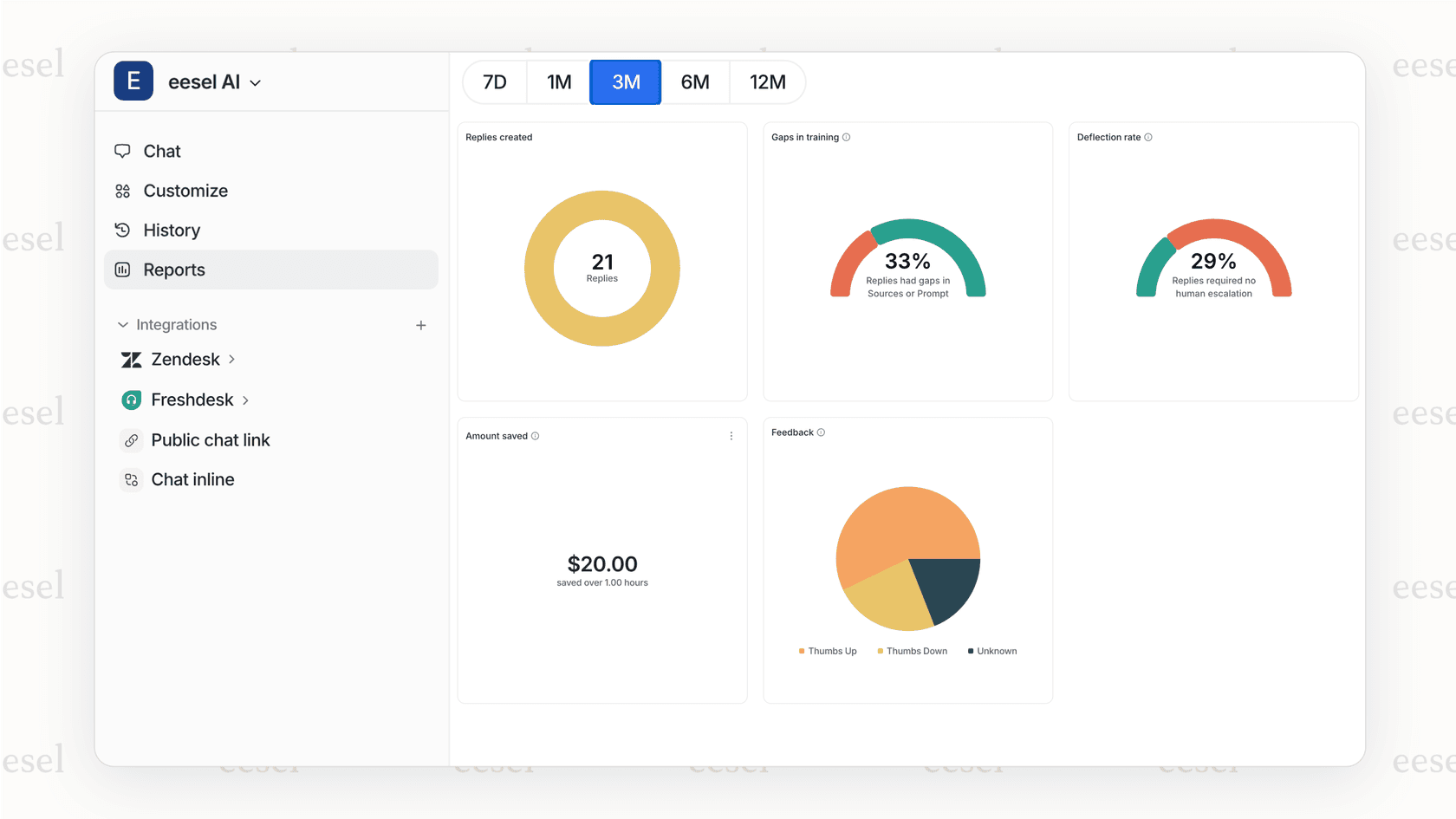
eesel AI integrates directly with Zendesk to handle frontline gift card support. Here's how it works:
Learning from your history
The AI agent learns from your past gift card resolutions. It studies how your team has handled thousands of similar tickets and understands your specific policies, tone, and common solutions.
API integrations for real-time data
eesel AI can connect to your gift card system via API. This means the AI can:
- Check gift card balances in real-time
- Verify if a card has been used
- Look up expiration dates
- Process simple actions like balance transfers
Drafting responses automatically
For common scenarios, the AI drafts complete responses that your agents can review and send. Over time, as confidence builds, you can let the AI send responses directly for specific ticket types.
Smart escalation
Not every gift card issue should be automated. eesel AI escalates to human agents when:
- The issue involves fraud or security concerns
- The customer expresses frustration or urgency
- The request falls outside standard policies
- Technical issues require IT involvement
You define these escalation rules in plain English. No complex workflows or coding required.
The business case
Based on our data from 1,000+ customer service teams, gift card inquiries typically see:
- 60-80% automation potential for balance checks
- 40-60% automation potential for redemption issues
- 20-30% automation potential for lost card requests (due to verification requirements)
At eesel AI pricing starts at $239/month (annual), and teams typically see payback within two months through reduced agent workload and faster resolution times.
Measuring gift card support performance
You can't improve what you don't measure. Track these metrics to identify bottlenecks and automation opportunities:
| Metric | Why It Matters | Target Benchmark |
|---|---|---|
| First response time | Gift card issues often have urgency | Under 1 hour |
| Resolution time by issue type | Balance checks should be faster than lost card replacements | Balance: Under 4 hours, Lost: Under 24 hours |
| Customer satisfaction (CSAT) | Gift card frustration can hurt loyalty | Above 90% |
| Volume trends | Plan staffing for holiday spikes | Track year-over-year |
| Automation rate | Percentage handled without human touch | 40-60% for balance checks |
Use Zendesk Explore to build dashboards tracking these metrics. Look for patterns:
- Do balance inquiries spike on weekends? (Customers shopping)
- Are redemption issues higher during sales events? (System strain)
- Which gift card processors generate the most support tickets? (Quality issues)
This data helps you justify automation investments and identify process improvements.
Streamline your gift card support today
Gift card support doesn't have to burden your team. With the right setup in Zendesk, you can organize tickets efficiently, respond quickly with templates, and automate the repetitive work.
The key takeaways:
- Use custom fields and tags to organize gift card tickets
- Create response templates for common scenarios
- Document workflows for consistency
- Measure performance to find improvement opportunities
- Consider AI automation for high-volume, repetitive inquiries
If your team's spending too much time on gift card balance checks and simple redemption questions, eesel AI can help. It integrates with your existing Zendesk setup and learns from your past resolutions to handle frontline gift card support autonomously.
Start with a free trial to see how much of your gift card volume you can automate. Most teams are surprised by the results.


Frequently Asked Questions
Share this article

Article by
Stevia Putri
Stevia Putri is a marketing generalist at eesel AI, where she helps turn powerful AI tools into stories that resonate. She’s driven by curiosity, clarity, and the human side of technology.