


Let's be real: an AI tool, no matter how smart its code, is only useful if it learns from the people who use it every day. It's this constant back-and-forth, input, analysis, and tweaking, that separates a helpful AI assistant from a frustrating piece of tech.
Notion AI has become a go-to copilot for millions of people, helping them summarize notes, draft emails, and get their projects in order. But just like any other AI, it needs a steady stream of user feedback to get sharper and more reliable. This brings up a pretty important question: how does Notion actually gather and use all that feedback?
In this post, we're going to take a closer look at the Notion AI feedback mechanism. We’ll break down how it works, what it does well, where it falls short, and how modern platforms can automate this whole process to help AI tools improve way faster.
What is the Notion AI feedback mechanism?
So, what exactly is the Notion AI feedback mechanism? It's not just a single button you click. Think of it more as a whole system that pulls together direct user input, community chatter, and a ton of internal review. At its heart, Notion's approach is all about listening to its users. They want to know what you think, and they've created several paths to get your opinion from a Reddit comment or an in-app click into their development pipeline.
This system is built on a few key parts: simple in-app prompts for quick reactions, community managers who keep an eye on public forums, organized beta programs for testing new stuff, and internal teams who have the massive job of sorting through everything. Let’s look at how it all fits together.
How Notion's AI feedback mechanism works in practice
Notion has set up a few different ways to get feedback. They cast a wide net to make sure they're catching everything from gut reactions to detailed requests for new features. Here’s a rundown of the moving parts.
Active community engagement and user forums
If you've ever spent time on the r/Notion subreddit, you know it's a hub for detailed feedback, feature requests, and bug reports. And Notion's team is right there in the mix, actively listening to what people are saying on Reddit and other social media spots. This is a great way to build a community, it makes users feel heard and like they're part of the conversation.
But, this is a very manual and qualitative process. It depends on community managers sifting through tons of posts and comments, spotting common themes, and packaging that feedback into something the product team can actually use. It works well for gauging how people feel, but it's incredibly hard to do at a large scale.
In-app feedback prompts and surveys
Notion also gathers feedback right inside the app. When Notion AI gives you a response, you’ll usually see a simple thumbs-up or thumbs-down option. This gives them a quick, clear signal about whether that specific output was any good, right in the moment.
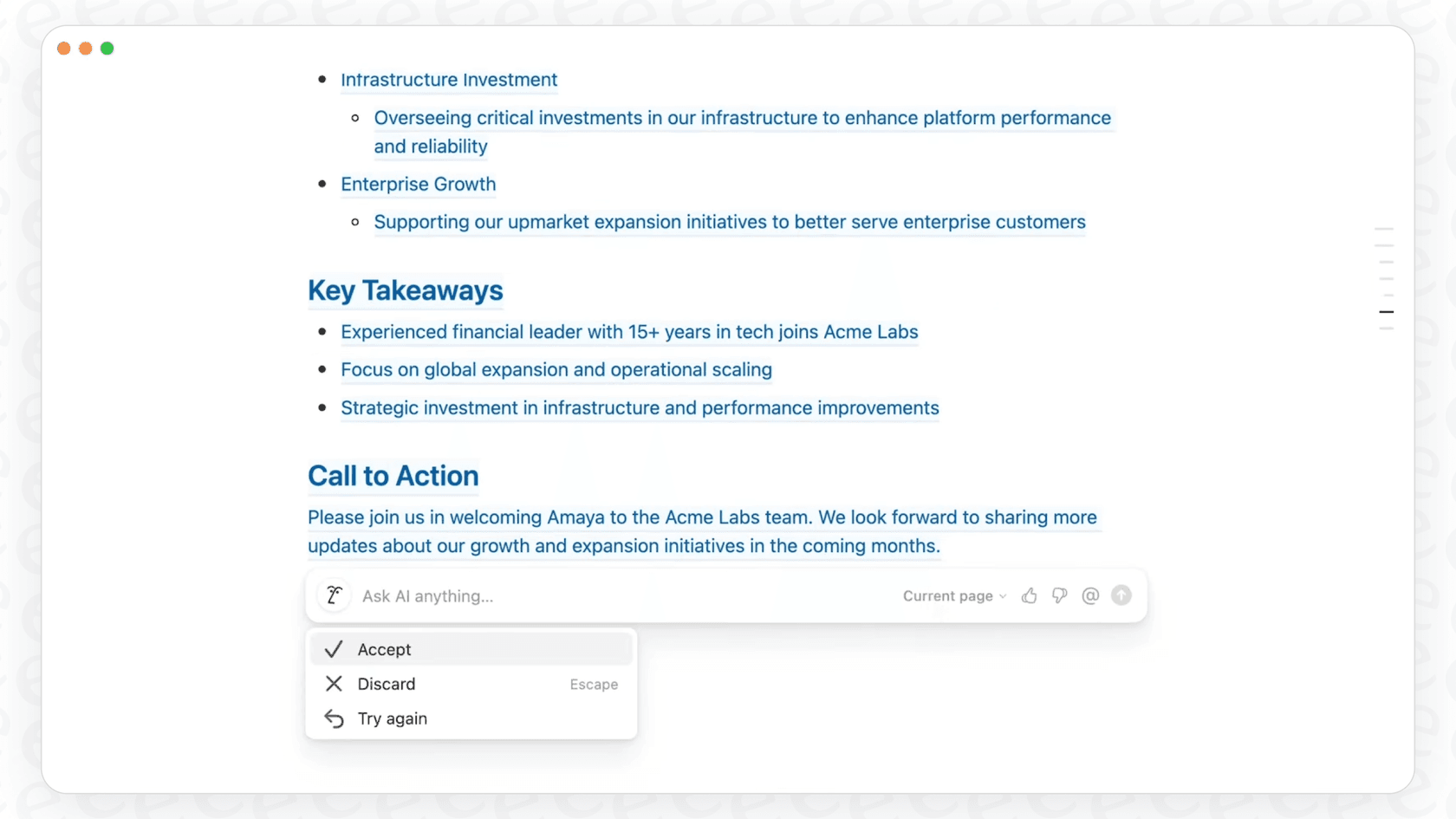
As one blogger pointed out, this is a key part of the learning process that helps the AI models improve. Beyond these simple clicks, Notion also uses surveys and feedback forms inside the app to get more detailed thoughts on certain features or workflows. This adds important context that a simple upvote or downvote can’t provide.
User testing, beta programs, and internal triage
Before Notion pushes out big AI updates, they rely on user testing and beta programs. A select group of users gets a sneak peek at new features, which lets the team collect feedback, find bugs, and see how things are working before releasing them to everyone.
Once all this feedback pours in, from Reddit, the app, and beta testers, it has to be organized. This is where Notion’s product operations and user insights teams come in. As detailed in case studies with companies like Enterpret and Braintrust, these teams had the huge job of sorting and tagging every single piece of feedback. Get this: at one point, they were juggling over 700 unique tags just to classify everything manually. That's a lot to keep track of.
graph TD A[Feedback from Reddit] --> D{Manual Triage}; B[In-app Feedback] --> D; C[Beta Tester Feedback] --> D; D --> E[Sort & Tag]; E --> F[Over 700 unique tags]; F --> G[Product Team Insights];
The limitations of a manual Notion AI feedback mechanism
While Notion's hands-on approach clearly shows they care about their users, it creates some major headaches as the company grows. A system that works for a small community can really start to creak under pressure.
Scalability and consistency issues
Trying to get a team of people to manually tag thousands of feedback items every month is bound to get messy. With over 700 tags floating around, it's almost impossible to make sure everyone is classifying things the same way. In fact, Notion’s own Head of Product Operations said that the product team eventually started to "lose trust in the data’s reliability and usefulness." When your team can't trust the data, making good decisions gets a lot harder.
A time-consuming and resource-intensive system
The amount of work needed to keep this system going is pretty wild. Before they brought in some automation, Notion’s team said it took them two full weeks just to pull together the monthly user insights report.
That kind of workflow requires whole teams of specialists in product ops, AI, and user experience just to keep the feedback coming in and getting sorted. That’s a luxury most companies don't have. It pulls talented people away from actually building the product and puts them on a treadmill of manual data entry.
Lack of real-time insights
Maybe the biggest problem, though, is the delay. A manual process means there's a big gap between when a user shares feedback and when the product team can do anything about it. By the time a report is finished, urgent problems could have been sitting there for weeks, and new trends might be missed. This puts teams on the back foot, constantly reacting to old news instead of getting ahead of what users need.
Automating the Notion AI feedback mechanism for scalable improvement
The good news? You don't need a huge product ops team to build a great AI. Today's platforms can automate the whole feedback loop, turning raw user comments into useful insights without all the manual grunt work.
Unify knowledge to improve the feedback mechanism
Instead of spending hours tagging feedback, platforms like eesel AI can connect straight to your help desk and learn from all your past support chats automatically. It figures out your brand voice, common customer problems, and what solutions worked before, all on its own.
Even better, eesel AI pulls knowledge from all the different places your team keeps information. It connects to your documents in Notion, Confluence, and Google Docs, creating one source of truth for your AI without anyone having to lift a finger.

From feedback to action in minutes
An automated system doesn't just collect information; it helps you act on it right away. For instance, eesel AI can spot trends in support tickets and automatically suggest new articles for your knowledge base, helping you fill in the gaps that real users are pointing out.
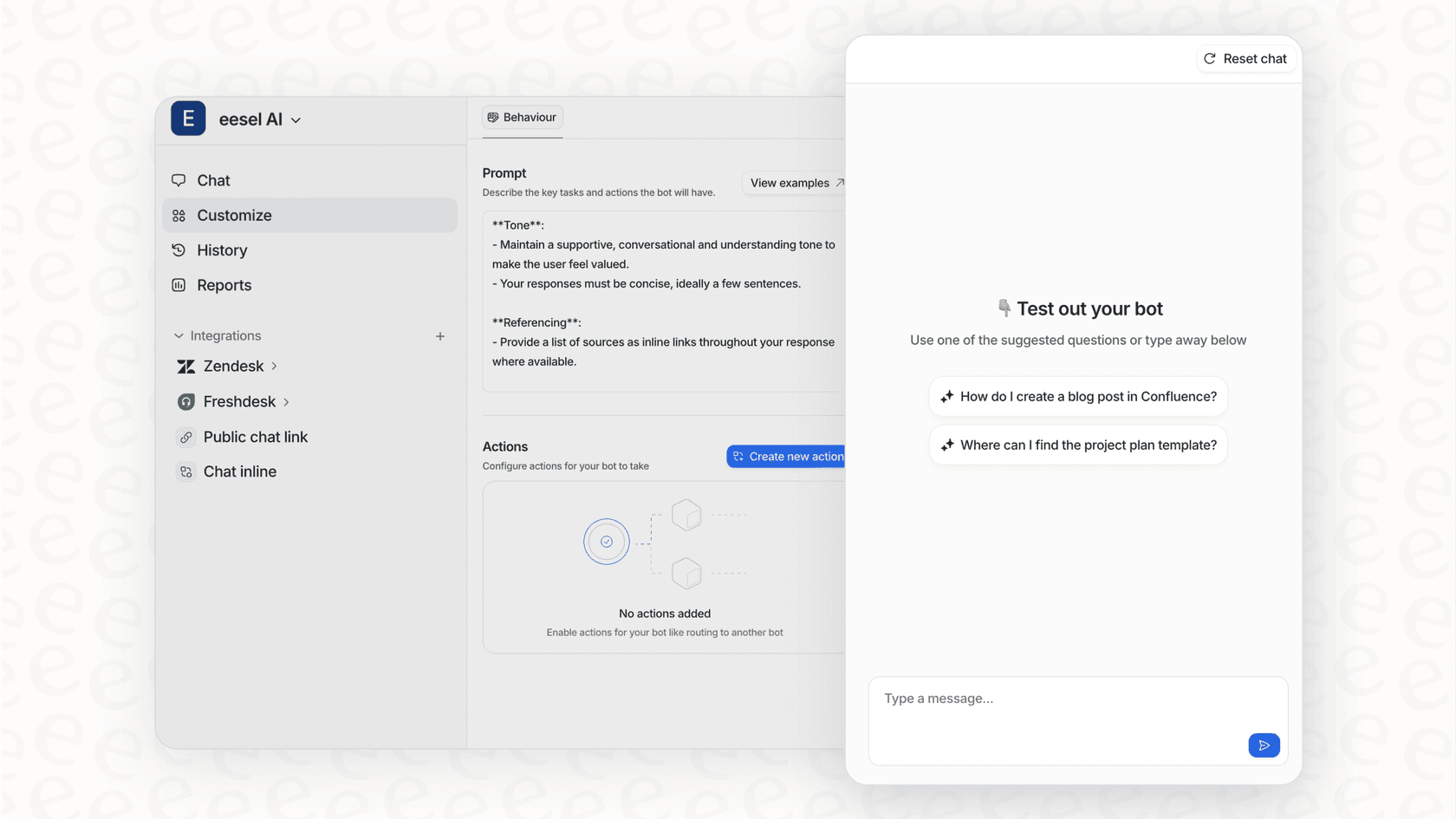
And forget about waiting weeks for a beta program to wrap up. eesel AI has a simulation mode that lets you test your AI setup on thousands of your own past support tickets in an instant. You get a clear, data-driven picture of how your AI will perform and where it might be weak before it ever talks to a real customer.
Gaining control without the complexity
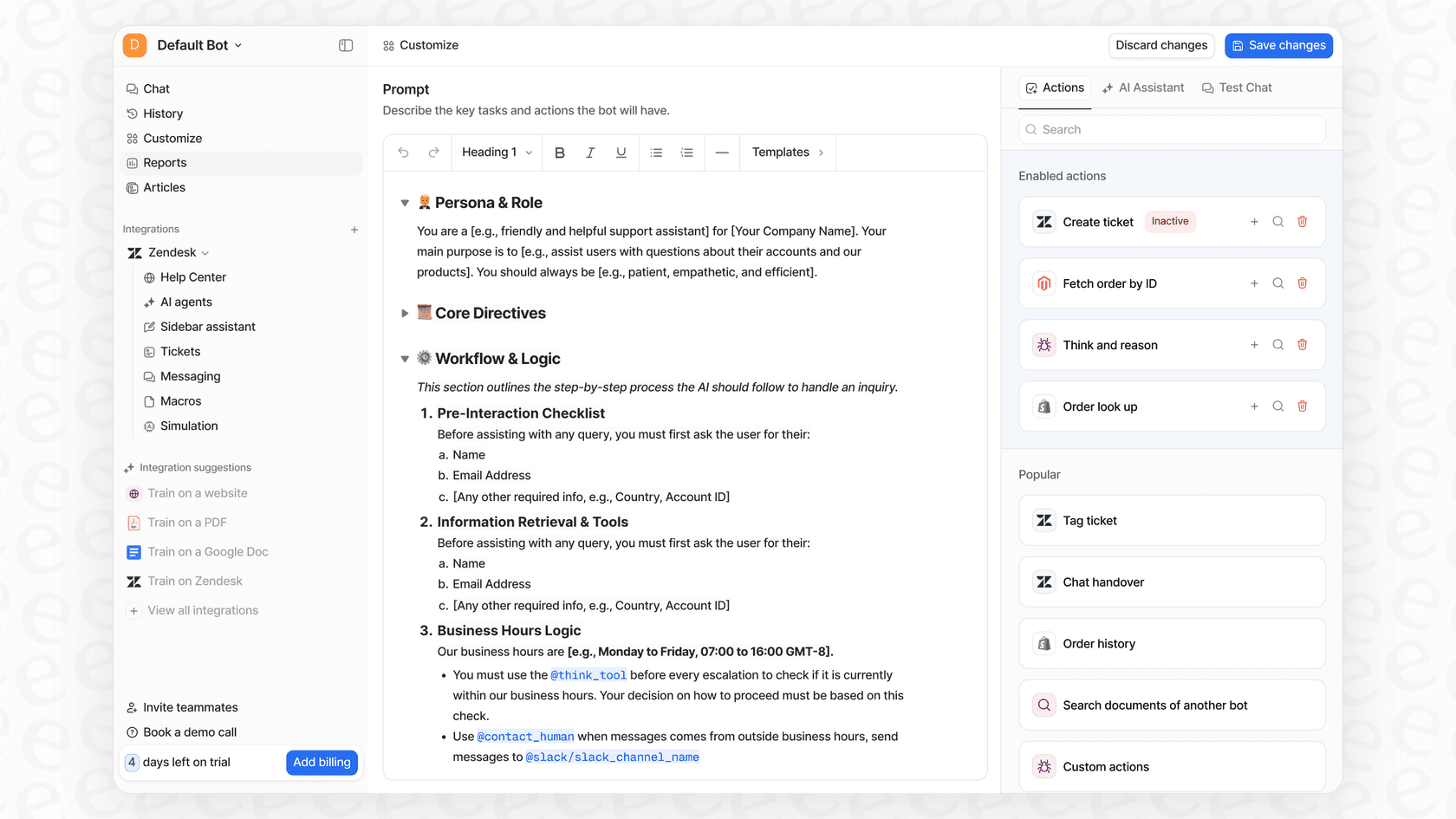
Automation doesn't mean you lose control. With a platform like eesel AI, you're in the driver's seat. You can define exactly what topics the AI should handle and tweak its personality with a simple prompt editor. There's no need for a dedicated engineering team or a two-week reporting delay. You can get it up and running in minutes and get back to focusing on your business, knowing your AI is getting smarter with every conversation.
Notion AI pricing and plan availability
If you want to use all of Notion AI's features, you'll need a paid plan. The Free and Plus plans give you a little taste, but full access comes with the higher-tier subscriptions. This is worth keeping in mind, since the features that really benefit from this kind of feedback are in those packages.
Here’s a quick look at the plans that include Notion AI:
| Plan | Price (per seat/month, billed annually) | Key AI Features Included |
|---|---|---|
| Free | $0 | Limited trial of Notion AI |
| Plus | $8 | Limited trial of Notion AI |
| Business | $15 | Full access to Notion AI Core (chat, autofill, etc.) |
| Enterprise | Custom | Everything in Business + Enterprise Search, AI Meeting Notes, Agent, Zero data retention |
Note: Pricing is based on public information and can change. Always check the official Notion pricing page for the latest details.
A final look at the Notion AI feedback mechanism
So, what's the bottom line? Notion is clearly committed to listening to its users, and that has been a big part of its success. But relying on manual feedback processing creates some real problems with scaling, staying consistent, and moving quickly. It’s a model that eats up a lot of resources and can't quite keep up with a fast-growing product.
The modern way of doing things flips this around. By using automation, teams of any size can build a smart, self-improving AI system that uses every user interaction as a chance to get better. The future of AI isn't just about clever tools; it's about creating intelligent systems that learn and adapt in real-time, right alongside your customers.
Want to build an AI feedback loop that grows with your business, not your payroll? eesel AI brings all your knowledge together and automates support in a platform you can get running in minutes. Start your free trial today.


Frequently asked questions
The main goal of the Notion AI feedback mechanism is to gather user input to continuously improve the AI's performance and reliability. It ensures the tool learns from daily interactions to become a more helpful assistant.
Notion uses several methods, including active engagement in community forums like Reddit, in-app prompts (like thumbs-up/down), surveys, user testing, and beta programs. This diverse approach helps them gather various types of user input.
The manual Notion AI feedback mechanism struggles with scalability and consistency, leading to data reliability issues. It's also very time-consuming and resource-intensive, often delaying real-time insights for product improvements.
Yes, modern platforms can automate the Notion AI feedback mechanism by unifying knowledge from various sources and turning raw user comments into actionable insights quickly. This reduces manual effort and speeds up the improvement cycle.
An automated Notion AI feedback mechanism can instantly spot trends in user feedback and simulate AI performance, providing immediate data-driven insights. This allows teams to address urgent problems and adapt faster than with manual processes.
While basic trials might be available on Free and Plus plans, full access to features that significantly benefit from the Notion AI feedback mechanism typically requires higher-tier subscriptions like Business or Enterprise plans.
Share this article

Article by
Kenneth Pangan
Writer and marketer for over ten years, Kenneth Pangan splits his time between history, politics, and art with plenty of interruptions from his dogs demanding attention.
