Kustomer agent assist AI: Features, pricing, and alternatives for 2026

Stevia Putri
Last edited March 9, 2026
When your support team is drowning in tickets, the right AI agent assist tool can be the difference between burnout and breathing room. Kustomer has built a reputation as an AI-native customer experience platform, but how does their agent assist offering actually work? And is it the right fit for your team?
Let's break down what Kustomer agent assist AI offers, how it compares to alternatives like eesel AI, and whether it makes sense for your specific situation.
What is Kustomer agent assist AI?
Kustomer positions itself as an AI-native CX platform, meaning AI capabilities are woven into the foundation rather than bolted on as an afterthought. Their agent assist functionality, branded as "AI for Reps," acts as a copilot for human support agents.
Here's the short version: instead of agents starting from scratch on every ticket, Kustomer's AI suggests responses, automates repetitive tasks, and surfaces relevant information from your knowledge base and CRM. The goal is to help agents resolve issues faster without sacrificing quality.
Kustomer also offers "AI Agents for Customers" (autonomous resolution) and a suite of seven "AI Assistants" for different CX functions. But for this guide, we're focusing specifically on the agent assist side, the tools that help your human agents work more efficiently.
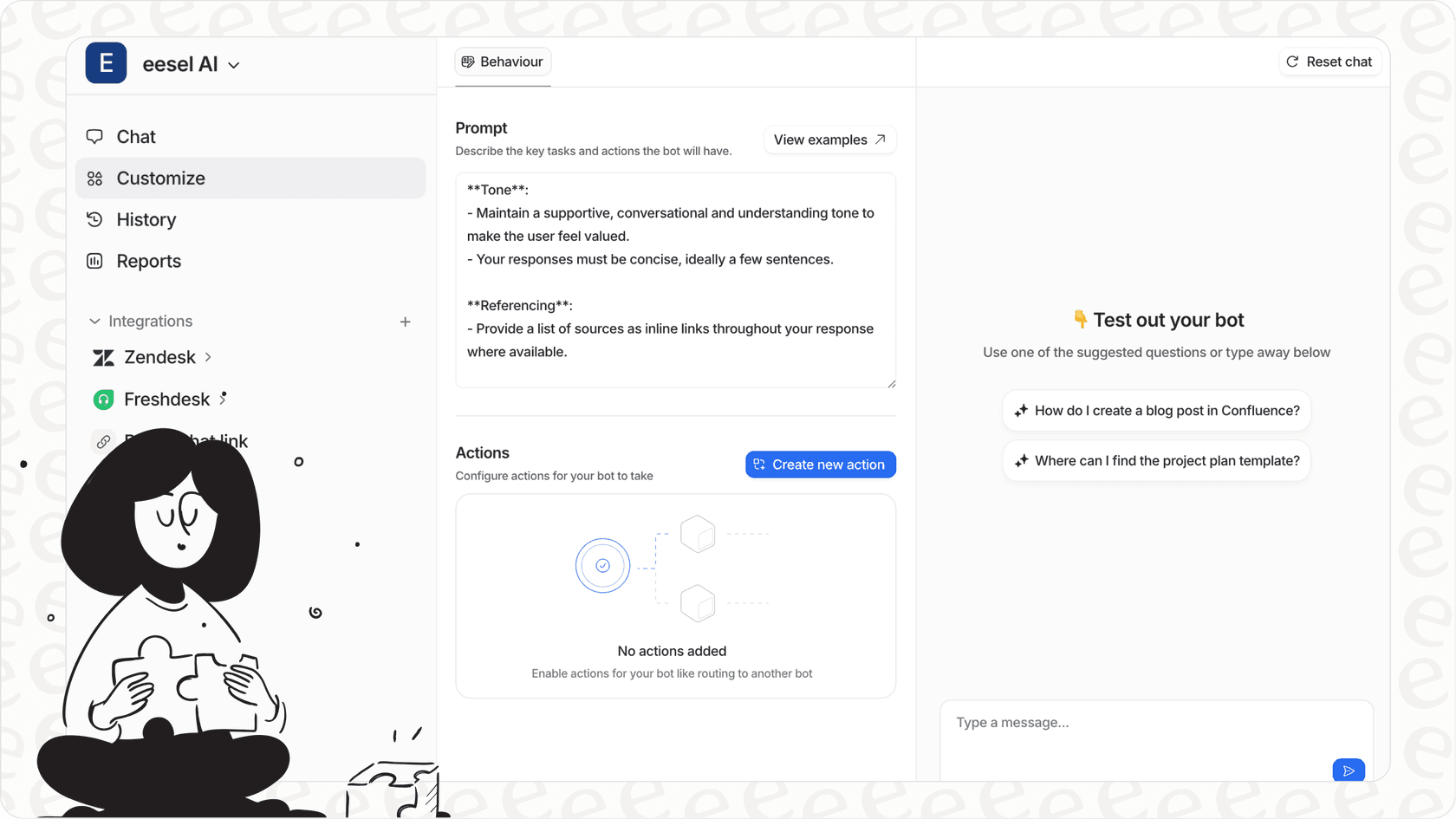
If you're exploring alternatives, eesel AI takes a different approach with what we call the "teammate model." Rather than configuring a tool, you hire an AI teammate that learns your business and progressively takes on more responsibility. Both approaches have merit, and we'll explore the differences throughout this guide.
Key features of Kustomer agent assist AI
Kustomer's agent assist capabilities break down into several core functions. Let's look at what each one actually does.
Instant prompts for faster resolution
When an agent opens a ticket, Kustomer's AI generates suggested responses based on your internal knowledge base, past tickets, and CRM data. This isn't generic templated text, it's context-aware suggestions that reference specific customer information.
The system pulls from multiple sources: your help center articles, previous similar tickets, and the customer's history in your CRM. Agents can use the suggestion as-is, edit it, or ignore it completely. The idea is to eliminate the "blank page" problem where agents spend minutes figuring out how to start a response.
Authentic conversation assistance
Kustomer includes writing enhancement tools that help agents maintain consistent tone and quality. The AI can expand brief notes into complete responses, condense lengthy drafts into concise messages, and fix grammar issues on the fly.
There's also brand voice alignment, which attempts to match your company's preferred communication style. If your brand is formal and professional, the suggestions lean that way. If you're more casual and conversational, the AI adapts accordingly.
Recommended actions
Beyond writing responses, the AI suggests next steps for handling tickets. This might include transferring to a specific department, sending a help article, offering a credit, or escalating to a supervisor. The system categorizes tasks and provides actionable recommendations based on the ticket content.
This feature aims to reduce the mental overhead for agents, especially newer ones who might not yet know all the available options for handling different situations.
Seamless handoffs
One of Kustomer's strengths is the bi-directional handoff between AI and human agents. When an AI agent encounters something it can't handle, it transfers to a human with full context. But here's the interesting part: after the human resolves the complex issue, they can hand it back to the AI to complete routine follow-up tasks.
The system generates conversation summaries at each handoff point, so no context gets lost in the transition. This addresses a common pain point with AI handoffs, where customers get frustrated having to repeat information.
Kustomer AI Assistants suite
Beyond the core agent assist features, Kustomer offers seven specialized AI Assistants that complement the agent experience. These are included with the platform at no extra charge.
| Assistant | What It Does |
|---|---|
| Data Explorer | Real-time insights and analytics on CX data |
| Workflow Assistant | No-code automation building with guided setup |
| Knowledge Base Assistant | Draft help articles and auto-generate SEO metadata |
| Search Assistant | Conversational search across all your data |
| AI Agent Team Assistant | Build and deploy AI agents with intuitive tools |
| Observability Assistant | Debug AI behavior and identify root causes |
| Automations Assistant | Analyze workflows and detect conflicts |
These assistants serve different stakeholders on your team. Data Explorer and Observability Assistant are primarily for managers and admins who need visibility into performance. Workflow Assistant and Knowledge Base Assistant help content and operations teams. The AI Agent Team Assistant is for building customer-facing AI agents.
For agents specifically, the Search Assistant is particularly relevant. It lets them find information quickly using natural language queries rather than digging through multiple systems.
Kustomer pricing and plans
Kustomer's pricing follows a seat-based model with AI features as add-ons. Here's the breakdown:
Platform pricing
| Plan | Price | Key Limits |
|---|---|---|
| Enterprise | $89/seat/month | 8 seats minimum, 5M custom objects, 250 custom attributes, 1000 RPM API limit, 25 brands, 20 languages |
| Ultimate | $139/seat/month | 8 seats minimum, 100M custom objects, 500 custom attributes, 2000 RPM API limit, 300 brands, all languages |
Both plans include the core AI Assistants suite (Data Explorer, Workflow Assistant, etc.) at no extra charge.
AI add-ons
| Add-on | Price | What You Get |
|---|---|---|
| AI for Customers | $0.60 per engaged conversation | Autonomous AI agents for customer-facing resolution |
| AI for Reps | $40 per user/month | Agent assist features (summaries, writing tools, suggestions) |
| HIPAA Enabled | $25 per user/month | Compliance for healthcare organizations |
Important pricing notes
The listed prices require annual payment and a minimum of 8 seats. If you have a smaller team, you'll need to contact sales for pricing. Some configurations may also require implementation fees.
For the agent assist features specifically (AI for Reps), you're looking at $40 per user per month on top of the base platform cost. So an agent on the Enterprise plan with AI for Reps would cost $129 per month ($89 base + $40 AI add-on).
Kustomer agent assist AI vs. alternatives
Kustomer isn't the only player in this space. Let's look at how it compares to alternatives, including our own approach at eesel AI.
Kustomer vs. eesel AI: Key differences
| Factor | Kustomer | eesel AI |
|---|---|---|
| Pricing model | Per seat/month + AI add-ons | Flat rate by interactions |
| Entry cost | $712/month minimum (8 seats) + $40/user for AI | $299/month (Team plan) |
| AI agent assist | $40/user/month add-on | Included in all plans |
| Setup approach | Configuration-focused | Teammate model (hire and level up) |
| Free trial | Contact sales/demo | 7-day free trial |
| Contract | Annual (for listed pricing) | Month-to-month available |
When Kustomer makes sense
Kustomer is a strong fit if:
- You need a unified CX platform (CRM + support + AI in one system)
- You have 8+ support agents
- You want AI-native architecture with deep customization
- You're comfortable with annual contracts
- You need extensive workflow automation and business rules
The unified data model is genuinely powerful. When everything lives in one system, you avoid the data silos that plague teams using separate CRM and helpdesk tools.
When to consider alternatives
Alternatives like eesel AI might be a better fit if:
- You have fewer than 8 agents (Kustomer's minimum)
- You prefer month-to-month flexibility
- You want AI agent assist without per-seat fees
- You value progressive rollout (start with guidance, level up to autonomy)
- You need faster setup without implementation fees
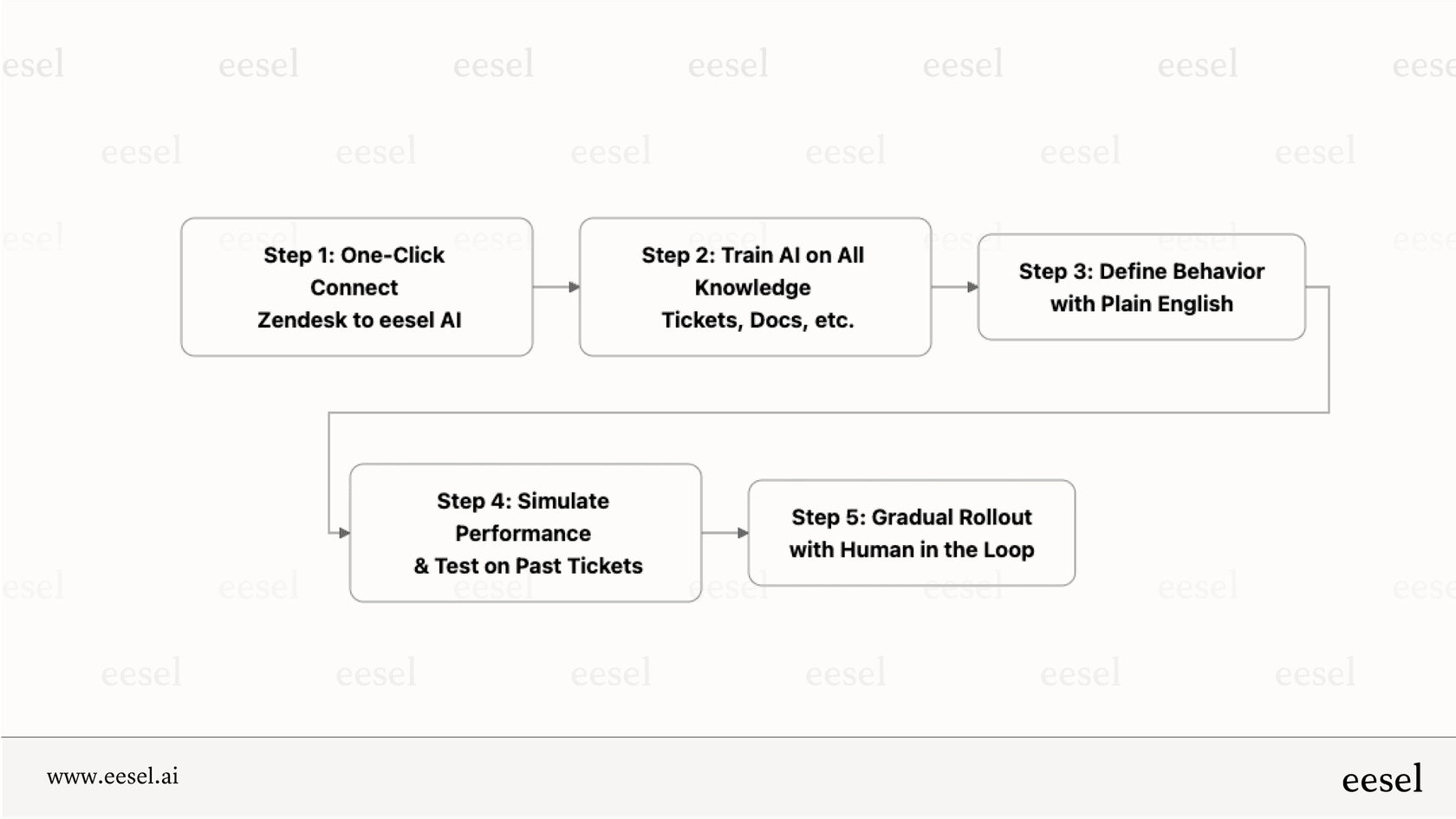
Our teammate model at eesel AI emphasizes hiring an AI teammate rather than configuring software. The AI learns from your existing tickets, docs, and help center, then starts by drafting replies for agent review. As it proves itself, you can grant more autonomy. This approach reduces risk and lets you verify quality before going fully autonomous.
We also price by interactions rather than seats, which can be more predictable for growing teams. Our Team plan starts at $299 per month with no minimum seat requirement.
Is Kustomer agent assist AI right for your team?
Choosing the right agent assist tool depends on your specific context. Here are the key factors to consider:
Team size and budget
Kustomer's pricing structure clearly targets mid-market to enterprise teams. With an 8-seat minimum and annual contracts, it's not designed for small teams or those wanting to test the waters. If you have 5 agents or fewer, the per-seat economics probably don't work in your favor.
Integration needs
Kustomer works best as an all-in-one platform. If you're already invested in separate CRM and helpdesk tools, migrating to Kustomer's unified system requires significant change management. On the flip side, if you're currently juggling multiple systems and want to consolidate, Kustomer's approach has real appeal.
AI maturity
Consider how ready your team is for AI assistance. Kustomer assumes you want AI features from day one (hence the add-on pricing). If you prefer to start simple and gradually introduce AI, look for platforms that support progressive adoption.
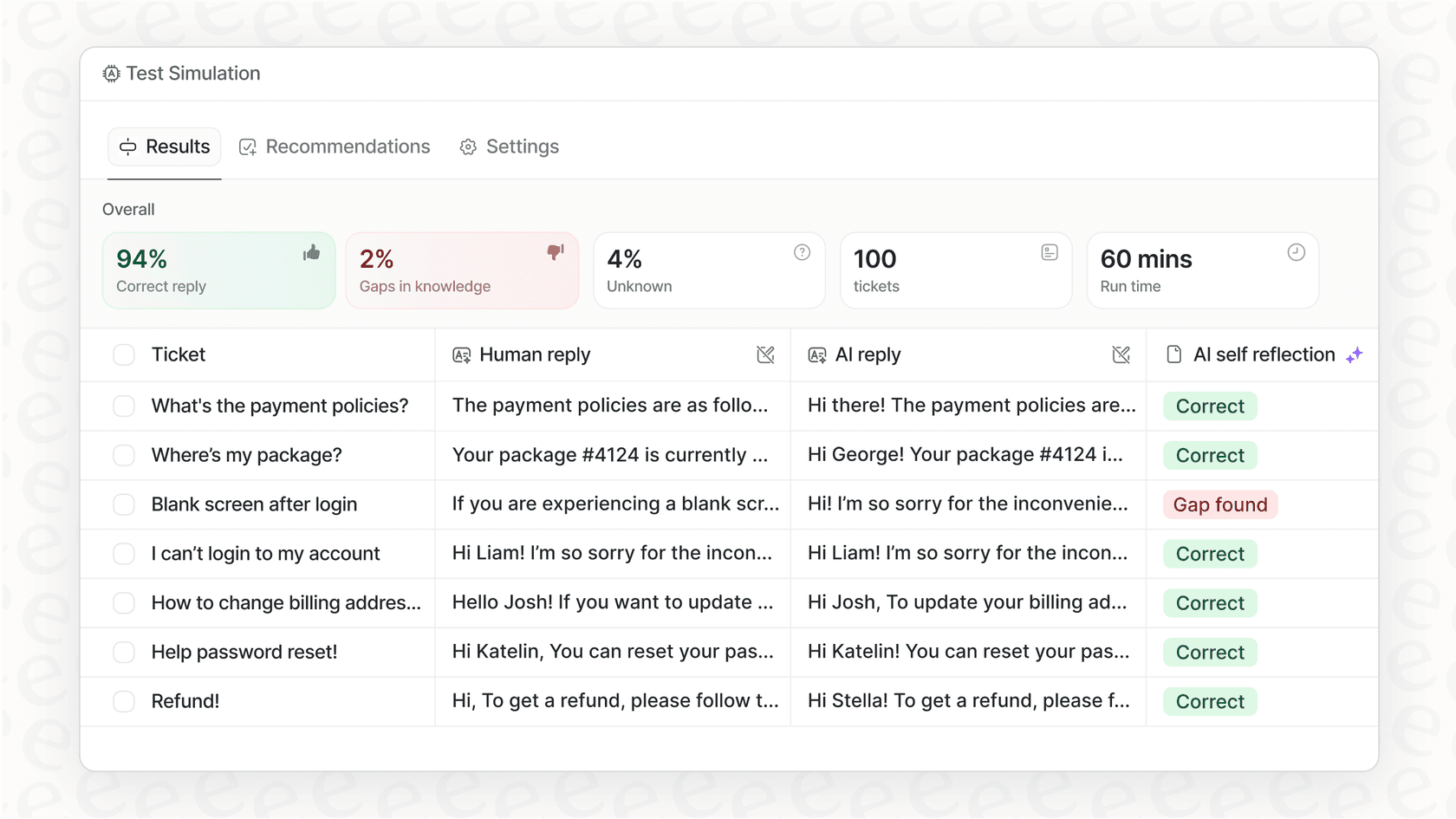
At eesel AI, we let you start with just the AI Copilot (drafting replies for review), then add AI Agent capabilities when you're ready. You can also run simulations on past tickets before going live, which helps build confidence.
Support complexity
Kustomer's strength is handling complex, multi-step workflows with lots of business rules. If your support process is relatively straightforward, you might be paying for capabilities you don't need. For simpler use cases, a more streamlined tool may serve you better.
Getting started with AI agent assist
If you're evaluating AI agent assist tools, here's a practical approach:
-
Audit your current state. How many tickets does your team handle? What's your average resolution time? Where do agents get stuck? This baseline helps you measure improvement.
-
Define success metrics. Are you aiming for faster response times, higher CSAT, reduced agent burnout, or something else? Different tools optimize for different outcomes.
-
Test before committing. Look for platforms that let you simulate AI performance on your actual tickets before purchase. This reveals how well the AI understands your specific business.
-
Plan the rollout. Even the best AI needs proper onboarding. Consider starting with a pilot group, gathering feedback, and iterating before full deployment.
-
Evaluate total cost of ownership. Factor in not just subscription costs, but implementation fees, training time, and ongoing administration.

Frequently Asked Questions
Share this article

Article by
Stevia Putri
Stevia Putri is a marketing generalist at eesel AI, where she helps turn powerful AI tools into stories that resonate. She’s driven by curiosity, clarity, and the human side of technology.