GitBook vs Document360: Complete comparison for 2026

Stevia Putri
Last edited March 26, 2026
Documentation has become the backbone of product teams. Whether you are building APIs, onboarding customers, or maintaining internal knowledge, the platform you choose shapes how information flows through your organization. Two tools dominate this space: GitBook and Document360. Both help teams create and manage documentation, but they approach the problem from opposite directions.
Let's break down what each platform offers, where they differ, and how to decide which one fits your team's workflow.
What is GitBook?
GitBook is an AI-native documentation platform built for technical teams. Its core philosophy centers on speed and accessibility: get documentation live quickly with minimal friction, then iterate collaboratively.
The platform uses a block-based visual editor that feels familiar to anyone who has used Notion or similar tools. Non-technical team members can create and format content without touching Markdown. At the same time, developers can work in Markdown or MDX directly from their IDE thanks to GitBook's two-way sync with GitHub and GitLab.
GitBook's target audience is clear from its positioning: startups, open-source projects, and technical teams who want documentation that "lives with your code." The platform emphasizes clean, modern public documentation that looks professional out of the box.
Key capabilities include:
- Block-based editor for visual content creation
- Two-way Git sync with GitHub and GitLab
- Git-like branching to protect primary documentation
- AI Assistant for rewriting, summarizing, and improving clarity
- AI Agent that can generate pages and propose structural changes
- Real-time collaboration with automatic saves and diff views
What is Document360?
Document360 positions itself as an AI-powered knowledge base platform for enterprises. Where GitBook prioritizes speed, Document360 prioritizes control and governance.
The platform is built around structured knowledge base workflows. Content is organized into categories and articles with approval processes, version management, and granular permissions. This structure appeals to support teams, mid-market companies, and regulated industries where documentation accuracy and compliance matter.
Document360's AI features (branded as "Eddy AI") focus on content transformation and assistance. The AI Writing Agent can convert videos, audio files, and text documents into structured articles. The platform also offers an AI chatbot that answers questions directly from your knowledge base.
Key capabilities include:
- Structured knowledge base with categories and approval workflows
- Video-to-documentation AI that transforms recordings into articles
- Extensive integrations with helpdesks, analytics, and communication tools
- Advanced analytics for tracking documentation effectiveness
- Multi-language support for global organizations
- On-premise deployment options for enterprise security
Notable customers include McDonald's, VMware, Virgin Red, Ticketmaster, and the NHS.
GitBook vs Document360: Feature comparison
Editor and content creation
GitBook's block-based editor is designed for mixed technical and non-technical teams. Writers, product managers, and support staff can contribute without learning Markdown syntax. Pages can be rearranged from the sidebar, and most everyday edits do not require developer involvement.
Document360 offers both WYSIWYG and Markdown editors, but the experience is more structured. Content flows through categories and articles with review steps. This works well in governed environments but introduces friction for quick updates.
Version control and publishing
GitBook uses a Git-like workflow with branches. Changes won't go live accidentally, and the two-way Git sync means developers can contribute from their IDE while non-technical team members use the visual editor.
Document360 offers version management with rollback capabilities, but it is not designed around docs-as-code workflows. Most configuration and publishing happens through the web interface rather than from an IDE.
AI capabilities
GitBook's AI features include an Assistant for writing help and an Agent that can restructure documentation. The Agent can generate new pages, add subsections, and propose broader changes through change requests.
Document360's Eddy AI focuses on content transformation: converting videos to articles, repurposing audio files, and generating content from prompts. It also includes an AI chatbot for customer self-service and tools for SEO optimization.
Search and discovery
GitBook provides built-in search with a clean, modern public documentation experience. The focus is on readability rather than heavy navigation.
Document360 offers advanced search with filtering, help center widgets, and comprehensive analytics to track what users are looking for and whether they find it.
Integrations
GitBook keeps integrations focused: GitHub, GitLab, and a curated set of tools for analytics, support, and visualization. The philosophy is tight integration with a developer-centric stack.
Document360 casts a wider net. Native integrations include Zendesk, Freshdesk, Salesforce, Slack, Microsoft Teams, Intercom, and dozens more. This breadth makes sense for enterprise support teams using multiple tools.
Pricing comparison
Understanding the true cost of each platform requires looking beyond the headline numbers.
GitBook pricing
| Plan | Monthly Price | Annual Price | Key Limits |
|---|---|---|---|
| Free | $0 | $0 | 1 user, 1 site, gitbook.io subdomain, 1,000 AI credits |
| Plus | $38/site/month | $31/site/month | Unlimited users, custom domain, 10,000 AI credits |
| Pro | $124/site/month | $103/site/month | Advanced analytics, 50,000 AI credits |
| Enterprise | Custom | Custom | Unlimited AI credits, SLA, dedicated support |
GitBook's pricing is transparent but can scale quickly. A 10-person team on the Plus plan pays $31/month for the site plus user costs. The AI credit system adds another variable: heavy use of AI features consumes credits that may require upgrading.
Source: GitBook Pricing
Document360 pricing
| Plan | Monthly Price | Annual Price | Key Limits |
|---|---|---|---|
| Free | Discontinued | Discontinued | No longer available (as of November 2024) |
| Professional | Contact sales | Contact sales | Growing teams, internal and external KB |
| Business | Contact sales | Contact sales | Advanced features, more team accounts |
| Enterprise | Contact sales | Contact sales | Unlimited everything, custom features |
Document360 moved to quote-based pricing in November 2024 and discontinued its free tier. All pricing now requires contacting sales, with a 14-day trial available for evaluation. A startup program offers 6 months free plus 50% off the next 6 months for qualifying companies.
Source: Document360 Pricing
Value analysis
GitBook offers predictable pricing if you know your team size and documentation needs upfront. The free tier works for solo developers or small open-source projects. Costs rise with team size and AI usage.
Document360's sales-led approach makes budgeting harder but allows for custom packages that might fit large organizations better. The lack of transparent pricing extends evaluation timelines, typically requiring 1-3 weeks for quotes.
When to choose each platform
Choose GitBook if:
- You want documentation live quickly with minimal configuration
- Non-technical team members need to contribute regularly
- You prefer visual editing with optional Git workflows
- Clean, modern public documentation is a priority
- Your team is small to mid-size (under 50 users)
- You value transparent, self-serve pricing
Choose Document360 if:
- You need strict governance, approval workflows, and controlled publishing
- Documentation is owned by support or enterprise teams
- Advanced analytics and reporting are essential
- Structure and permissions matter more than speed
- You require extensive third-party integrations
- You are comfortable with sales-led procurement
eesel AI as an alternative for documentation workflows
While GitBook and Document360 focus on creating and organizing documentation, some teams need something different: an AI teammate that learns from documentation they already have and helps answer questions at scale.
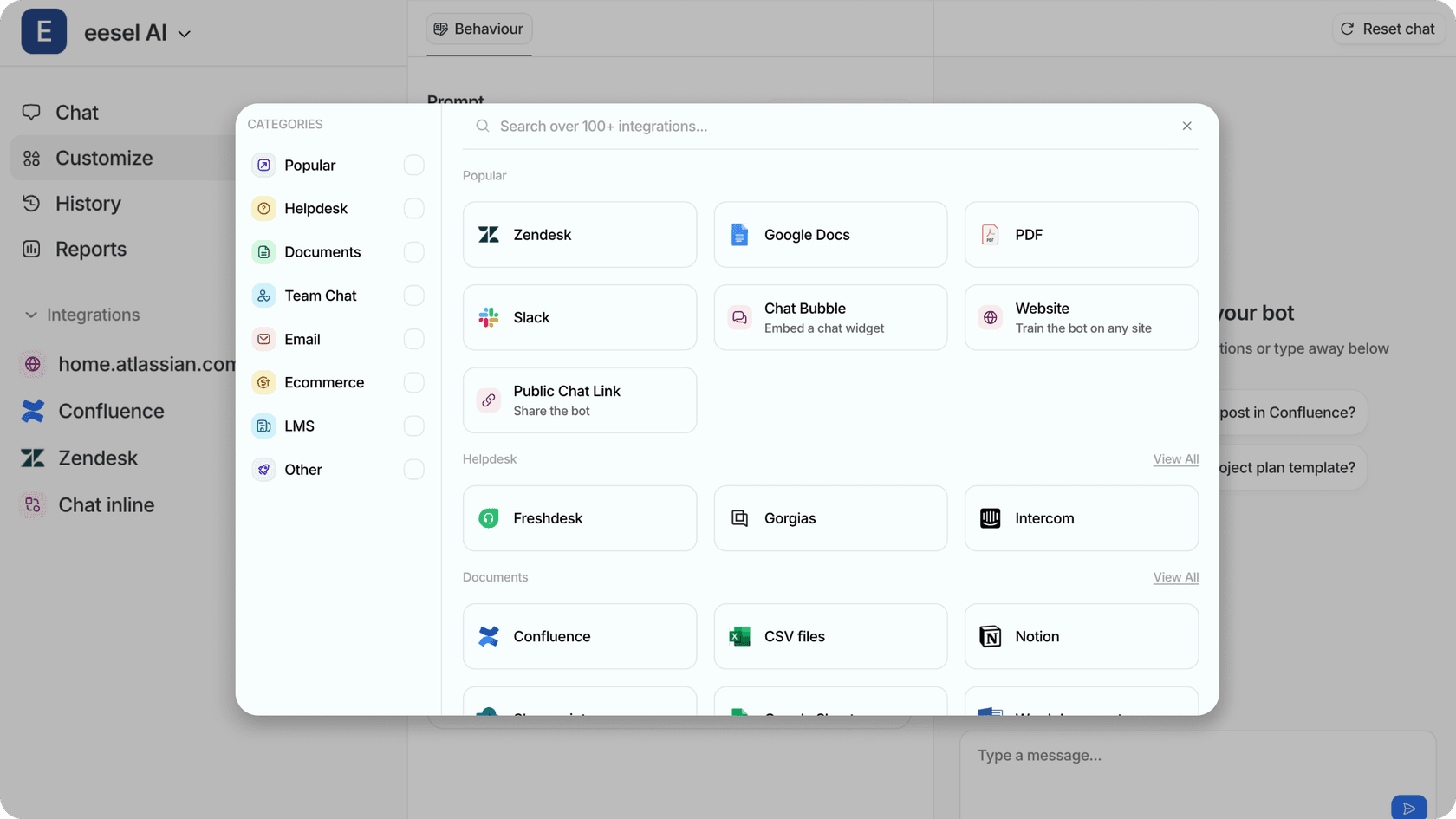
This is where we come in. At eesel AI, we have built an AI teammate for customer service and internal knowledge that works alongside your existing documentation platforms rather than replacing them.
Here's how we differ:
-
Learn from existing knowledge: Instead of migrating everything to a new platform, eesel AI connects to your help center, past tickets, Confluence, Google Docs, Notion, or PDFs. It learns your business context from day one.
-
Progressive rollout: Like any new hire, eesel starts with guidance. You can have it draft replies for review before sending, then expand to autonomous responses as it proves itself.
-
Plain-English control: Define what eesel handles and when it escalates using natural language. No rigid decision trees or complex configuration.
-
Works with your stack: We integrate with Zendesk, Freshdesk, Slack, and 100+ other tools. You do not need to replace your documentation platform.
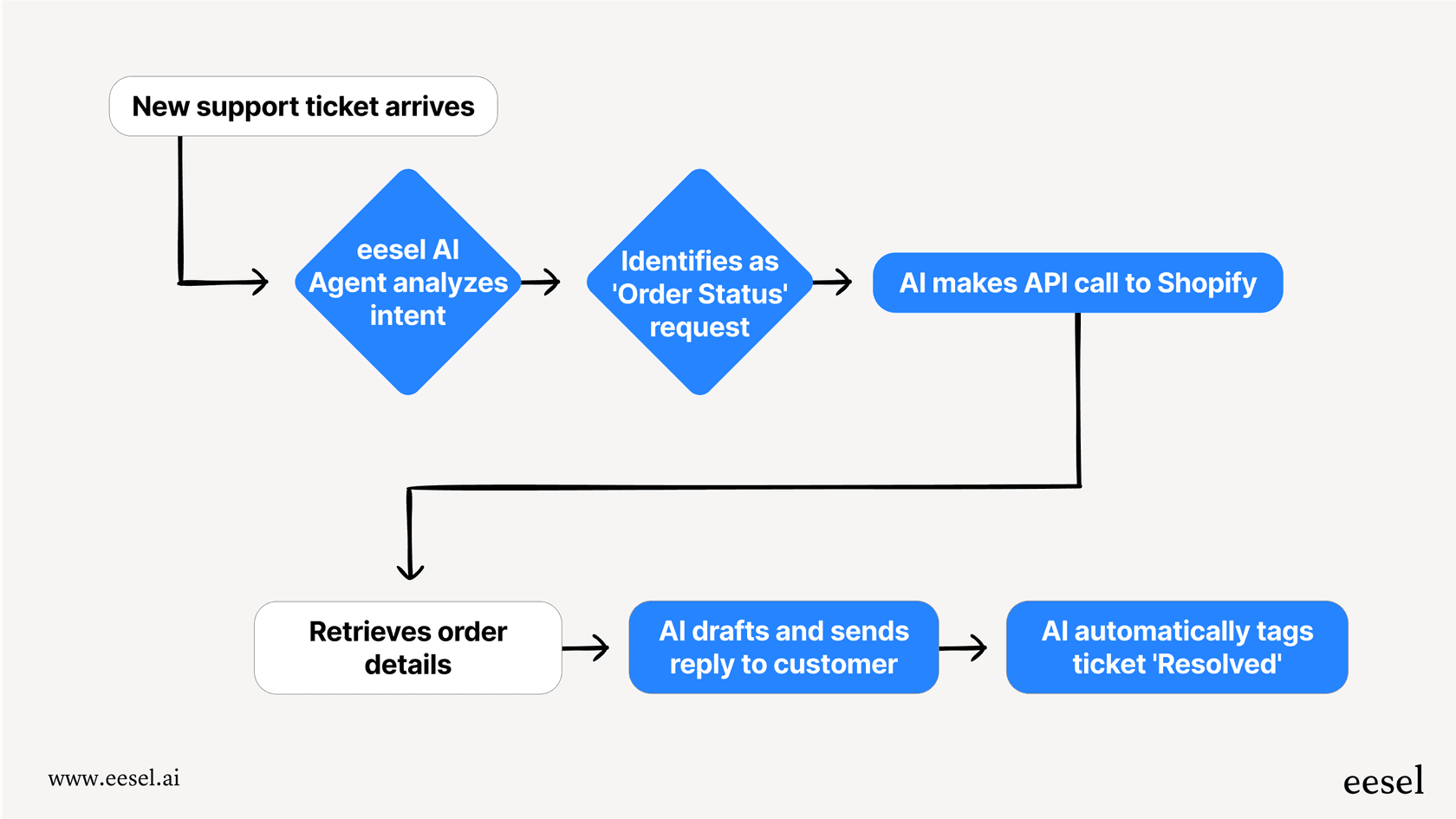
If your challenge is not creating documentation but making it accessible and actionable, an AI teammate might be what you actually need.
Making the right choice for your documentation needs
The fundamental difference between GitBook and Document360 comes down to philosophy. GitBook optimizes for speed and accessibility. Document360 optimizes for control and governance.
Here's the short version:
-
GitBook fits teams that want to move fast, share documentation ownership across roles, and publish clean docs with minimal friction. It works best where flexibility and speed matter most.
-
Document360 fits organizations that require strict governance, approval workflows, and controlled publishing. It excels in support-led or enterprise environments where structure and compliance take priority.
Your decision should start with one question: who owns documentation at your organization, and how formal does your publishing process need to be?
If developers and product managers own docs and need to iterate quickly, GitBook is likely the better fit. If support teams or compliance requirements drive documentation needs, Document360's structure will serve you better.
Either way, start with a trial. Both platforms offer evaluation periods that let you test actual workflows before committing. Documentation is too central to your operations to choose based on feature lists alone.

Frequently Asked Questions
Share this article

Article by
Stevia Putri
Stevia Putri is a marketing generalist at eesel AI, where she helps turn powerful AI tools into stories that resonate. She’s driven by curiosity, clarity, and the human side of technology.