Rytr pricing 2026: A full breakdown of plans and value

Kenneth Pangan
Last edited January 5, 2026
If you're shopping around for an AI writing assistant, you've probably seen Rytr pop up. It’s known for being one of the more wallet-friendly options, built to help you quickly create short-form content like ad copy, social media updates, and product descriptions. This article will give you a straightforward breakdown of Rytr's pricing plans, what you get, and some important considerations to help you figure out if it's the right fit for you.
What is Rytr?
Rytr is an AI writer that helps you generate different kinds of short-form content in a flash. You can think of it as a creative sidekick that uses a simple, template-based system to get words on the page. You just pick a "use case," give it a little context, and it spits out a starting point.
It’s mostly for freelancers, marketers, and small business owners who need an affordable way to get past writer's block and get initial ideas down without spending a fortune. At its heart, Rytr gives you access to over 40 use cases (which are just templates for things like blog ideas or emails), more than 20 tones of voice, and support for over 30 languages. It's built for speed, especially when you're dealing with content that doesn't need a ton of depth.
Rytr pricing plans breakdown
Rytr keeps its pricing simple with three main tiers, including a free plan to let you dip your toes in. Each plan unlocks more features, so let's see what each one brings to the table. To give you a clear overview, here is a visual breakdown of the plans.
Here's a quick side-by-side look at the plans:
| Feature | Free Plan | Saver Plan | Unlimited Plan |
|---|---|---|---|
| Price | $0/month | $9/month | $29/month |
| Character Limit | 10,000 per month | Unlimited | Unlimited |
| Use Cases | 40+ | 40+ | 40+ |
| Languages | 30+ | 30+ | 30+ |
| AI Image Generation | 5 images/month | 20 images/month | 100 images/month |
| Plagiarism Checks | Included (powered by Copyscape) | Included (powered by Copyscape) | Included (powered by Copyscape) |
| Custom Use Cases | No | Yes | Yes |
| Support | Community Access | Premium Community | Priority Email & Chat |
| Account Manager | No | No | Yes |
The free plan
The Free plan is exactly what it says on the tin: a way to try Rytr without any commitment. It gives you a monthly allowance of 10,000 characters. That’s about 1,500-2,000 words, which is enough to write a very short blog post or a few social media captions.
You get access to all 40+ use cases and 20+ tones, so you can get a good feel for the variety of content it can create. It even includes the plagiarism checker, which is a nice perk for a free plan.
The main drawback is that character limit. It’s pretty tight and resets every month, so you'll hit that wall fast if you're doing more than just poking around. It’s best to think of it as a trial run to see if you vibe with the interface and the AI's writing style.
The saver plan
At $9 a month, the Saver plan is Rytr's most popular option. The biggest reason to upgrade is the jump to unlimited character generation. This gets rid of the main headache of the free plan, letting you create as much content as you want without watching a usage meter.
No, and definitely not for free. Ryter is unlimited in a sense they will not hold you back unless you make the AI create unnaturally many texts. I'm not sure what that means, but probably if you use it like normal blogger then it's fine. If you create 20 posts in 3 minutes that could be sketchy. It's just my guess. But it's a paid AI, which sucks. :S

This plan is a great fit for individual content creators, freelancers, or bloggers who produce a steady stream of short-form content. Whether you're writing daily social posts, email newsletters, or product descriptions, the unlimited count gives you the freedom you need.
The Saver plan also lets you create your own custom use cases. This is a neat feature if you often find yourself creating a specific type of content that isn't already in Rytr's templates. You also get a small boost in AI image generation, up to 20 images per month.
The unlimited plan
The Unlimited plan, at $29 a month, is aimed at heavy users, small businesses, or teams who need more support. It has everything from the Saver plan, plus two key additions: a dedicated account manager and priority email and chat support.
If you're running a business, having a direct line to support can be a lifesaver. Your questions get answered faster, and you have someone to help you make the most of the platform. This is really the main reason to pick the Unlimited plan over the Saver plan.
You also get a big jump in AI-generated images, with a cap of 100 per month. If your content strategy depends on unique visuals, this extra allowance could make a difference. This plan is for people who see Rytr as a daily tool and value the extra support.
A review of key features
A price tag only tells you so much. What really counts is how the features hold up in the real world. So, let’s take a closer look at what Rytr actually delivers.
Content quality and templates
Rytr’s library of over 40 templates is one of its main draws. It gives you a starting point for almost any kind of short-form content you can imagine. Need a headline? There's a template. Writing a follow-up email? There's one for that, too. It makes getting first drafts done super quick.
An important consideration is the content quality. Rytr reportedly runs on GPT-3, which is an earlier generation AI model. This means the output can sometimes be generic and may require manual editing to add a human touch and align with a specific brand voice. For quick, simple tasks, it serves as a good starting point, but the limitations of the AI model may be more apparent with complex requests.
AI image generation and plagiarism checker
The AI image generator is a nice little extra. It can help you create custom visuals for your blog or social media, which is great since stock photos can feel a bit tired. The quality of the generated images can vary, but it's a useful tool for creating visual ideas directly within the app.
One of Rytr's best features is its plagiarism checker, which is powered by Copyscape, a trusted name in the industry. This integration gives you confidence that the content it generates is original. With duplicate content being a real SEO killer, having a reliable checker built-in is a huge plus.
SEO and team collaboration tools
Rytr has some basic SEO features, like a SERP analysis tool that can suggest keywords. However, some users have noted that it is not as comprehensive as dedicated SEO tools like Ahrefs or Semrush. It’s okay for grabbing a few ideas, but it won’t replace a proper SEO tool in your stack.
For teams, Rytr offers some simple collaboration tools. You can set up a team plan, manage billing from one account, and share project folders. This makes it a decent option for small teams on a budget who need to work together on drafts. It’s not a full-blown project management tool, but it works for simple workflows.
Additional considerations beyond the subscription price
Beyond the monthly subscription fee, it's helpful to consider the time and effort required to turn an AI-generated draft into a final, published piece of content.
Time investment for editing
This relates back to the AI model. While the Saver and Unlimited plans offer "unlimited characters," the value of this feature depends on the output quality and the subsequent editing needed. A significant factor to consider is the time spent on editing. This can be particularly true for longer content. For instance, one review noted that when asked to expand a paragraph, the tool started producing "very odd, repetitive, and often nonsensical output." Users may find they spend considerable time editing, fact-checking, and refining the text. This editing time is an important factor when calculating the overall value for high-volume content production.
Workflow and integration considerations
Certain workflow aspects may impact efficiency. For example, Rytr's AI chat assistant is in a separate window from the main document editor, which requires copying and pasting text between the two. Another point to consider is the lack of direct integrations with marketing tools like HubSpot, WordPress, or Zapier. This means workflows cannot be fully automated, and content must be manually transferred to a CMS, adding an extra step to the process. This can be a challenge for those looking to build a highly automated content pipeline.
An alternative for generating publish-ready content
For users looking for an AI tool that focuses on producing more complete first drafts of blog posts, an alternative to consider is the eesel AI blog writer. This tool is designed to generate a full article from a single keyword, aiming to reduce manual editing time.
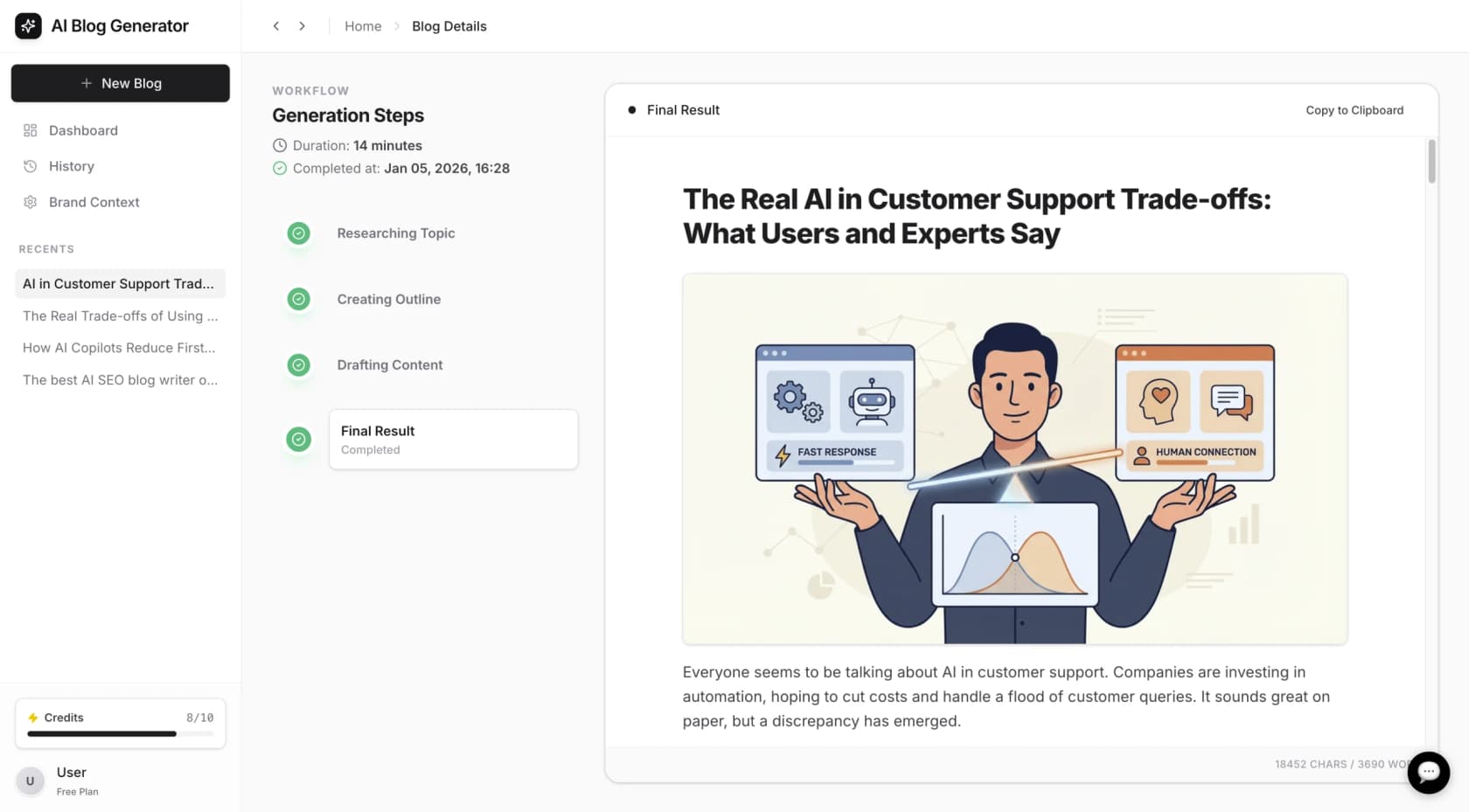
Some of its features include:
-
Contextual Research: It performs research on the topic to create a comprehensive article.
-
Automatic Asset Creation: It can generate and embed assets like images, tables, and charts directly into the post.
-
Third-Party Content: It incorporates relevant Reddit quotes and YouTube videos to add real-world perspectives.
eesel AI used this tool to publish over 1,000 blogs, which contributed to organic traffic growth from 700 to 750,000 daily impressions in three months. It is available to try for free. You can generate your first blog post to evaluate its output.
To get a better visual sense of Rytr's pricing structure and features, check out this video breakdown which walks through the different plans and what they offer.
Is Rytr pricing worth it?
So, is Rytr worth it? The answer depends on your specific needs. Rytr's pricing makes it a strong candidate for those with basic, short-form content needs. For freelancers needing a tool for quick ideas, outlines, or social media captions who are prepared for some editing, Rytr offers good value for its cost. It’s a useful entry-level tool for getting started with AI writing.
For businesses and content creators focused on producing high-quality, long-form content efficiently, the value proposition may be different. Factors like the required editing time, workflow, and the capabilities of its AI model should be weighed against the subscription price. Ultimately, the best choice depends on balancing budget with specific content creation needs.

Frequently asked questions
Yes, the Free plan is genuinely free. It gives you 10,000 characters per month to test out the platform's features, and this allowance resets every month. It’s a great way to try before you buy.
Both plans offer unlimited character generation. The main upgrade with the Unlimited plan is the dedicated support, including a personal account manager and priority email/chat help, which is ideal for businesses. You also get more AI image credits (100 vs. 20).
Yes, all Rytr pricing plans, including the Free plan, come with a built-in plagiarism checker powered by Copyscape. This helps ensure the content you generate is original.
Rytr is primarily designed for short-form content like social media posts or ad copy. While paid plans offer unlimited characters, its AI model can be less effective for long-form content, sometimes producing text that is repetitive and requires significant editing.
Share this article

Article by
Kenneth Pangan
Writer and marketer for over ten years, Kenneth Pangan splits his time between history, politics, and art with plenty of interruptions from his dogs demanding attention.



