Why Zendesk can't help with your missing order (and what to do)

Stevia Putri
Last edited March 3, 2026
You placed an order online. The package arrived, but something's wrong, an item is missing. You search for help, find a support page, and submit a ticket. Then you get an auto-reply that leaves you even more confused. The message says something like "Zendesk can't help with your order."
Wait, what? Isn't Zendesk who you contacted?
This confusion happens thousands of times every day. Customers see "Zendesk" in a help center URL or at the bottom of a support page and assume it's the company they bought from. It's an easy mistake to make, but it leaves shoppers frustrated and support teams dealing with misdirected tickets.
Let's break down why this happens, how to actually get help with missing items, and what support teams can do to handle these tickets more efficiently.
What Zendesk actually is
Zendesk is a software company that makes help desk tools. They don't sell the products you're buying online. They don't fulfill orders or handle returns. They provide the platform that other companies use to manage their customer support.

When you see a URL like support.retailername.zendesk.com, you're on that retailer's help center. The retailer pays Zendesk to use their software. The "Powered by Zendesk" link at the bottom of many support pages adds to the confusion. It makes it seem like Zendesk is who you're dealing with.
Here's how Zendesk explains it in their own help center:
"Zendesk makes the software that companies use for customer support and don't provide support for their product, just the channel for communication." Source: https://support.zendesk.com/hc/en-us/articles/4408884120730-Can-Zendesk-help-me-with-my-order
Think of it like this: if you call a company and get put on hold, you don't contact the phone company about your order. You need to reach the actual business. Zendesk is the phone system, not the store.
Why customers contact Zendesk by mistake
The confusion stems from a few specific things:
- The URL structure: When you see
zendesk.comin the address bar, your brain registers that as the company name - The branding: "Powered by Zendesk" links appear on thousands of help center pages
- The ticket auto-replies: Sometimes the sender name shows as "Zendesk" instead of the retailer's name
- Generic support forms: Many companies use default Zendesk templates without enough customization
This isn't just a minor inconvenience. When customers contact the wrong company, their actual issue goes unresolved. They wait for a response that either won't come or will be unhelpful. Meanwhile, the retailer they actually bought from has no idea there's a problem.
Zendesk acknowledges this is a real issue. Their help center article on the topic gets significant traffic because so many people make this mistake.
How to actually get help with missing items
If you're missing items from an order, here's the right way to get help:
Step 1: Check your order status first
Before contacting support, verify whether your order shipped in multiple packages. Many retailers split shipments when items come from different warehouses or when some items are backordered.
- Log into your account on the retailer's main website (not the help center)
- Check the order details for multiple tracking numbers
- Look for emails about split shipments
Companies like The Iconic explicitly tell customers to check for split shipments first. Their help center explains: "Your order may include items that ship from both our Fulfilment Centre and our trusted Marketplace Seller. When this happens, items are sent in separate parcels, each with its own tracking number."
Step 2: Find the right contact method
Look for these on the retailer's main website:
- A "Contact Us" or "Support" link in the main navigation
- A chat widget (often in the bottom corner)
- A customer service phone number in the footer
- The email address from your order confirmation
The help center you're on probably has a "Submit a request" button. That goes to the right place. Just remember: you're submitting a request to the retailer, not to Zendesk.
Step 3: Provide the right information
When you contact support, include:
- Your order number
- Which items are missing
- Your shipping address
- Any tracking numbers you received
- Photos of the package if it arrived damaged
The more details you provide upfront, the faster they can resolve your issue. Most retailers will either reship the missing items or issue a refund.
How support teams handle missing items tickets in Zendesk
For support teams using Zendesk, missing items tickets are a constant reality. They're one of the most common ticket types for e-commerce businesses, and they follow a predictable pattern.
Here's what typically happens:
- Ticket arrives with subject line "Missing item from order #12345"
- Agent looks up the order in the e-commerce platform (Shopify, WooCommerce, etc.)
- Agent checks fulfillment status to see if items shipped separately
- Agent responds with tracking info or initiates a reshipment/refund
- Ticket is resolved once the customer confirms receipt
The challenge is volume. During busy periods, missing items tickets can overwhelm a support queue. Each one requires looking up order details, checking multiple systems, and writing a personalized response.

This is where AI can help. Our AI agent at eesel integrates directly with e-commerce platforms like Shopify. When a missing items ticket comes in, we automatically pull the order information, check fulfillment status, and draft a response with the relevant tracking details or next steps. For routine cases, we can resolve the ticket entirely. Complex cases get escalated to human agents with all the context they need.
Mature deployments using our AI agent achieve up to 81% autonomous resolution. The typical payback period is under two months because you're deflecting so many routine tickets that would otherwise require agent time.
Preventing customer confusion
If you run a support team using Zendesk, there are steps you can take to reduce the "I thought you were Zendesk" confusion:
- Customize your help center branding with your logo, colors, and company name prominently displayed
- Add a clear explanation on your contact page about who you are and how to reach you
- Customize sender names so emails come from your company, not "Zendesk Support"
- Set up proactive communication about split shipments before customers need to ask
- Create self-service options that let customers check order status without opening a ticket
The goal is to make it crystal clear who the customer is actually contacting. Every bit of confusion you eliminate is a ticket that doesn't get misdirected or frustrated.
Tools for managing Zendesk data and workflows
Beyond handling tickets more efficiently, there are tools that help you manage your Zendesk configuration itself:
Salto for configuration management
Salto is a DevOps platform for business applications, including Zendesk. It helps you manage the complexity of triggers, automations, and custom fields.
One specific problem Salto solves: broken triggers. In Zendesk, when you delete a field that's referenced in a trigger, the trigger breaks silently. It just stops working. You might not notice until customers complain that they're not getting responses.
Salto detects these issues by mapping dependencies between your configuration elements. It shows you which triggers reference which fields, so you can see the impact of changes before you make them. You can also compare your Sandbox and Production environments to catch discrepancies.
Salto is a certified Zendesk Technology Partner and offers a free tier to get started.
Keepit for backup and recovery
Keepit provides backup and recovery for Zendesk data. This matters because Zendesk's recycle bin only holds deleted items for 40 days. After that, they're gone permanently.
Keepit retains your data beyond that window, so you can recover tickets, automations, macros, and other configuration elements even months later. They operate their own independent cloud infrastructure (not just reselling AWS), which means your backups are truly separate from your primary data.
eesel AI for ticket automation
We built eesel AI to handle the repetitive work that clogs support queues. For missing items specifically, our AI agent can:
- Look up orders in Shopify, WooCommerce, or Magento
- Check fulfillment and tracking status
- Draft responses with the relevant information
- Process refunds or initiate reshipments based on your rules
- Escalate complex cases to human agents
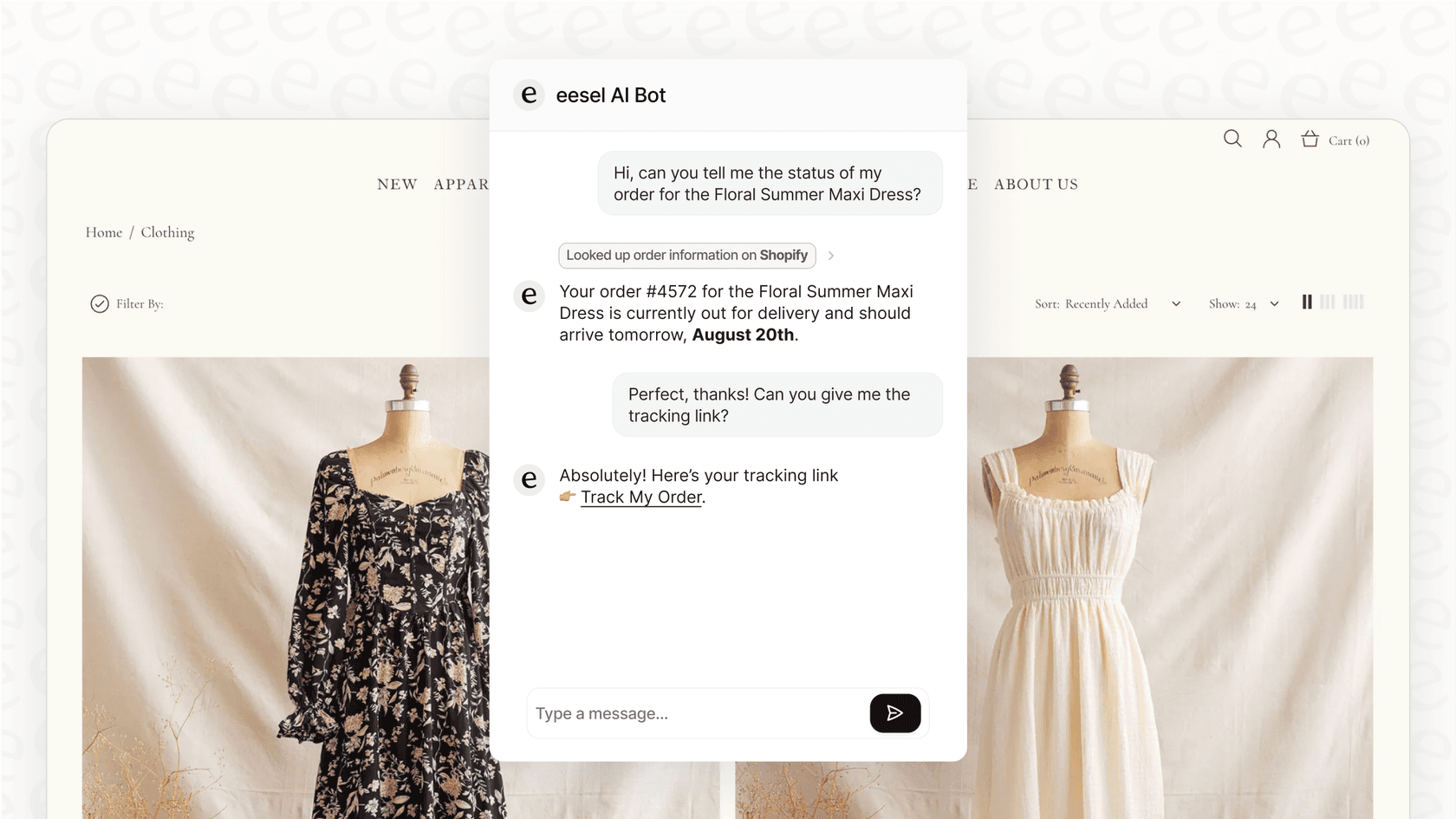
You define the escalation rules in plain English. For example: "If the missing item value is over $500, escalate to a senior agent" or "Always escalate if the customer mentions legal action."
Our AI learns from your past tickets, so it understands your tone, policies, and common issues. Most teams start with eesel drafting replies for review, then level up to full autonomy as they gain confidence.
Getting started with better missing items support
Whether you're a customer or a support professional, here's the bottom line:
For customers: When you need help with a missing item, contact the retailer directly. Check their main website for contact info, not just the help center URL. And always check for split shipments first, your missing items might be on their way in a separate package.
For support teams: Missing items tickets are never going away entirely, but you can handle them more efficiently. The right mix of self-service, automation, and clear communication reduces the burden on your team while getting customers faster resolutions.
If you're drowning in missing items tickets and want to see how AI could help, you can try eesel AI free. We'll show you exactly how it would handle your specific ticket types before you commit to anything.


Frequently Asked Questions
Share this article

Article by
Stevia Putri
Stevia Putri is a marketing generalist at eesel AI, where she helps turn powerful AI tools into stories that resonate. She’s driven by curiosity, clarity, and the human side of technology.