
Managing IT in educational institutions isn't like managing IT anywhere else. You've got thousands of students bringing their own devices, faculty spread across multiple buildings, and support requests that spike dramatically during admissions and graduation. One week it's quiet. The next, your inbox is overflowing with password reset requests from panicked freshmen.
IT service management (ITSM) platforms exist to bring order to this chaos. Among the options available, Freshservice has positioned itself as a solution built specifically with schools and universities in mind.
But is it the right choice for your institution? This guide covers what Freshservice offers, how it handles education-specific challenges, and what you should know before making a decision.
What is Freshservice?
Freshservice is a cloud-based ITSM platform from Freshworks, a company that serves over 74,000 businesses worldwide. It's designed to help IT teams manage incidents, service requests, assets, and changes from a single platform.
Unlike legacy ITSM tools that require months of implementation and dedicated infrastructure, Freshservice runs entirely in the cloud. You can set it up quickly without spinning up servers or configuring complex databases. For schools with limited IT resources, this matters.
The platform covers the full ITSM spectrum: incident management, problem management, change management, asset management, and service catalog functionality. It also includes AI capabilities through "Freddy AI" (more on that later) and extends beyond IT to support HR, facilities, and other departments through Enterprise Service Management (ESM).
Key features for educational institutions
Unified service desk
Freshservice consolidates all IT and non-IT requests into a single platform. Students, faculty, and staff can submit requests through a self-service portal that looks and feels like modern consumer apps they're already familiar with.
The service catalog lets you organize requests by department: IT support, student housing, payroll, admissions, and more. Users browse services like they're shopping online, add items to a cart, and submit requests with all the necessary details captured upfront. This reduces the back-and-forth emails that typically clog IT inboxes.
For schools dealing with seasonal volume spikes, this self-service approach becomes essential. During admissions season, instead of fielding hundreds of "how do I reset my password" tickets, students find answers in the knowledge base or submit structured requests that route automatically.
Asset management
Educational institutions manage massive device fleets: laptops for students, lab equipment, projectors, networking gear, and increasingly, IoT devices across campus. Freshservice's IT Asset Management (ITAM) module tracks all of this through a Configuration Management Database (CMDB).
The platform can auto-discover devices on your network using discovery probes, pulling in details like hardware specs, installed software, and ownership information. For schools running device loaner programs (where students borrow laptops or tablets for the semester), Freshservice tracks loan schedules, sends reminder alerts for returns, and manages inventory availability.
The CMDB also maps relationships between assets, so when a network switch goes down, you can see exactly which labs and classrooms are affected. This visibility is critical for prioritizing fixes during busy periods.
AI and automation capabilities
Freshservice's "Freddy AI" comes in three flavors:
- Freddy AI Agent: Provides 24/7 support through Slack and Microsoft Teams, handling routine questions and freeing up human agents for complex issues
- Freddy AI Copilot: Assists agents by drafting responses, summarizing tickets, and suggesting knowledge base articles
- Freddy AI Insights: Surfaces trends and root causes to help IT leaders make data-driven decisions
For educational institutions, the AI Agent is particularly relevant. Students and faculty already live in Slack and Teams. Having an AI assistant available in those channels (rather than forcing them to log into a separate portal) meets users where they already are.
The automation capabilities extend beyond AI. Workflow automations handle routine tasks like routing tickets based on keywords, escalating priority issues, and triggering approval workflows for software requests or equipment purchases.
Mobile accessibility
Freshservice offers native iOS and Android apps for both agents and end users. For IT staff who need to respond to issues while walking between buildings or managing events, mobile ticket management is essential. Students can check ticket status, browse the knowledge base, and receive push notifications for updates without being tied to a desktop.
Freshservice pricing for education
Freshservice uses a per-agent pricing model billed annually. Here's the breakdown:
| Plan | Price (Annual Billing) | Best For |
|---|---|---|
| Starter | $19/agent/month | Small IT teams just getting started with formal service management |
| Growth | $49/agent/month | Teams building foundational ITSM practices with SLAs and change management |
| Pro | $99/agent/month | Advancing teams needing asset management, IT operations, and ESM |
| Enterprise | Custom pricing | Large institutions requiring AI features, advanced analytics, and enterprise-wide deployment |
All plans include core ITSM features like incident management, knowledge base, and support portal. The Growth plan adds problem management, change management, and service catalog functionality. Pro introduces IT asset management, IT operations management, and the ability to extend service management to non-IT departments. Enterprise unlocks Freddy AI capabilities and project portfolio management.
Freshservice offers a 14-day free trial with no credit card required. For schools with seasonal IT staff or student workers, occasional agent "Day Passes" are available starting at $3 per day.
Note: Education discounts may be available. Contact Freshservice sales directly to discuss pricing for your institution.
Real-world use cases in education
K-12 schools
For K-12 districts, Freshservice helps manage:
- Student device programs: Track Chromebooks, iPads, and laptops distributed to students with automated check-in/check-out
- Parent and community portals: Provide self-service options for common requests like transcript requests, enrollment questions, and facility rentals
- Staff IT support: Centralize help desk operations for teachers and administrators across multiple school buildings
Higher education
Universities face unique complexity with multiple departments, research units, and administrative offices. Freshservice addresses this through:
- Multi-department service management: Separate workspaces for IT, HR, facilities, admissions, and student housing while maintaining centralized oversight
- Research computing support: Specialized service catalog items for high-performance computing access, software licensing, and lab equipment requests
- Student worker management: Use occasional agent licenses to give student IT workers limited access during peak periods
Case study: Judson University
Judson University, a Christian liberal arts university in Illinois with approximately 1,300 students, implemented Freshservice and saw significant improvements in their IT service delivery.
The university reported a 250% increase in first call resolution rates after implementing Freshservice. They also achieved measurable SLA compliance for the first time and saw a dramatic reduction in change-related incidents. Customer satisfaction scores improved substantially as IT staff could focus on more complex issues rather than repetitive requests.
The IT team noted that Freshservice enabled a "work smarter, not harder" mentality and allowed team members to move into more specialized roles rather than handling every request that came in.
Implementation best practices for schools
Start with a hybrid IT strategy
Most educational institutions have some combination of central IT and departmental IT support. Freshservice works best when you define clear roles:
- Central IT: Handles procurement, infrastructure, enterprise applications, and governance
- Department IT: Manages local services, specialized software, and immediate user support
- Collaboration: Use Freshservice to create hybrid teams for complex issues requiring both perspectives
This approach balances standardization with local responsiveness.
Build your service catalog thoughtfully
The service catalog is where users interact with your IT department. Invest time in:
- Creating intuitive categories that match how users think (not how IT is organized)
- Adding clear descriptions and required fields to capture all necessary information upfront
- Setting up automated approval workflows for requests that need manager sign-off
- Including relevant images and themes that match your school's branding
Drive self-service adoption
Self-service only works if people actually use it. Strategies that work in education:
- Embed the service portal links in your LMS (Canvas, Blackboard, Moodle) where students already spend time
- Train student orientation leaders to show new students how to submit requests
- Run occasional prize drawings for users who submit tickets through the portal
- Set up auto-responses to email tickets that gently redirect users to the portal for faster service
Integrate with existing tools
Freshservice integrates with over 1,000 apps through its marketplace. For schools, the most relevant integrations include:
- Slack and Microsoft Teams: For chat-based support and notifications
- Google Workspace and Office 365: For user provisioning and calendar integration
- Jamf and Intune: For device management
- Canvas, Blackboard, or Moodle: For LMS connectivity
These integrations reduce context-switching and make Freshservice feel like a natural extension of tools your community already uses.
Freshservice alternatives for schools
Freshservice isn't the only option for educational ITSM. Depending on your needs, you might also consider:
eesel AI
If your school is looking for AI-powered support that goes beyond traditional ITSM, eesel AI offers a different approach. Rather than just managing tickets, eesel acts as an AI teammate that can actually resolve issues autonomously.

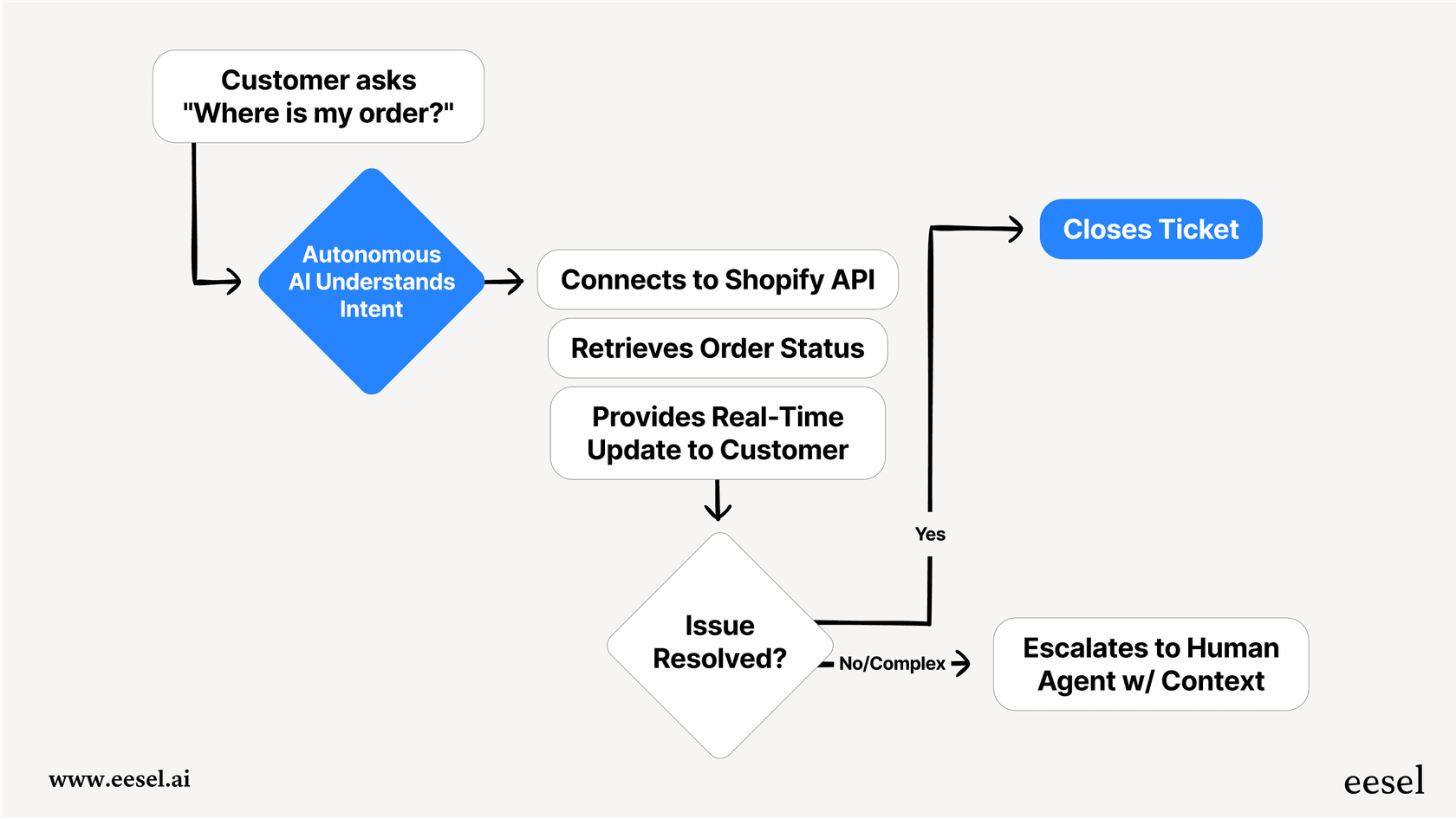
Here's how it works: eesel learns from your existing help center articles, past tickets, and documentation. You start with it drafting replies for human review, then gradually expand its scope as it proves itself. Eventually, it can handle full frontline support 24/7, escalating only the complex issues that truly need a human touch.
For schools facing budget constraints or staffing challenges, eesel's autonomous resolution capabilities (up to 81% in mature deployments) could be a compelling alternative to hiring additional IT staff. Learn more about eesel AI for ITSM.
ServiceNow
The enterprise standard for ITSM, ServiceNow offers unmatched depth and customization. However, it's typically overkill for smaller institutions and comes with implementation timelines measured in months, not weeks. The pricing also reflects its enterprise positioning.
Zendesk
Better known for customer service, Zendesk has expanded into ITSM with Zendesk IT. It's a solid choice if you're already using Zendesk for other support functions and want a unified platform. However, its ITSM capabilities aren't as mature as Freshservice's.
Jira Service Management
Jira Service Management integrates tightly with Jira and Confluence. It's popular with schools already in the Atlassian ecosystem, particularly those with software development or technical programs. The pricing is competitive, but the interface can feel cluttered for non-technical users.
Choosing the right ITSM solution for your school
The best ITSM platform for your institution depends on several factors:
Size and complexity: Smaller schools with straightforward IT needs might find Freshservice's Starter or Growth plans sufficient. Large universities with multiple campuses and complex governance requirements may need Enterprise features.
Existing infrastructure: If you're already using Freshworks products (like Freshdesk for admissions inquiries), Freshservice integrates seamlessly. Similarly, heavy Microsoft or Google users should verify integration quality.
AI readiness: Freshservice's Freddy AI requires the Enterprise plan. If AI-powered support is a priority, factor this into your cost analysis. Alternatively, eesel AI offers autonomous resolution as its core value proposition.
Implementation resources: Freshservice's cloud-based model requires minimal technical setup. Schools without dedicated IT project managers will appreciate the faster time-to-value compared to on-premise alternatives.
Budget constraints: Compare total cost of ownership, including agent licenses, implementation services, and ongoing training. Don't forget to ask about education discounts.
Getting started with Freshservice
If Freshservice sounds like a fit for your institution, start with their 14-day free trial. Use this period to:
- Set up a basic service catalog with your most common request types
- Import a sample of your asset inventory
- Configure SLAs that match your current response time goals
- Test the mobile app with a small group of users
- Evaluate the AI features (if trialing Enterprise)
Involve representatives from different user groups (students, faculty, staff) in the evaluation. Their feedback will reveal usability issues that IT might miss.
For schools specifically interested in AI-powered support, we recommend also exploring eesel AI as a complementary or alternative solution. While Freshservice excels at structured ITSM workflows, eesel specializes in autonomous ticket resolution through AI. Depending on your pain points, one approach may fit better than the other.
The bottom line? Educational IT is only getting more complex. Between BYOD policies, cloud migrations, and ever-rising user expectations, manual ticket management doesn't scale. Whether you choose Freshservice, eesel AI, or another solution, investing in modern ITSM capabilities will pay dividends in reduced response times, improved user satisfaction, and IT staff who can focus on strategic initiatives instead of password resets.


