

Picking a project management tool can feel like you're stuck between two very different paths. On one side, you have a tool that’s simple, visual, and gets you up and running in minutes. On the other, you have a powerhouse platform that can, supposedly, do everything you could ever dream of. This is the core of the Trello vs ClickUp dilemma: simplicity versus a do-it-all approach.
The right choice really boils down to your team’s size, how complex your projects are, and how you like to work. Pick the wrong one, and you could end up with a frustrated team, slow adoption, or worse, paying for a ton of features you never actually touch.
This guide will give you a straight-up, head-to-head look at Trello and ClickUp. We’ll get into their core features, collaboration tools, pricing, and the general vibe of each one, so you can make a call that works for your team.
What are Trello and ClickUp?
Before we dive into the details, let's get a quick sense of what each platform is all about.
What is Trello?
Trello is a visual and super-intuitive tool built around the Kanban board concept. Seriously, if you've ever used sticky notes on a whiteboard to track what you're doing, you already know how to use Trello. Everything is based on three simple things:
-
Boards: Think of this as your project's home base.
-
Lists: These are the stages of your workflow, like "To Do," "Doing," and "Done."
-
Cards: These are the actual tasks you move from one list to the next.
Trello's biggest win is its simplicity. The learning curve is practically flat, which makes it perfect for teams who just want to get organized without a week of training. It's a fantastic tool for seeing your workflow at a glance and managing straightforward projects.
What is ClickUp?
ClickUp markets itself as "the one app to replace them all." It's an all-in-one platform built to be the single hub for all your work, trying to save you from constantly flipping between different apps.
If Trello is simple, ClickUp is the opposite: it's absolutely packed with features. It has everything from tasks and subtasks to docs, chat, and goal tracking. You get more than 15 different ways to view your work, including lists, boards, calendars, and Gantt charts. ClickUp’s main strength is how much you can customize it. You can tweak and tailor it to handle just about any complicated project or team need you can throw at it.
Feature comparison: Task and project management
Both tools help you get tasks done, but their approach and the depth of their features are worlds apart. This is usually where people make their decision.
Project views and visualization
How you see your work can make or break your day. ClickUp gets that different jobs need different views. It gives you over 15 options right out of the box, like Gantt charts for timelines, Mind Maps for brainstorming, and a Workload view to see who’s doing what. This flexibility is a huge advantage for teams that need to look at their projects from every possible angle.
Trello, on the other hand, is famous for its best-in-class Kanban board. It’s clean, fast, and does that one thing incredibly well. While it does offer other views like a calendar, timeline, and table, they’re only available on the paid Premium plan and can feel a little tacked on compared to ClickUp's deeply integrated views.
Task hierarchy and customization
Got a big, complicated project? You need to be able to break it down into smaller pieces. ClickUp has a pretty deep structure for this: Workspace > Space > Folder > List > Task > Subtask > Checklist. This lets you organize huge projects with lots of moving parts without creating a total mess. It also offers a wide range of custom fields to track any kind of info you need.
Trello keeps things way simpler with its Workspace > Board > List > Card > Checklist setup. It’s easy to get your head around and works great for straightforward projects, but it can feel a bit restrictive when you're trying to manage a multi-layered initiative. Custom fields are available, but they aren't as powerful as what ClickUp gives you.
Advanced features: Time tracking and reporting
If you're the kind of team that needs to know where every minute goes, ClickUp has you covered. It comes with built-in time tracking, goal setting, and advanced dashboards with over 50 widgets. This gives you a clear picture of project progress and team performance without needing any add-ons.
Trello's plans don't list a built-in time tracker. To get that, along with detailed reports, you have to use third-party integrations called "Power-Ups." This keeps the main tool light and simple, which is nice, but it also means you might have to pay extra for key features and manage a few different tools to see the full picture.
Collaboration and integrations: How your team works together
A good project management tool isn't just about checking off tasks. It's also about how well your team can communicate and connect their tools.
In-app communication
ClickUp really wants to keep all your conversations in one spot. It has a built-in chat, collaborative documents (called ClickUp Docs), and lets you assign comments to specific team members. This is pretty handy for keeping discussions tied directly to the work they’re about.
In Trello, collaboration mostly happens in the comments on each card. You can tag people and attach files, but for a real-time chat, you’ll probably find yourself switching over to an integration like Slack.
Integrations and the knowledge gap
Trello has a massive library of over 200 "Power-Ups," which can add all sorts of new functions. ClickUp has over 50 native integrations but generally tries to build more features directly into the app so you don't need as many outside tools.
But here’s a catch with both tools: they can easily become information silos. All those project plans, task comments, and important decisions get locked away inside Trello or ClickUp. When your support team needs that info to answer a customer question, they have to stop what they're doing, leave their helpdesk, and go on a scavenger hunt through projects and tasks. This constant app-switching is a real productivity killer.
Instead of making agents search for information, a tool like eesel AI connects to your knowledge sources (like Confluence or Google Docs) and your helpdesk. It brings all that scattered knowledge together and uses it to automate frontline support or give agents instant, accurate answers right where they already work.
Ease of use and performance
A tool is only as good as the number of people on your team who actually use it. The user experience is often the deciding factor in the Trello vs ClickUp debate.
Learning curve and setup
Trello is famous for being incredibly easy to pick up. You can sign up and be productive within minutes. The interface is clean, doesn't throw a million options at you, and makes it simple for new team members to get started.
ClickUp, on the other hand, has a pretty steep learning curve. The sheer number of features and customization options can be overwhelming for new users. Getting it set up just right for your team's workflow takes a real time investment, and it's easy to get lost tweaking endless settings.
Speed and reliability
Most people find Trello to be quick and snappy. Because it focuses on doing one thing really well, the user experience is generally smooth and stable.
With all its power, ClickUp sometimes gets complaints about performance. Users occasionally report slow loading times or bugs. While it’s an incredibly powerful platform, that complexity can sometimes slow things down and make the experience feel less fluid.
While it’s an incredibly powerful platform, that complexity can sometimes slow things down and make the experience feel less fluid.

Trello vs ClickUp: Pricing compared
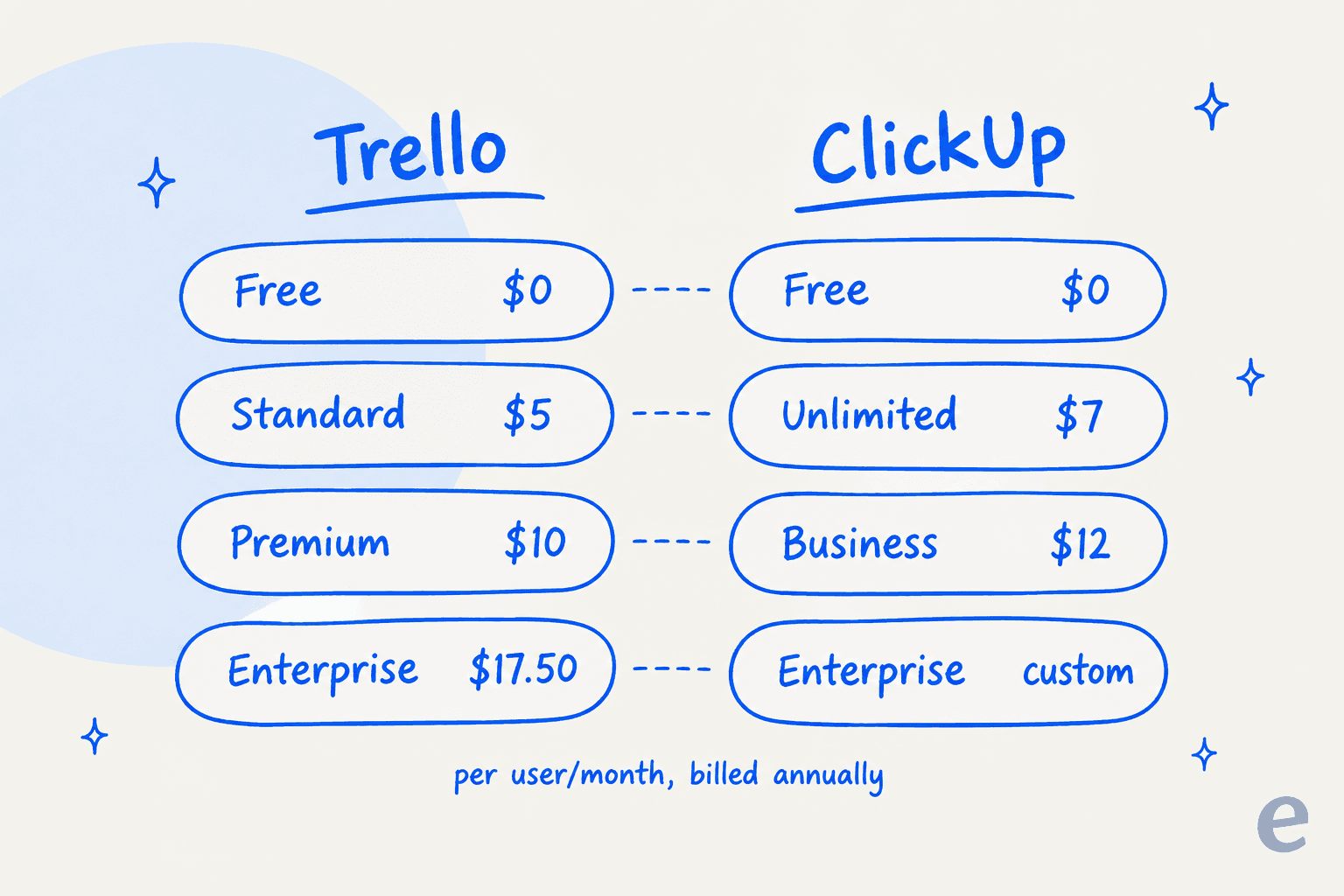
Both platforms have decent free plans and paid tiers that grow with you, but what you actually get for your money is quite different.
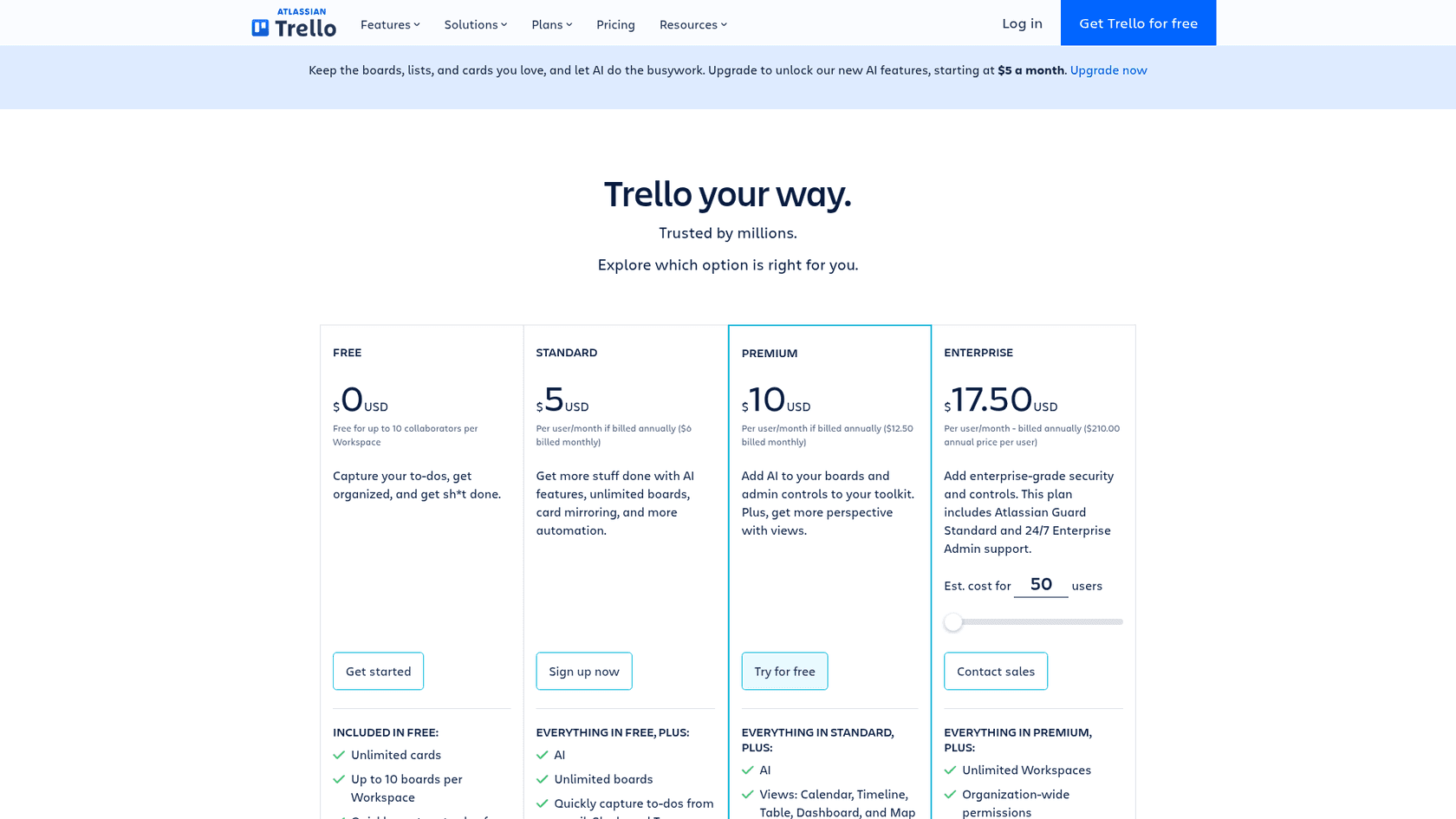
Trello pricing
| Plan | Price (Billed Annually) | Key Features |
|---|---|---|
| Free | $0 | Unlimited cards, Up to 10 boards per Workspace, 250 Workspace command runs/month. |
| Standard | $5/user/month | Unlimited boards, AI features, Advanced checklists, Custom Fields, 1,000 Workspace command runs/month. |
| Premium | $10/user/month | Multiple views (Calendar, Timeline, Dashboard), Unlimited command runs, Admin and security features. |
| Enterprise | $17.50/user/month | Unlimited Workspaces, Organization-wide permissions, SSO with Atlassian Guard. |
ClickUp pricing
| Plan | Price (Billed Annually) | Key Features |
|---|---|---|
| Free Forever | $0 | 60MB Storage, Unlimited Tasks, Collaborative Docs, Kanban Boards. |
| Unlimited | $7/user/month | Unlimited Storage, Unlimited Integrations, Unlimited Gantt Charts, Native Time Tracking, Guests with permissions. |
| Business | $12/user/month | Google SSO, Unlimited Mind Maps, Billable Time Reports & Timesheets, Workload Management. |
| Enterprise | Contact Sales | White Labeling, Advanced Permissions, Enterprise API, Dedicated Success Manager. |
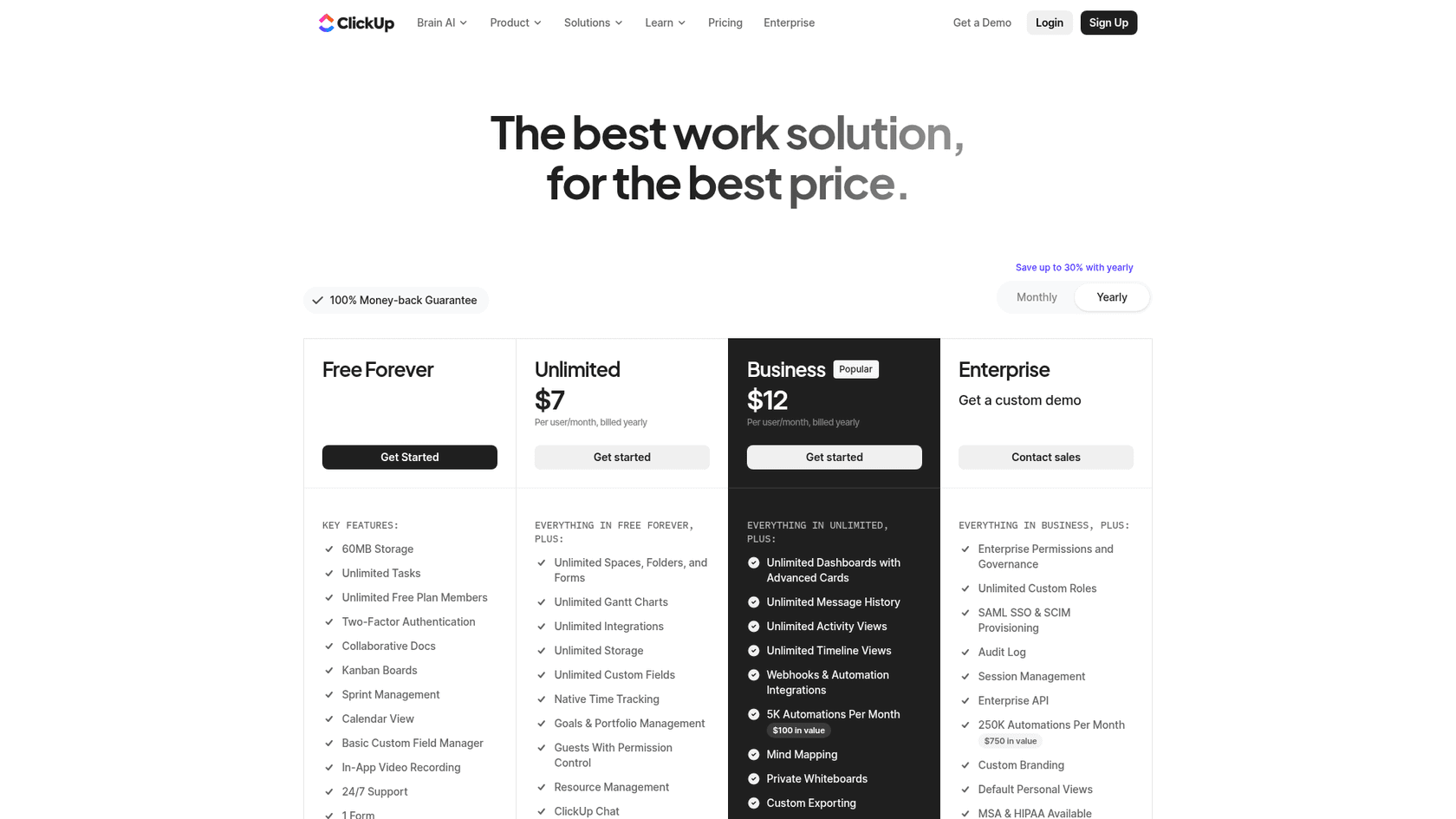
On AI, the two price differently. ClickUp sells Brain AI as an add-on from $9 per user per month billed yearly, applied to every member of the Workspace, while Trello includes its AI features from the $5 Standard plan. On storage, ClickUp Free Forever caps total storage at 60MB, while Trello Free has unlimited storage with a 10MB limit per file. On automation, ClickUp Free allows 5 active rules and 100 executions, while Trello Free allows 250 Workspace command runs a month. Trello's MCP server works with AI assistants on any plan, including Free.
Trello vs ClickUp: Which one should you choose?
So, after all that, who comes out on top in the Trello vs ClickUp matchup? Honestly, it’s all about what you and your team need.
-
Choose Trello if: you're a small-to-medium team that values simplicity and a visual way to manage work. It’s perfect if you need a tool that's easy to adopt with almost no training and want to get started fast.
-
Choose ClickUp if: you're a larger team managing complex projects with lots of dependencies. It's the right choice if you need deep customization and want an all-in-one platform to handle as much of your work as possible.
The best project management tool is the one that actually helps your team get organized. But real efficiency comes when the knowledge you create in that tool is easy to find and use everywhere else.
While you’re figuring out your project workflows, it's worth thinking about your support workflows, too. A tool like eesel AI connects your knowledge sources to your helpdesk, giving your support team instant answers and automating away those repetitive questions. You can get it running in minutes and see for yourself how much time it can save.
Frequently asked questions
How do I decide which is better for my team: Trello vs ClickUp?
The best choice depends on your team's size, project complexity, and preferred working style. Trello suits smaller teams needing simplicity, while ClickUp is better for larger teams with complex projects requiring extensive features.
Which tool offers a faster learning curve, Trello vs ClickUp?
Trello has a significantly flatter learning curve, allowing teams to become productive almost immediately due to its intuitive Kanban board interface. ClickUp, with its vast array of features, requires more time investment for setup and mastery.
For managing highly complex projects with deep hierarchies, which platform is more effective: Trello vs ClickUp?
ClickUp is generally more effective for complex projects, offering a deep task hierarchy and extensive customization options. Trello's simpler structure may feel restrictive for multi-layered initiatives.
What are the key differences in pricing and included features when comparing Trello vs ClickUp?
Both offer free plans, but ClickUp's paid tiers tend to include more built-in advanced features like unlimited storage, Gantt charts, and time tracking. Trello often relies on paid "Power-Ups" for similar advanced functionalities.
When it comes to performance and reliability, how do Trello vs ClickUp compare?
Trello is generally reported as quick and snappy, offering a smooth user experience due to its focused design. ClickUp, while powerful, sometimes faces complaints regarding slower loading times or occasional bugs due to its feature-rich complexity.
Which is better for an all-in-one solution with native integrations: Trello vs ClickUp?
ClickUp positions itself as an all-in-one solution with many features built directly into the app, reducing the need for numerous outside tools. Trello, while having a large library of "Power-Ups," often requires integrations for advanced functionalities like time tracking.
How do the collaboration features, particularly in-app communication, differ between Trello vs ClickUp?
ClickUp offers built-in chat, collaborative docs, and assignable comments to keep conversations within the platform. Trello primarily uses card comments for collaboration, often necessitating external tools like Slack for real-time chat.