


We’ve all been there. You fire off an urgent request to a company’s support team, and then… you wait. The minutes tick by, your frustration grows, and you start to wonder if your message just disappeared into the internet void.
In today's world, that wait time isn't just a minor annoyance; it's a fast track to losing customers. A slow response sends a clear message: "You're not our priority." And with so many alternatives available, customers won't think twice about finding a competitor who makes them feel valued.
Many support teams are drowning in tickets, but the answer isn't always to work harder or hire more people. It's about working smarter. This guide offers some practical, modern tips for lowering first reply time, starting with basic process improvements and then diving into how AI automation can give your current support setup a serious boost.
What is first reply time (FRT) and why does it matter?
First Reply Time (FRT) is simply the time between a customer sending a ticket and a human agent sending back the first personalized response. It's worth noting that the automatic "we've received your email" confirmation doesn't count. FRT is all about how long it takes for a real person to jump in.
It’s one of the most important metrics in customer service for a few straightforward reasons:
-
It’s your first impression: A quick FRT is the very first signal to a customer that you value their time and are on the case.
-
It calms people down: A speedy, personal reply reassures customers that their problem hasn't been ignored and that help is actually on the way.
-
It’s good for business: Speed isn't just a nice-to-have. There's a clear connection between fast response times and happier, more loyal customers who stick around. One customer service study even found that almost half of all customers expect a response in less than four hours.
Calculating your FRT is easy: "Time of First Agent Response - Time of Customer Request = First Reply Time".
What counts as "good" can change depending on the channel, but here are some general benchmarks to aim for:
| Channel | Good FRT | Better FRT | Best FRT |
|---|---|---|---|
| Under 12 hours | Under 4 hours | Under 1 hour | |
| Social Media | Under 5 hours | Under 2 hours | Under 1 hour |
| Live Chat | Under 1 minute | Under 40 seconds | Instant |
Getting the basics right: Tips for lowering first reply time (no AI needed)
Before you get into fancy automation, you need to have the fundamentals down. These are the core, non-technical strategies every support team should master. They create the right environment for AI to really make a difference later on.
1. Set clear SLAs
Service Level Agreements (SLAs) are basically your promises to customers about how quickly you'll respond. They hold your team accountable and, just as importantly, let customers know what to expect. An SLA that tells a customer, "We'll get back to you within 4 hours," can do a lot to reduce their anxiety while they wait.
2. Arm your team with training and a knowledge base
A well-trained agent is a fast agent. When your team knows the product inside and out and understands your internal procedures, they aren't wasting precious minutes hunting for answers or bugging a manager. That means they can send that first reply much faster and with more confidence.
An internal knowledge base, maybe in a tool like Confluence or Notion, is a great way to keep all that information in one place. The problem is, knowledge bases don't update themselves. It's a never-ending manual job. This is one of those spots where newer tools can help. For example, eesel AI can analyze your successfully resolved tickets and automatically suggest new articles for your knowledge base, helping you fill in the gaps with solutions that are already proven to work.
3. Use templates and macros
Most support teams quickly realize that the majority of their questions are about the same handful of topics. Creating pre-written responses (you might call them templates or macros) for these frequently asked questions stops your agents from typing out the same answer ten times a day.
The downside? Nobody wants a reply that sounds like a robot wrote it. Agents still have to take a moment to personalize these templates for each customer's specific issue, which can chip away at the time you're trying to save.
4. Implement smart triage
Not all support tickets are born equal. A billing error from a major customer is obviously more urgent than a general question about a feature. Ticket triage is just the process of spotting the high-priority tickets and getting them to the right person or team quickly.
This is a really important step, but for a lot of teams, it’s a manual bottleneck. Having one person (or a small group) read and sort every single ticket just slows down the first reply for everyone else.
Next-level tips: Lowering first reply time with AI automation
Once your basics are solid, AI automation is how you can achieve a whole new level of speed and efficiency. It helps get around the limits of manual work and lets you handle more support volume without having to double your team size.
5. Train AI on past tickets
Templates are a decent start, but a truly smart AI goes way beyond that. Instead of just using fixed, pre-written scripts, modern AI can learn from your team's entire history of customer conversations. It gets the context, the nuance, and even your brand's unique voice.
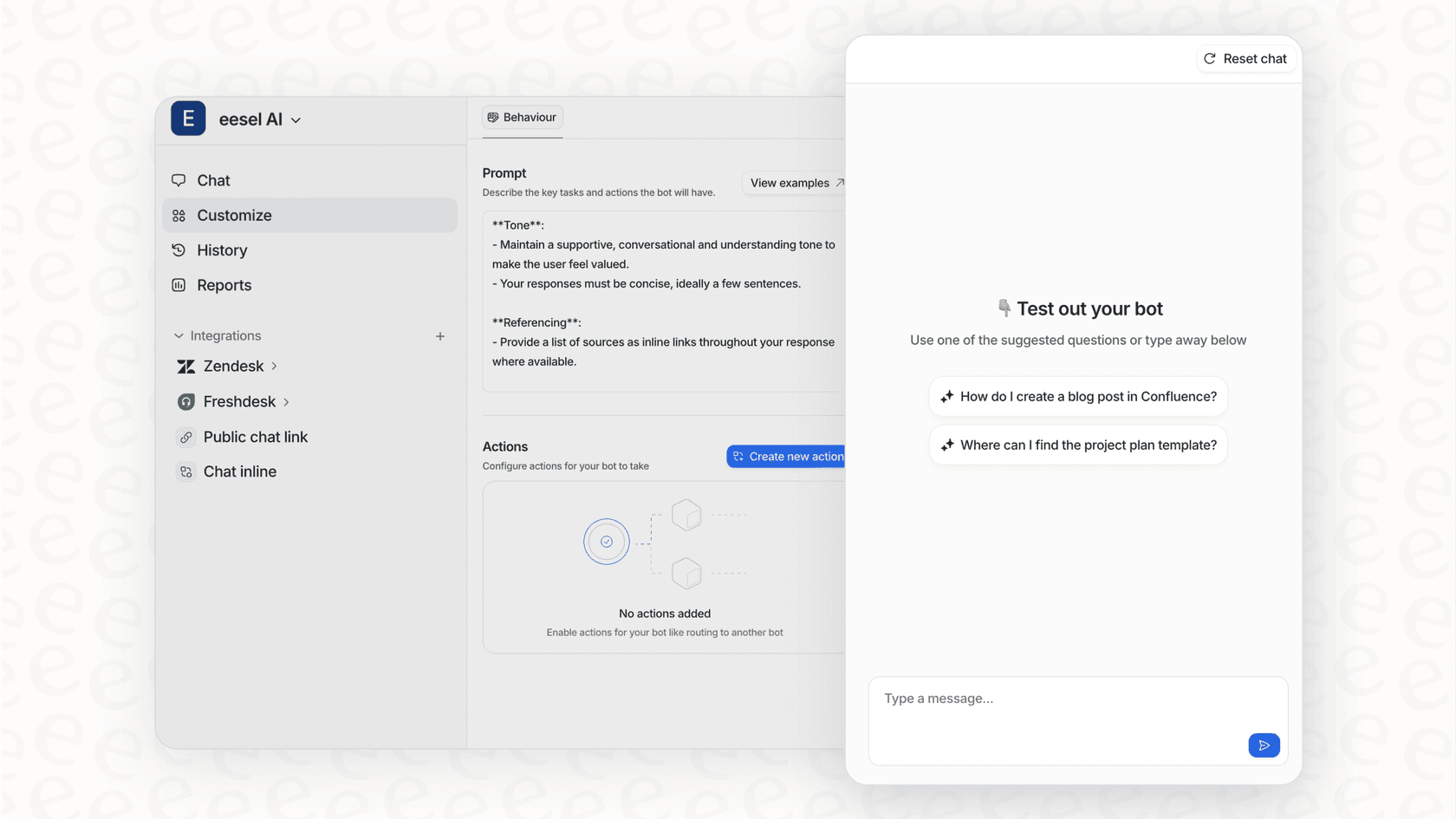
This is where platforms like eesel AI really shine. By connecting directly with your helpdesk, whether that’s Zendesk, Gorgias, or something else, it can analyze thousands of your past tickets right from the start. This allows an AI agent to begin resolving a big chunk of your repetitive Tier 1 tickets on its own, instantly. That frees up your human agents to focus on the tricky issues that actually need their expertise.
6. Unify knowledge sources
A common reason basic chatbots fail is that their knowledge is too limited. They usually only know what's in your official help center. But let's be real, your company's actual knowledge is scattered all over the place: in Google Docs, internal wikis, and random Slack threads.
A smarter AI needs to be able to access all of it. For example, eesel AI can connect to over 100 different sources with simple, one-click integrations. By giving your AI a complete picture of your company’s knowledge, you make sure its answers are complete and correct. This means the AI has to say "I don't know" and pass the ticket to a human far less often.

7. Automate triage
A good AI doesn't just answer questions; it gets things done. It can handle triage by automatically tagging tickets, sending them to the right department, updating ticket information, or even looking up real-time order details from a platform like Shopify.
Many built-in AI tools lock you into a rigid, all-or-nothing automation system that's tough to manage. In contrast, the workflow engine in eesel AI gives you fine-grained control. You get to decide exactly which types of tickets the AI should touch and what specific actions it's allowed to perform. This lets you start small, build confidence, and automate with care.

8. Test your AI risk-free
The biggest fear most people have with AI is "letting a bot loose" on their customers. What if it messes up and says the wrong thing? That lack of confidence is what stops many teams from even trying.
That's why having a safe place to test is absolutely essential. eesel AI offers a powerful simulation mode that really sets it apart. You can run your AI setup against thousands of your own past tickets in a safe, sandboxed environment. You'll see exactly how the AI would have replied, which gives you a clear forecast of your automation rate, cost savings, and ROI before you ever turn it on for a single live customer.
How to measure FRT: Continuous improvement tips
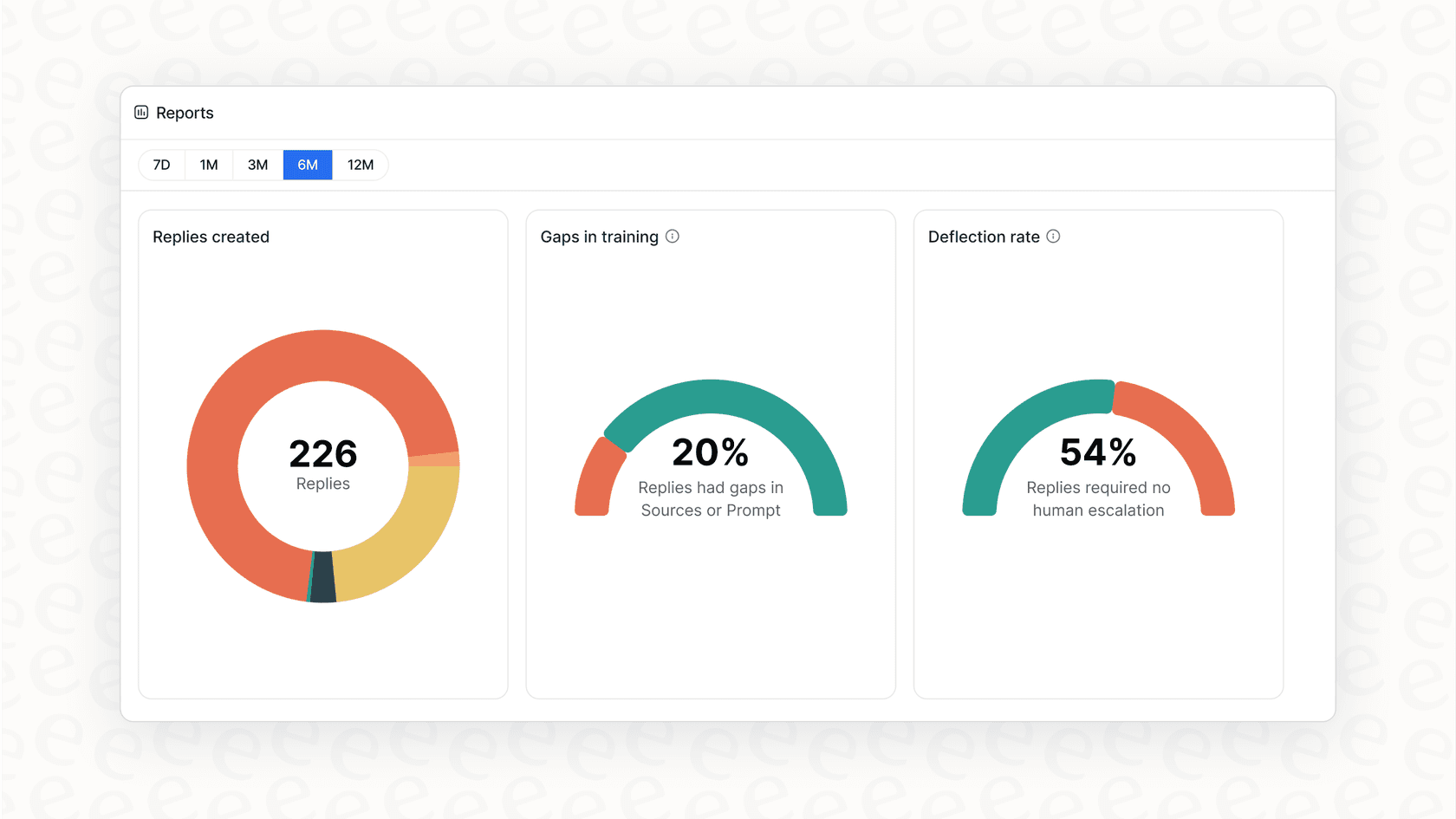
Lowering your FRT isn't a one-and-done project. It's something you have to keep an eye on and tweak over time. Just calculating your average FRT isn't enough. You should also track the median FRT (which helps ignore a few weirdly long outliers) and look at FRT by time of day, day of the week, and ticket type to find any patterns or slowdowns.
But the goal isn't just to be fast; it's to be helpful. Your data should tell you why people are contacting you in the first place. This is where most standard helpdesk reports don't quite cut it, often giving you only surface-level information.
You need reports you can actually act on. The analytics dashboard in eesel AI, for example, is designed to give you insights, not just a pile of numbers. It spots trends in customer questions and automatically points out gaps in your knowledge base. This creates a feedback loop where your AI doesn't just solve problems, it tells you how to stop them from happening in the first place.
Choosing a platform: Why transparent pricing matters
When you're looking at AI support tools, pay close attention to the pricing. A lot of vendors use a "per-resolution" or "per-ticket" model. This can lead to unpredictable bills that go up and down with your ticket volume. You essentially get penalized with a bigger bill for having a busy month or for your automation working too well.
We built eesel AI on the idea that pricing should be clear and predictable. Our plans are based on the number of AI interactions you need, with no hidden costs or per-resolution fees. This lets you set a budget and grow your support without stressing about surprise charges.
| Plan | Monthly Price (Billed Monthly) | Key Features |
|---|---|---|
| Team | $299 | Train on docs, AI Copilot for agents, Slack integration. |
| Business | $799 | Everything in Team + Train on past tickets, custom AI Actions, bulk simulation. |
| Custom | Contact Sales | Advanced integrations, multi-agent orchestration, custom data retention. |
The fastest reply is one your customer never has to send
Lowering your first reply time is a mix of smart processes and helpful technology. While the basics like training your team and setting SLAs are vital, AI automation is what will truly unlock a new level of speed and efficiency.
The best way forward isn't to throw out the tools you already know and use. It's about adding an intelligent layer of AI on top of your existing helpdesk. eesel AI is a refreshingly simple, self-serve platform that you can set up in minutes, not months. It gives you the power to automate support, streamline how you work, and make your customers happy with nearly instant responses.
But you don't have to take our word for it. See for yourself how much time you could be saving. Start a free trial and run a simulation on your own historical tickets today.

Frequently asked questions
Start by setting clear Service Level Agreements (SLAs) so customers know what to expect. Ensure your team is well-trained and has access to a comprehensive, up-to-date internal knowledge base. Also, utilize templates and macros for common questions and implement smart triage processes to prioritize urgent tickets.
AI can learn from your entire history of past tickets to understand context and your brand's voice, allowing it to [resolve many repetitive Tier 1 issues](https://www.eesel.ai/blog/ai-agent-examples) instantly. It can also automate complex triage, tagging tickets, and routing them to the correct department without manual intervention.
Modern AI platforms can unify knowledge by connecting to over 100 different sources like Google Docs, internal wikis, and Slack threads. This ensures the AI has a complete and accurate understanding of your company's information, reducing instances where it needs to escalate to a human.
Look for platforms that offer a simulation mode. This allows you to run your AI setup against thousands of your own past tickets in a safe, sandboxed environment. You can then see exactly how the AI would have performed and forecast its automation rate and ROI before engaging live customers.
Beyond tracking your average FRT, monitor the median FRT to account for outliers and analyze FRT by channel, time of day, and ticket type to spot patterns. Utilize analytics dashboards that provide actionable insights, such as trends in customer questions and gaps in your knowledge base.
Be cautious of ["per-resolution" or "per-ticket" pricing models](https://www.eesel.ai/blog/understanding-zendesk-ai-pricing-a-complete-pay-per-resolution-guide), which can lead to unpredictable costs. Instead, look for transparent, predictable pricing based on AI interactions, allowing you to budget effectively without unexpected charges for high volume or successful automation.
Share this article

Article by
Stevia Putri
Stevia Putri is a marketing generalist at eesel AI, where she helps turn powerful AI tools into stories that resonate. She’s driven by curiosity, clarity, and the human side of technology.
