Let's be real: creating videos is a pain. If you've ever been tasked with making a simple training tutorial or a product explainer, you know the drill. It involves booking a studio (or a quiet room), wrangling cameras and microphones, and spending hours editing. By the time you’re done, the feature you were explaining might have already changed.
AI video generation platforms like Synthesia have popped up to solve this exact problem. They promise to let anyone create professional-looking videos using just a script and a few clicks. No camera or microphone required.
But is it the right tool for every job? This Synthesia overview will walk you through everything you need to know, what it does well, its pricing, and some crucial limitations to keep in mind, especially if your goal is to scale up customer support or make internal knowledge more accessible.
What is Synthesia?
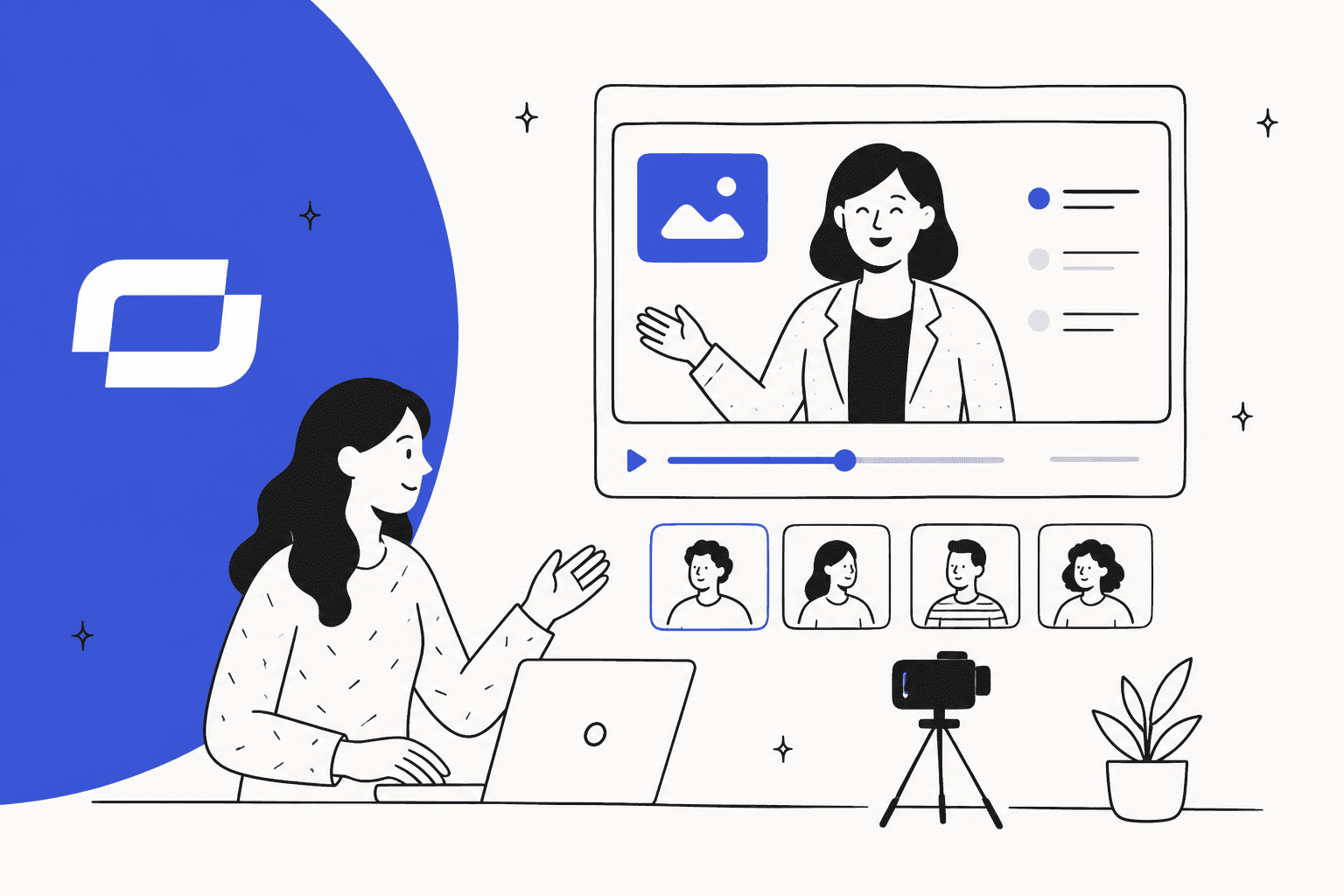
Synthesia is an online tool that uses AI to create videos from text. It was started in 2017 with the goal of making video creation easier for everyone, and they’ve definitely made a splash.
At its heart, Synthesia works by mixing a few different technologies:
-
AI Avatars: You get access to a library of 240+ realistic digital people who can "present" your video for you.
-
Text-to-Speech (TTS): The platform takes your script and turns it into surprisingly natural-sounding narration. It can do this in 160+ languages and accents, which is pretty impressive.
-
Video Templates: To make things easier, there are pre-designed layouts you can use to quickly structure your video and make it look polished.
You just type up what you want to say, pick an avatar to say it, choose a template, and the platform generates a full video in a few minutes. It's a massive shortcut compared to the old way of doing things.
Synthesia's key features
Synthesia has a lot going on under the hood, but it's all wrapped up in a fairly simple interface. Let’s break down what it can do and where it might not be the perfect fit for a support team.
AI avatars and voices
This is Synthesia's main claim to fame. The library of avatars is diverse and high-quality, and you even have the option to create a custom "digital twin" of yourself. For personalizing company announcements or training, that’s a pretty neat feature. The voice tech is also solid, with options for voice cloning to keep things consistent.
But here’s the thing: the avatars can sometimes feel a bit... off. They can drift into that "uncanny valley" where they look almost human, but not quite, which can be a little distracting. For a marketing video, that might be fine. But for customer-facing communication where you need to build trust, that lack of genuine human connection can be a hurdle.
AI video assistant and editor
Getting started is easy. Synthesia has an AI Video Assistant that can take a document, a link to a webpage, or even a simple text prompt and whip up a first draft of a video for you. From there, you can jump into a simple editor to tweak things. You can pick from 60+ templates, add stock photos and videos, overlay text, and add your company's branding.
This whole process, however, is geared toward creating content. It produces a pre-rendered video. Synthesia also offers clickable CTAs, branching paths and quizzes, but the avatar still doesn't listen to a viewer's own question. Once you publish it, the script is fixed. You’re building a resource, but it's not a tool that can deliver a specific answer right when someone needs it.
Collaboration and distribution
For teams, Synthesia has workspaces where people can collaborate on video scripts, leave comments, and manage different versions. When a video is ready, you can embed it on a webpage or share a link. There are even some basic analytics to see how many people are watching.
This is all great for a content or marketing team whose main job is to produce and distribute media. But for a support team, the goal isn't just to get views; it's to solve a customer's problem. The feedback is disconnected. You have no real way of knowing if the person watching your video actually found the answer they were looking for, or if they just gave up and created a support ticket.
Common business use cases
Synthesia is flexible enough to be used by a bunch of different departments. Looking at how it's used in customer support really highlights the difference between creating content and automating work.
Corporate training and L&D
This is a sweet spot for Synthesia. Teams use it to create onboarding guides, compliance training, and software tutorials that can be easily scaled. The biggest win here is being able to update the content without having to re-shoot an entire video. If a policy changes, you just edit the script and generate a new version.
Marketing and sales enablement
Marketing teams love Synthesia for churning out product explainers, personalized sales outreach videos, and content for social media. It helps them produce a high volume of videos quickly while keeping the branding consistent.
Customer service and support
A popular use case here is converting dense, text-heavy help articles into video tutorials. For showing someone how to navigate a complex interface, a video can be much clearer than a wall of text.
- But here’s the catch: These videos are a good first step, but they are a one-way conversation. When a customer has a slightly different problem or a follow-up question, they're stuck. They either have to scrub through the video trying to find the right part or, more likely, they’ll just open a support ticket. This is where an AI agent like eesel AI works differently. Instead of just showing a video, it provides an immediate, conversational answer pulled from your entire knowledge base, right inside your helpdesk or Slack.
Pricing and plans
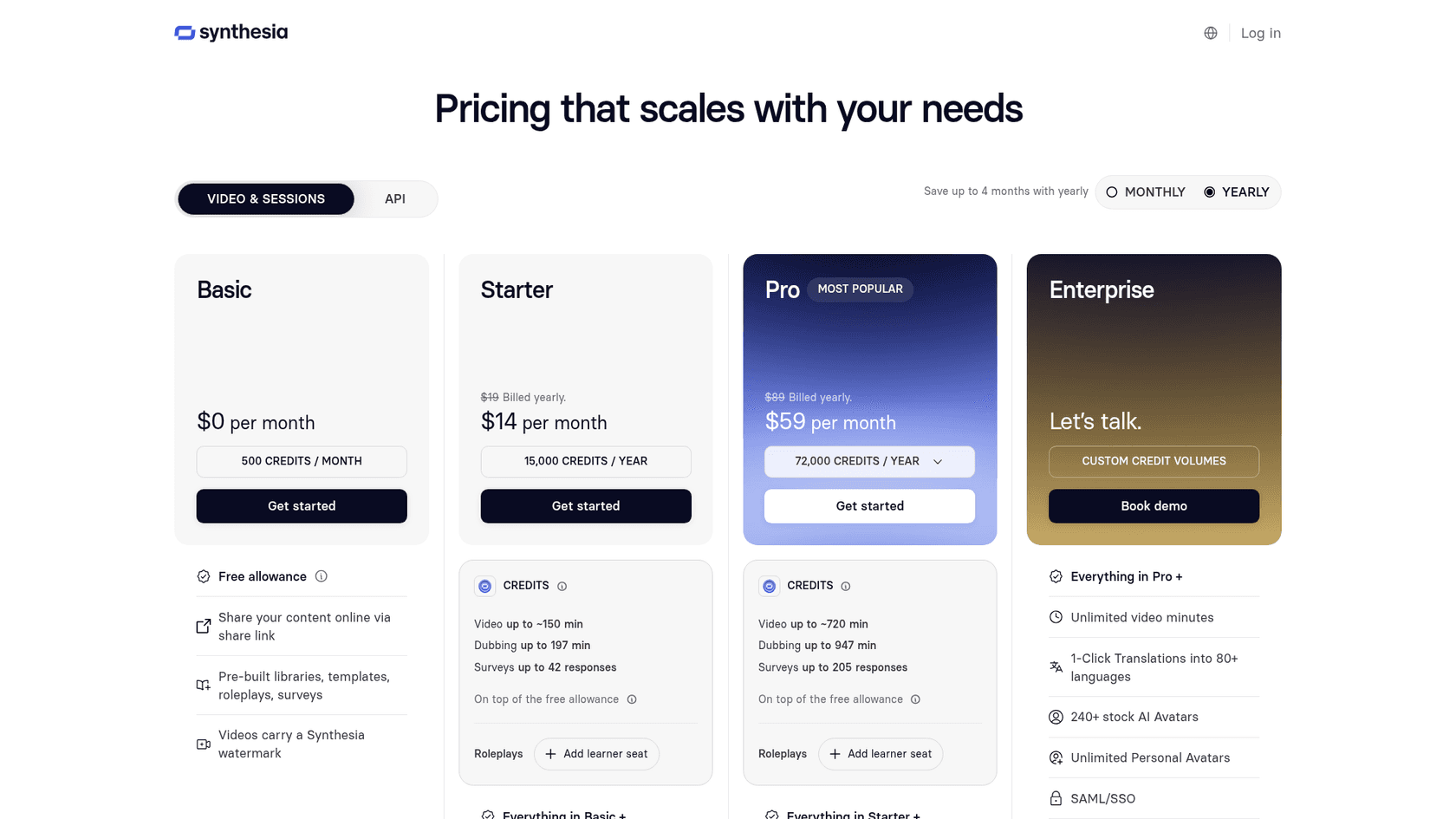
Synthesia has a few different plans, but the thing you really need to pay attention to on the lower-tier plans is the limit on video minutes per month. This can make your costs hard to predict.
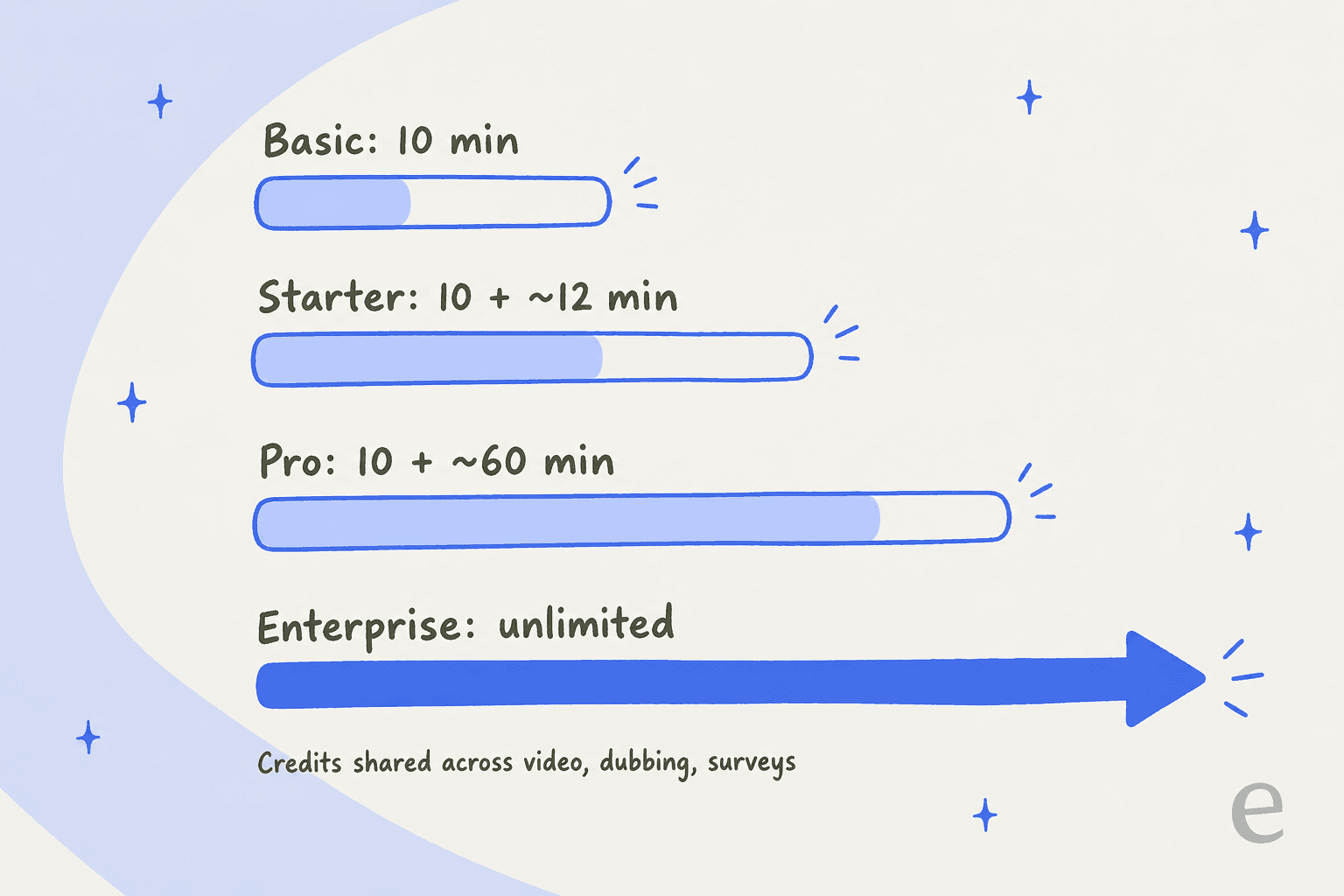
Here's a quick rundown of their plans (based on yearly billing, with credits shared across video, dubbing and surveys):
-
Basic (free): This plan costs nothing and gives you 10 minutes of video a month to play with. You get access to 9 stock avatars, and videos carry a Synthesia watermark. It's really just for testing the waters.
-
Starter: At $14 per month on yearly billing ($19 billed monthly), you get credits for up to about 12 minutes of video on top of the free 10. This unlocks 125+ avatars, downloads and the AI video assistant.
-
Pro (formerly Creator): At $59 per month on yearly billing ($89 billed monthly), credits stretch to about 60 minutes on top of the free 10, and you get 180+ avatars and 5 personal avatars.
-
Enterprise: This is a custom plan with no limits on video minutes. It gives you access to the full library of 240+ avatars, unlimited personal avatars, and a dedicated customer success manager.
That capped allowance on the Starter and Pro plans can really sneak up on you. If you have a busy month creating a new set of training modules or a batch of help videos, you could easily blow past your limit and need to move up a plan.
- A different way to think about pricing: This model is a big contrast to a solution like eesel AI, which sells one fixed monthly price (from $299/month for 500 credits, where 1 credit is a ticket or chat) with no per-seat fee, not a minute allowance tied to how long a piece of content runs.
Key limitations for support and internal knowledge
Synthesia is great at what it does: producing slick, polished video content. But it falls short when your main goal is to solve problems dynamically. For support and IT teams, that's a really important distinction.
-
It's a one-way street. A standard video talks at you. It doesn't listen to a follow-up question, work out what a user is really trying to do, or adjust its response on the fly. If the answer isn't in the script you wrote, the user is out of luck. Synthesia's separate Interactive Avatars API does hold real-time conversations, but you bring your own LLM or agent and build it into your own app.
-
It doesn't connect to your workflow. A video is an asset that sits on a server somewhere. It can’t automatically resolve a support ticket, help triage incoming requests, or give your support agents draft replies. It creates more content that your team still has to manually find and send to customers.
-
The knowledge is frozen in time. A Synthesia video is based on a script that was finalized on a specific day. It can't access real-time information from your constantly changing knowledge sources like past support tickets, your Confluence wiki, or shared Google Docs to help with a brand-new issue.
The better alternative: From content creation to workflow automation
For teams that are truly focused on efficiency, the objective isn't just to make more help articles or videos. It's to resolve more issues with less manual work. It's the difference between handing someone a user manual (a Synthesia video) and giving them an expert assistant who knows the manual inside and out (eesel AI).
eesel AI is an AI platform built for automation, not just creation. It plugs directly into the tools your team already uses every day to provide instant and accurate help.
Here’s what makes it different:
-
It connects to all your company knowledge. eesel AI doesn't just rely on a single script. It hooks into your helpdesk (like Zendesk or Intercom), internal wikis (Confluence, Notion), chat tools (Slack, Microsoft Teams), and all your documents. It learns from everything to give complete, up-to-date answers.
-
It automates entire workflows. Instead of just being a video player, eesel AI's Agent can actually answer customer questions, triage incoming tickets, and even close out requests on its own. And for your human agents, its AI Copilot helps by drafting replies, making everyone faster.
-
It's genuinely self-serve. You can get eesel AI set up and running in a few minutes, without ever having to talk to a salesperson. It’s designed for teams that need to get things done now.
-
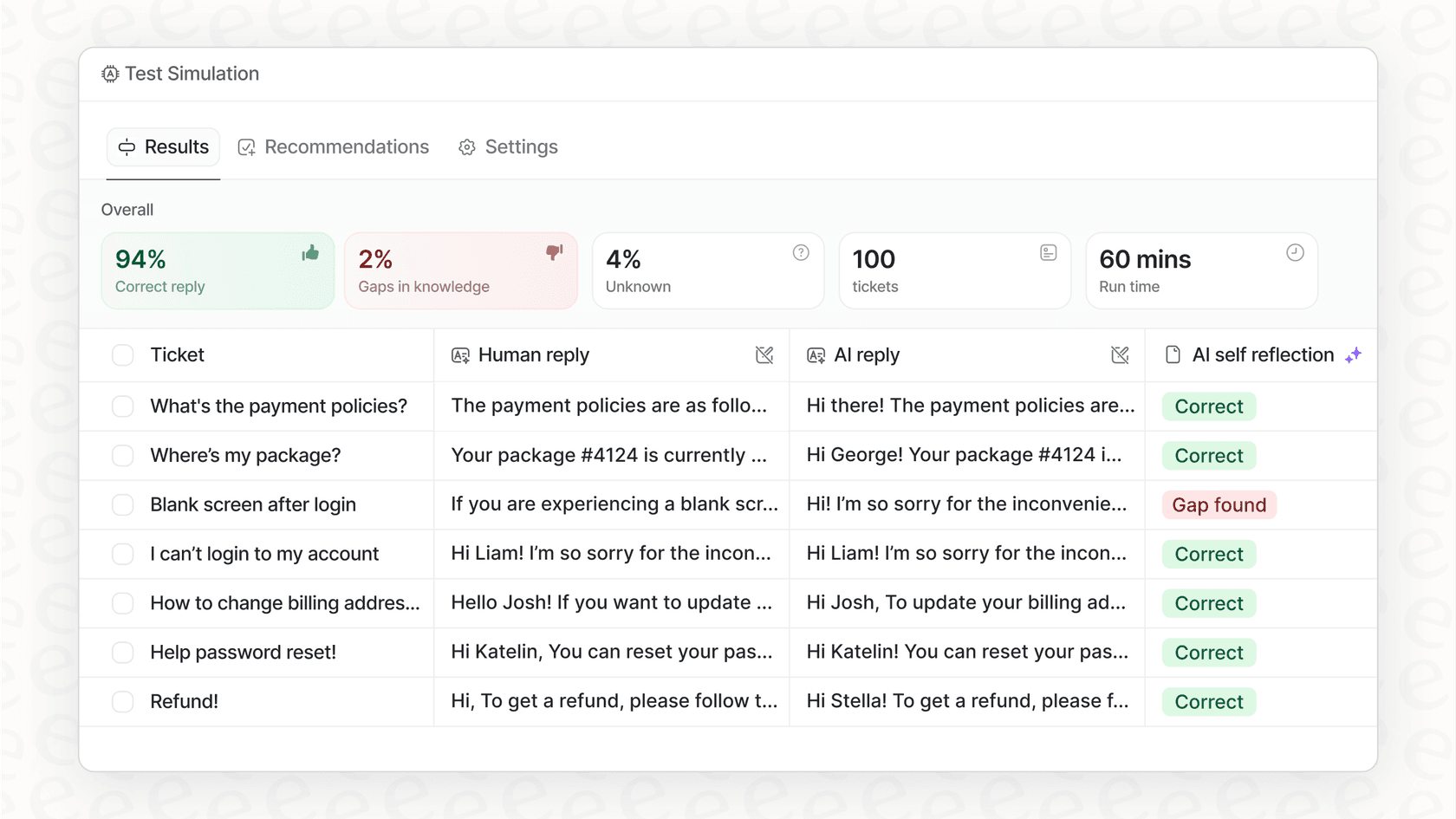
You can test it risk-free. Before you even turn it on for customers, you can run a simulation on thousands of your past support tickets. This shows you exactly how the AI will perform and helps you calculate the return on investment.
Synthesia is for content, eesel AI is for answers
Look, Synthesia is a seriously impressive tool that has made video production way more accessible. If your main job is creating polished, scalable video content for things like marketing campaigns or one-off training sessions, it's a fantastic option.
But for customer support and internal knowledge management, just creating more content is only solving half the problem. The real challenge is providing fast, accurate answers and automating resolutions whenever possible. A static video can’t do that, but an AI agent that’s deeply connected to all your knowledge can.
If you’re ready to shift your focus from simply making content to actually automating resolutions, you can get started with eesel AI in minutes.
Frequently asked questions
What exactly is a Synthesia overview, and what problem does it aim to solve for users?
A Synthesia overview explains that it's an AI video generation tool designed to simplify video creation from text. It aims to eliminate the need for traditional filming equipment and extensive editing, making professional-looking videos accessible.
Can a Synthesia overview explain how its AI avatars and text-to-speech features work?
A Synthesia overview highlights AI avatars as realistic digital presenters and text-to-speech (TTS) as the technology converting scripts into natural narration. It notes the platform offers a diverse library of avatars and supports 160+ languages.
What are the primary business use cases detailed in a Synthesia overview, particularly for training or marketing?
A Synthesia overview points to corporate training and L&D, as well as marketing and sales enablement, as primary use cases. It allows teams to create scalable onboarding guides, product explainers, and social media content efficiently.
From a Synthesia overview, what should I understand about its pricing plans and potential cost implications?
A Synthesia overview clarifies that its lower-tier pricing plans are primarily based on a capped monthly allowance of video minutes (now drawn from a shared credit pool), which can lead to unpredictable costs if exceeded. Enterprise plans offer unlimited minutes but are custom-quoted.
Why does a Synthesia overview suggest it has limitations for customer support and internal knowledge management?
A Synthesia overview notes limitations for support because its videos are static, one-way communications. They cannot interact with users, understand follow-up questions, or integrate dynamically with real-time knowledge bases to resolve complex issues.
How does a Synthesia overview differentiate between Synthesia and solutions like eesel AI for workflow automation?
A Synthesia overview differentiates by explaining Synthesia creates content, while eesel AI focuses on automating answers and workflows by integrating with all company knowledge. Synthesia delivers static resources, whereas eesel AI provides dynamic, conversational solutions.