If you've ever tried to figure out Microsoft SharePoint pricing, you know it's a special kind of headache. It feels like you're being sent on a scavenger hunt with no map. You end up scrolling through old Microsoft forums or Reddit threads, asking the same question everyone else is: "Is there just a simple pricing page somewhere?" Most of the time, the answer is a messy puzzle of per-user licenses, complicated bundles, and vague add-on costs.
But here’s the good news: you don't actually need to schedule a call with a sales rep to get a straight answer. I’ve already done the hard work, digging through the dense documentation and fine print to make sense of it all. This guide will give you a clear, no-nonsense breakdown of what SharePoint really costs in 2026, from the basic plans to the hidden fees for storage and AI that can easily catch you by surprise.
What is SharePoint and why is its Microsoft SharePoint pricing so confusing?
Let's start with the basics. At its core, SharePoint is Microsoft's platform for team collaboration and document management. Companies use it to build internal websites (often called intranets), create dedicated sites for specific projects, and keep all their documents and files in one central, secure spot.
The pricing gets tricky because SharePoint isn't really a single, standalone product. It's woven into the very fabric of the Microsoft 365 ecosystem. While you can buy it on its own, most businesses get it as part of a much larger software bundle. This setup immediately creates a few moving parts that can dramatically change your final bill. You have to consider whether you're buying it standalone or with apps like Word and Teams, how many individual user licenses you'll need, and how you'll manage your storage, which is pooled across the entire company. On top of that, some of the coolest new features, especially AI, run on a pay-as-you-go model that can make your monthly costs pretty unpredictable.
Breaking down the core Microsoft SharePoint pricing plans
To get a handle on this, let's walk through the most common ways companies buy SharePoint, whether you're a tiny startup or a massive enterprise.
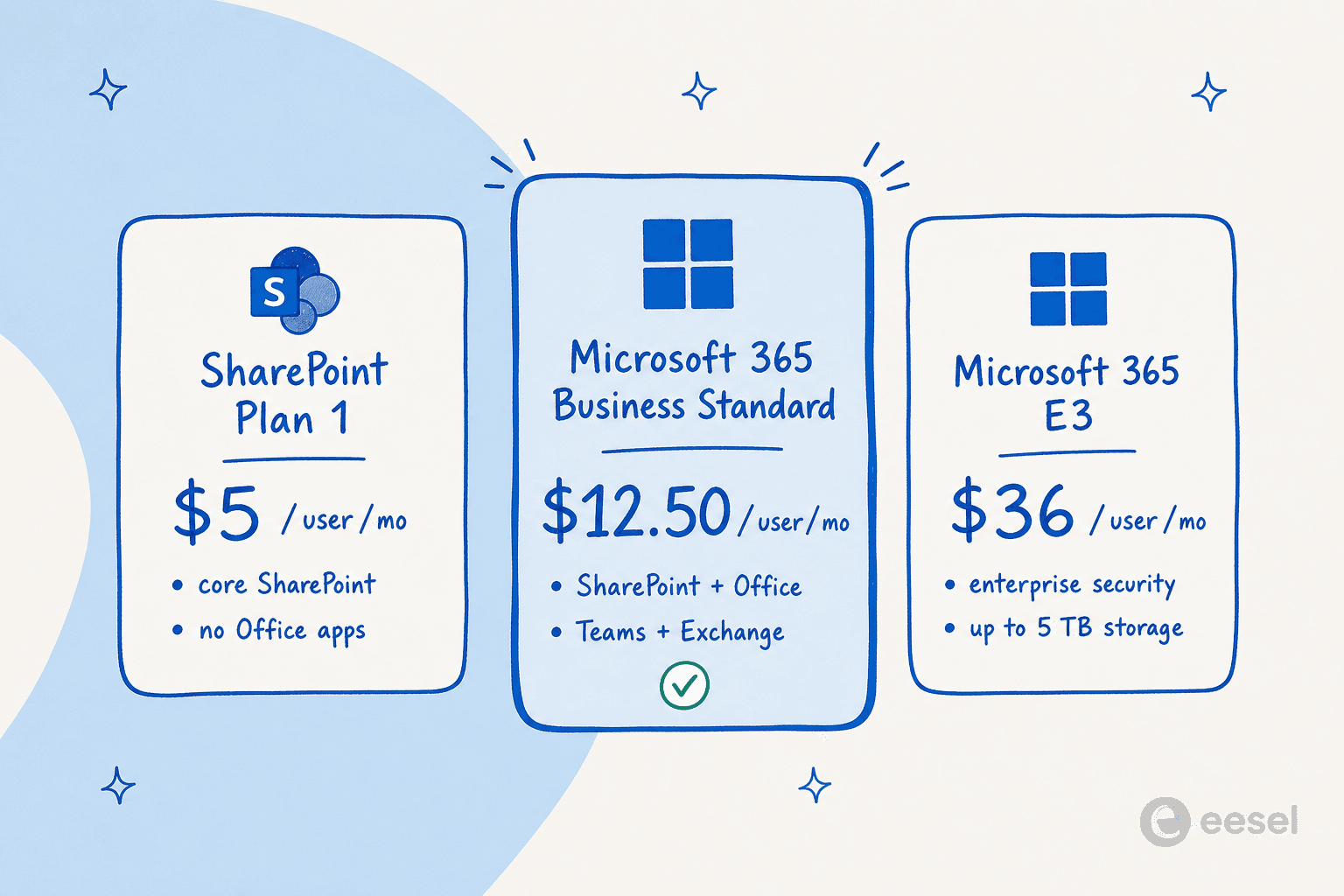
Microsoft SharePoint pricing for the standalone plan (Plan 1)
Think of this as the "just the basics" plan. It's the most direct way to get SharePoint and is designed for businesses that need its powerful content management features but aren't looking to adopt the entire Microsoft 365 suite of apps.
- Price: $5.00 per user, per month (with an annual commitment).
- What you get: This plan covers the essentials. You get secure file sharing, the ability for multiple people to work on a document at the same time, team sites for collaboration, and document libraries with version control (so you can always roll back to an older version of a file). Each user also gets a solid 1 TB of personal cloud storage through OneDrive.
- Who it's for: This is a great fit for small businesses or individual teams that might already be happy using other tools, like Google Workspace, for their email and calendars but need a more structured and secure place for their important files.
Microsoft SharePoint pricing bundled with Microsoft 365 business plans
For most small to medium-sized businesses (those with up to 300 employees), this is the most logical and popular route. Instead of just buying SharePoint, you get it as part of a complete, all-in-one package. The go-to option here is usually Microsoft 365 Business Standard.
- Price: $12.50 per user, per month (with an annual commitment).
- What you get: You get everything from SharePoint Plan 1, but it's bundled with the full desktop versions of the Office apps we all know (Word, Excel, PowerPoint, Outlook), a professional email inbox via Exchange, and the full-featured version of Microsoft Teams for chats, calls, and meetings.
- Who it's for: This plan is perfect for businesses that want a single, integrated system to handle everything. It’s a really efficient way to get all your essential productivity and collaboration tools under one subscription, often for less than you'd pay for them separately.
Microsoft SharePoint pricing in Microsoft 365 enterprise plans
When you get into the world of larger organizations with more complicated demands, Microsoft offers its Enterprise plans, like E3 and E5. These are built to handle thousands of users and come packed with advanced tools for security, legal compliance, and data analytics.
- Price: Microsoft 365 E3 starts at $36.00 per user, per month (with an annual commitment), and goes up from there (E5 runs $57.00).
- What you get: You get all the features of Business Standard, but with a major focus on control and security. This includes more advanced information protection, compliance tools to meet industry regulations, and a big boost in storage. For companies with five or more users, the "unlimited" OneDrive storage kicks in, starting with a whopping 5 TB per person.
- Who it's for: This is for the big players. Large companies, especially those in regulated fields like finance or healthcare, need the enterprise-grade security and data governance tools that these plans offer. The higher price tag buys you peace of mind and massive storage capacity.
Microsoft SharePoint pricing comparison
Here's a quick side-by-side look at how the main plans stack up.
| Feature | SharePoint (Plan 1) | Microsoft 365 Business Standard | Microsoft 365 E3 |
|---|---|---|---|
| Price (per user/month) | $5.00 | $12.50 | $36.00+ |
| Core SharePoint Features | Included | Included | Included |
| Desktop Office Apps | Not Included | Included | Included |
| Microsoft Teams | Not Included | Included | Included |
| Business Email (Exchange) | Not Included | Included | Included |
| Base Storage | 1 TB/user (OneDrive) + Pooled | 1 TB/user (OneDrive) + Pooled | Up to 5 TB/user (OneDrive) + Pooled |
| Advanced Security | Basic | Standard | Advanced |
| Ideal User | Small teams needing just a DMS | SMBs needing an all-in-one suite | Large enterprises |
Beyond the license: The hidden costs of Microsoft SharePoint pricing
The per-user fee you see on the pricing page is just the starting line. The true cost of running your company on SharePoint often comes from two places you might not expect: storage overages and pricey add-ons for advanced features.
How SharePoint storage costs impact Microsoft SharePoint pricing
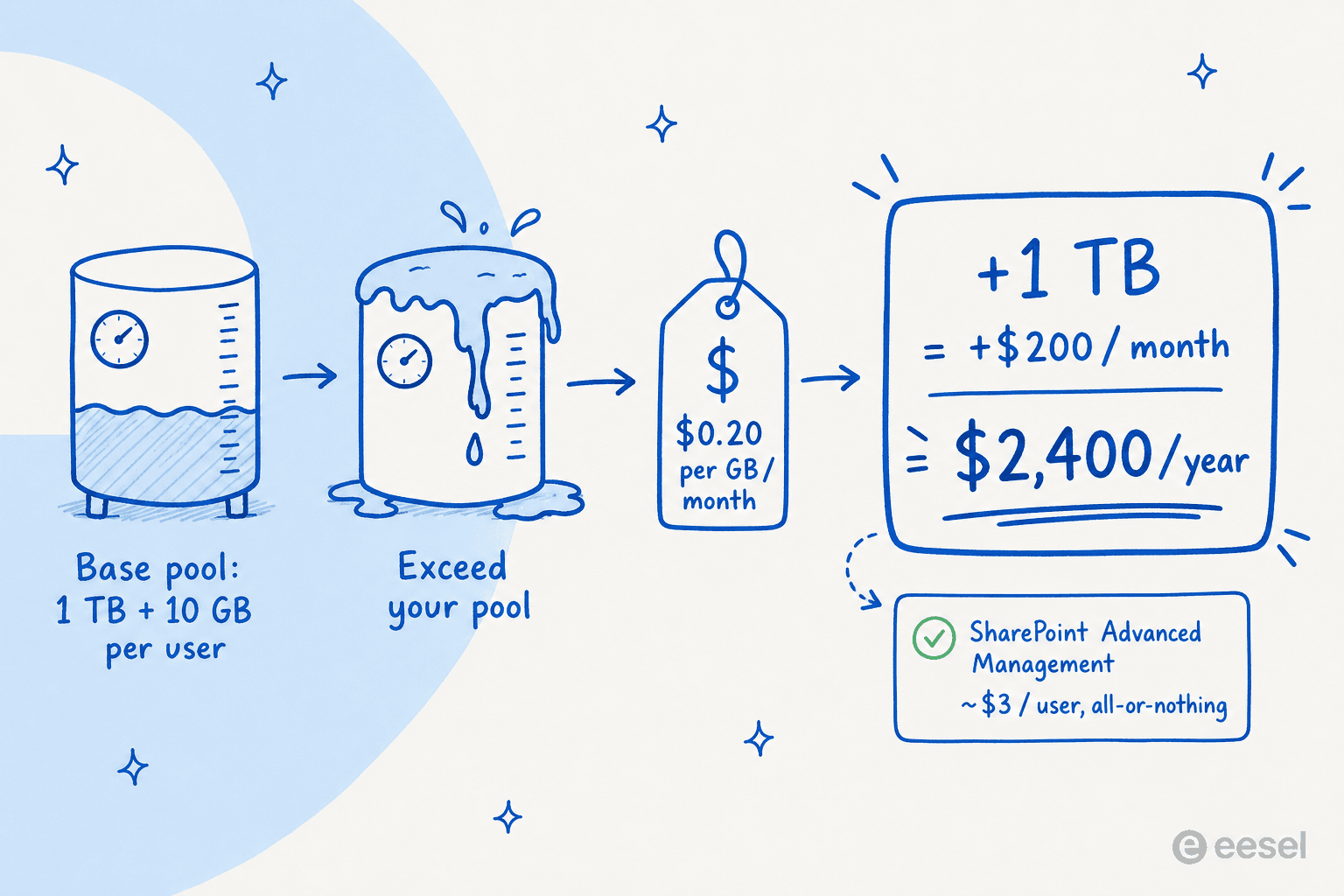
This is probably the biggest "gotcha" in the entire SharePoint pricing structure. Here’s how it works: your whole company gets a base storage pool of 1 TB, plus another 10 GB for every licensed user. At first glance, that sounds like plenty of space. But for companies that work with large files like high-resolution videos, design assets, or extensive historical archives, that pool can fill up surprisingly quickly.
So, what happens when you hit your limit? You have to buy more storage, and it is not cheap.
The cost for extra SharePoint storage is $0.20 per GB per month.
Let that sink in for a moment. If your company just needs one extra terabyte (TB) of storage to keep projects moving, you'll be paying an extra $200 every single month. That's an unplanned expense of $2,400 a year, a budget shock that catches many businesses completely off guard.
Pro Tip: You can keep tabs on your storage usage by going to the SharePoint Admin Center and looking under "Active sites." Monitoring this regularly can help you predict future costs and avoid that painful surprise on your monthly bill.
Microsoft SharePoint pricing for SharePoint premium and advanced management
If your business needs more firepower, Microsoft offers add-ons like SharePoint Premium (which absorbed the old Microsoft Syntex features) and SharePoint Advanced Management. These tools give you things like content AI to automatically process and tag documents, along with advanced policies for managing access and tightening security.
Of course, these capabilities add another layer of cost, and it comes in two confusing flavors:
- Pay-as-you-go: Many of the AI and content processing features are billed through an Azure subscription. This means your costs are variable and can swing wildly depending on how much you use them in a given month.
- Per-user license: SharePoint Advanced Management is an add-on that costs about $3 per user, per month. But here’s the catch: you often have to license it for every single user in your organization, even if only a couple of admins will ever actually use the features. It’s an all-or-nothing deal that can add up fast.
The AI dilemma: How AI affects Microsoft SharePoint pricing
As more companies lean on AI to power their knowledge management and customer support, it’s become a huge factor in picking the right platform. And once again, SharePoint’s approach to AI comes with some serious strings attached.
Understanding the pay-as-you-go AI model's impact on Microsoft SharePoint pricing
Microsoft's native AI tool comes in the form of SharePoint Agents, which you can build using something called Copilot Studio. The goal is to create an AI assistant that can answer questions based on all the documents and information you have stored across your SharePoint sites.
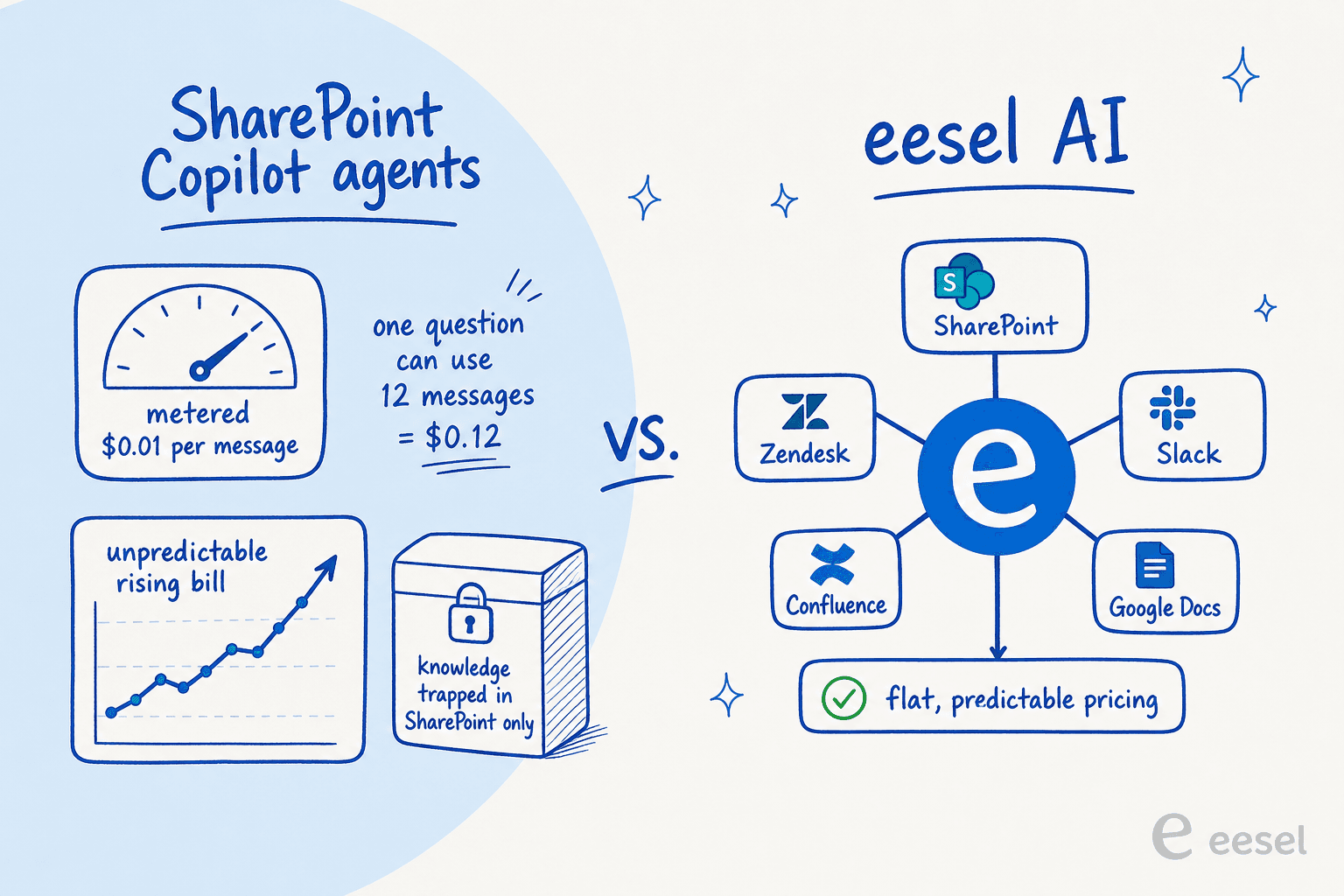
The biggest issue here is the pricing model. It's a metered, pay-as-you-go service, which makes it nearly impossible to budget for. According to Microsoft's own documentation, the service costs $0.01 per message. That sounds tiny, but they also point out that a single interaction, one question and one answer, can consume up to 12 messages. That means one simple query could cost you $0.12.
This creates a massive headache for any business trying to manage a budget. What if your support team has a really busy month? What if your internal help bot becomes super popular with employees? You could be looking at a shockingly high and completely unpredictable bill. Even worse, the AI's knowledge is trapped inside the Microsoft bubble. It can only see what's in SharePoint. But what about all the vital information your teams keep in other places, like Zendesk, Slack, Confluence, or Google Docs? SharePoint's AI is completely blind to it.
The eesel AI advantage: Predictable costs and unified knowledge
This is where a modern, specialized knowledge platform like eesel AI offers a much clearer path forward, solving SharePoint's biggest AI problems.
- Transparent and predictable pricing: Your bill shouldn't be a lottery. You shouldn't be punished for having a busy month. eesel AI offers one fixed monthly price with no per-seat fees, and you’ll never get a surprise bill because it doesn't charge per message (1 credit covers a whole ticket or chat, however long). You know exactly what you're paying, every time.
- Unify all your knowledge, instantly: An AI that's stuck in one system is only half-useful. eesel AI connects to all of your company's knowledge, wherever it lives. That includes SharePoint, of course, but it also hooks directly into your helpdesk, internal wikis, and over 100 other tools your team already uses. This gives your AI agent the full picture, so it can deliver complete and accurate answers every time.
- Go live in minutes, not months: eesel AI is built to be incredibly easy to use. You can connect your knowledge sources with a single click and launch a fully functional AI agent in just a few minutes. There's no need to hire a developer or get lost in the complexities of Copilot Studio.
- Test with total confidence: Worried about how well it will actually work? eesel AI has a powerful simulation mode that lets you test your setup on thousands of your own past support tickets. You can see the exact resolution rate and calculate your potential cost savings before you ever turn it on for customers. It completely removes the guesswork and risk.
Making the right choice on Microsoft SharePoint pricing
Figuring out Microsoft SharePoint pricing is definitely a challenge, but seeing the complete picture is the only way to make a smart decision for your business.
Just remember the key things to watch out for:
- The per-user license fee is just the beginning; your total cost of ownership is often much, much higher.
- The biggest hidden cost is almost always additional storage, which is billed at a steep rate that can lead to major budget overruns.
- Microsoft’s native AI tools run on a pay-as-you-go model that makes costs unpredictable and keeps your knowledge locked inside the Microsoft ecosystem.
While SharePoint is a solid tool for managing documents, if your business is looking for predictable costs, a ridiculously fast setup, and an AI that can learn from your entire company knowledge base, a dedicated platform is often the smarter, more scalable choice.
Ready for an AI support solution with transparent pricing that connects all your tools, not just SharePoint? Try eesel AI for free and see how much you can automate in the next five minutes.
Frequently asked questions


Article by
Kurnia Kharisma
Kurnia is a software engineer and writer at eesel AI with two years of SEO experience, writing about AI tools, helpdesk software, and customer support. He pairs a developer's understanding of how these products are built with search-driven research into what actually ranks and resonates with the people searching for them.