AI coding assistants aren't just a neat gimmick anymore; they're pretty much standard issue in a modern dev toolkit. They help you write code faster, cut down on boring boilerplate stuff, and act like a second pair of eyes when you're stuck on a tricky function.
When you start looking into them, two names pop up everywhere: Microsoft's powerful GitHub Copilot and the enterprise-friendly alternative, Tabnine. While both are designed to make you a more productive developer, they have very different ideas about how to get there. This guide will walk you through their core differences, from the AI models they use to their security and pricing, so you can pick the right tool for your team.
What is Microsoft Copilot?
Microsoft calls Copilot your "AI pair programmer," which is a pretty good way to put it. It was born out of a team-up between GitHub, Microsoft, and OpenAI, and it really does feel like having a senior dev looking over your shoulder, ready to offer suggestions.
The whole thing runs on OpenAI's advanced GPT models, which have been trained on a mind-boggling amount of public code from countless GitHub repositories. This gives it a massive vocabulary across different languages and frameworks. Its main gig is to spit out code suggestions, from a single line to a whole function, based on a comment you write or the code you're already working on. It’s a great option for individual developers, open-source contributors, and teams that are all-in on the GitHub ecosystem.
[Screenshot] , Microsoft Copilot suggesting a complete function in a VS Code editor based on a natural language comment.
What is Tabnine?
Tabnine has been around for a while and was one of the first AI code assistants on the scene. It’s always been focused on the needs of professional dev teams and big companies, so its approach is more about being secure and specialized.
Instead of one giant model trained on the entire internet's code, Tabnine uses its own Large Language Models (LLMs) trained on a hand-picked set of open-source code with friendly licenses. This helps dodge a lot of intellectual property headaches right off the bat. The real kicker, though, is that you can train Tabnine on your company's own private code. This means it gives you suggestions that actually fit your team's style and standards, all while keeping your data safe. This makes it the default choice for enterprises, teams in regulated industries like finance or healthcare, and anyone who needs an AI that adapts to their way of working.
[Screenshot] , Tabnine providing a code suggestion in a JetBrains IDE that aligns with a company's internal coding style.
Microsoft Copilot vs Tabnine: A side-by-side comparison
While both tools are trying to make you more productive, they come at it from completely different angles. Let's dig into the key differences so you can figure out what you're gaining, and giving up, with each one.
AI model and training data
Microsoft Copilot is all about raw power. It uses GPT-4, which has learned from billions of lines of public code. This means it can generate some seriously complex code from a simple prompt.
But that "train on everything" method has some catches. Developers have found that the code it generates, while looking good on the surface, can have logical errors, security holes, or might be a little too similar to code with a restrictive license. This has even sparked lawsuits over copyright infringement, which is a real IP risk for any business.
Tabnine, on the other hand, plays it safer. Its models are trained on a curated dataset of code with permissive licenses, which cuts down on IP and security risks from the get-go. But the feature that really sets it apart is the ability to train a private AI model on your own repositories. This makes sure the code suggestions aren't just safe; they’re actually relevant, consistent with your internal style guides, and aware of your team's specific architecture.
Privacy and security
Okay, this is probably the biggest difference between them. Microsoft Copilot is a cloud-only solution. While it has Microsoft's security backing it, your code snippets are still sent to external servers, and your data can be kept for up to 28 days. For a lot of companies, especially in finance or healthcare, that's a non-starter because of data governance rules.
Tabnine was built with these companies in mind. It offers a ton of flexibility in how you deploy it: you can use their secure cloud service, a virtual private cloud (VPC), install it on your own servers, or even run it in a completely disconnected, air-gapped environment. They have a zero-data-retention policy, meaning your code never leaves your network. You get full control.
[Workflow] , A diagram comparing the data flow and deployment options for Microsoft Copilot vs Tabnine.
Features and customization
Microsoft Copilot is pretty much a "what you see is what you get" kind of tool. It's great at spitting out big chunks of code from natural language, and its Copilot Chat feature is useful for asking questions. But you can't really tweak it much. You get the power of the core model, and that's about it.
Tabnine is all about giving you control. It has specialized "AI agents" for things like writing tests or documentation. A huge plus is its model portability, you can swap out the underlying AI model (from places like OpenAI, Anthropic, or Cohere) to find the right mix of performance and cost for a project. It also works with a wider range of IDEs, so it fits into more workflows.
Here’s a quick rundown of how they stack up on the most important points:
-
Who it's for: Copilot feels like an AI pair programmer, fantastic for generating big code blocks quickly. Tabnine acts more like super-smart autocomplete that learns your private codebase inside and out.
-
Where it runs: Copilot is cloud-only, no exceptions. Tabnine gives you options: cloud, a private cloud (VPC), on your own servers, or even completely offline (air-gapped).
-
How much you can tweak it: Copilot is simple, with limited customization. Tabnine lets you fine-tune models and connect to any Git repository you want.
-
What's under the hood: With Copilot, you're using OpenAI's GPT models. Tabnine lets you use different large language models and even your own custom ones.
-
Privacy and IP: Copilot processes your code in the cloud, which comes with some potential IP risk. Tabnine doesn't hold onto your data, is trained on permissively licensed code, and even offers IP indemnification.
-
Editor support: Copilot covers the big ones like VS Code, JetBrains, and Visual Studio. Tabnine has a wider reach, including Eclipse, Sublime, and Vim.
[Table] , A side-by-side comparison of features for Microsoft Copilot vs Tabnine.
| Feature | Microsoft Copilot | Tabnine |
|---|---|---|
| Primary Use Case | AI Pair Programmer (Generates large code blocks) | Intelligent Autocomplete (Learns private codebase) |
| Deployment | Cloud-Only | Cloud, VPC, On-Premise, Air-Gapped |
| Customization | Limited | High (Fine-tune models, connect to any Git repo) |
| Underlying Model | OpenAI GPT Models | Multiple LLMs (OpenAI, Anthropic, Cohere, etc.) + Custom Models |
| Privacy & IP | Cloud processing, potential IP risk | Zero data retention, trained on permissive code, IP indemnification |
| IDE Support | VS Code, JetBrains, Visual Studio | VS Code, JetBrains, Eclipse, Sublime, Vim, and more |
Pricing and plans
Both tools have competitive pricing, but they're aimed at different budgets and priorities.
With Microsoft Copilot, you're looking at:
-
Individual: $10 a month for solo developers.
-
Business: $19 per user/month, which gives you some basic policy management tools.
-
Enterprise: $39 per user/month for extra features like personalized chat and code search.
For Tabnine, the plans look like this:
-
Dev Preview: Free. This is great for just trying out the basic code completions and AI chat without pulling out your credit card.
-
Dev: $9 a month, which unlocks the full AI assistant.
-
Enterprise: $39 per user/month. This is where you get private deployment, custom models, top-tier security, and IP indemnification.
The entry-level paid plans are almost the same price. But Tabnine’s free plan is a nice perk. At the enterprise level, the price is identical ($39), but what you're buying is completely different. With Copilot, you’re paying for more powerful code generation. With Tabnine, you're paying for security, privacy, and the ability to deeply customize the tool for your business.
The verdict on Microsoft Copilot vs Tabnine: How to choose the right AI assistant
So, how do you choose? There's no single "best" option here, it all depends on what your team actually needs.
Choose Microsoft Copilot if:
-
Your main goal is raw speed and getting code written as fast as possible.
-
You mostly work on open-source projects or in an industry where data privacy rules aren't super strict.
-
Your team is already living and breathing in the GitHub and Microsoft world.
Choose Tabnine if:
-
Security, data privacy, and protecting your intellectual property are your absolute top priorities.
-
You work for a large company or in a regulated industry where you need total control over your data.
-
You want an AI assistant that can truly learn your private codebase and give suggestions that match your team's unique way of doing things.
[Workflow] , A decision flowchart to help teams choose between Microsoft Copilot vs Tabnine.
Beyond Microsoft Copilot vs Tabnine: Bringing specialized AI to your entire organization
This whole debate, a powerful, general-purpose tool versus a secure, specialized one, isn't just for developers. Think about it: customer support and IT teams run into the same problem all the time.
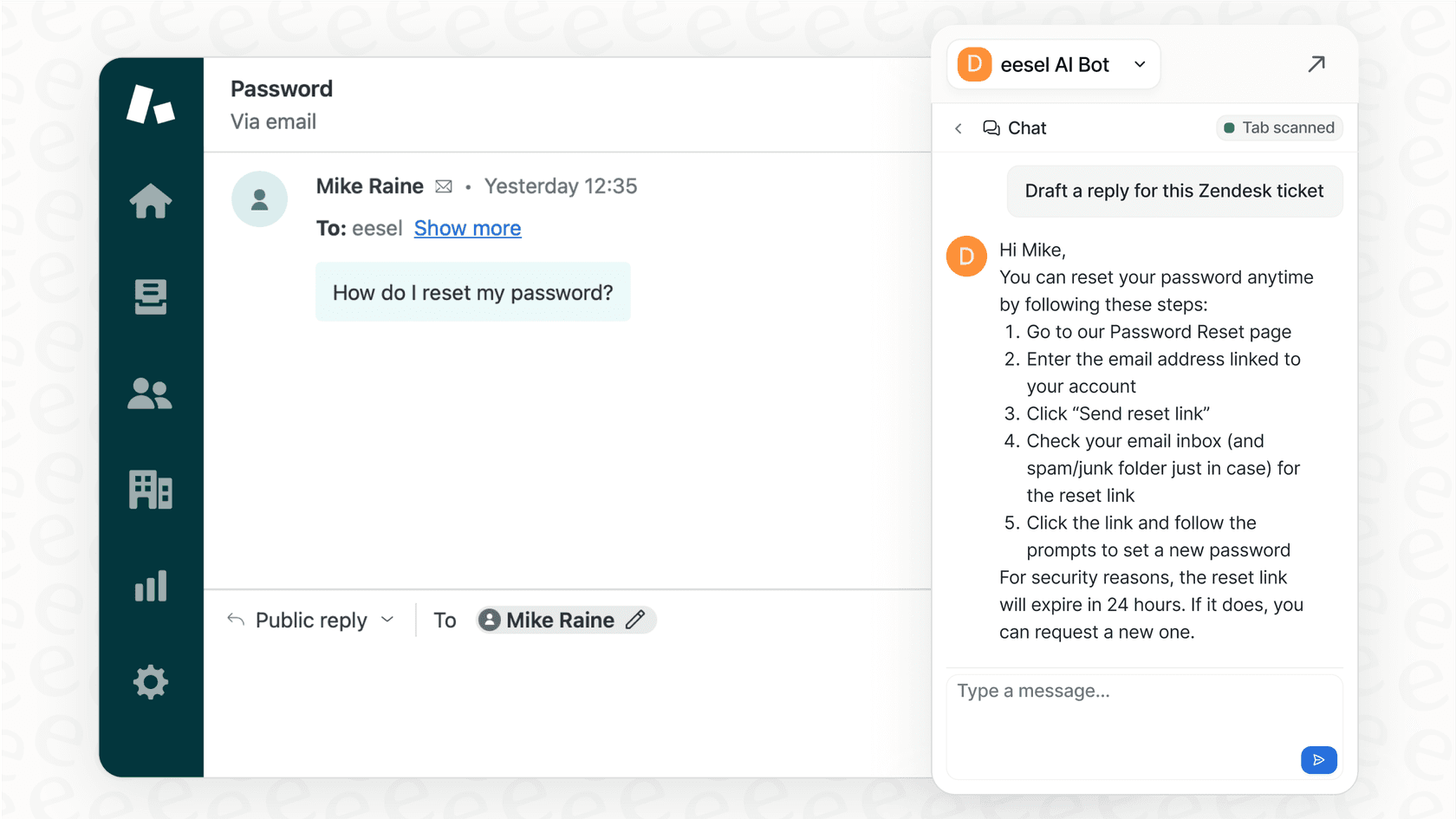
Generic AI chatbots often fall flat because they just don't have the right context. They don't know your company's past support tickets, internal wikis, or specific business rules. That's where a tool built for the job, like eesel AI, comes in. It’s an AI platform designed specifically for customer service, IT support, and internal help desks.
It solves the same kinds of problems Tabnine does for coders, just for support teams:
-
It actually knows your business. Just like Tabnine learns your code, eesel AI learns from your company's unique knowledge. It can digest info from past tickets in Zendesk, read your internal guides in Confluence, and pull from documents scattered across Google Docs.
-
You're in control. eesel AI lets you set clear rules for what its AI agent can and can't do. It even has a simulation mode where you can test it on thousands of your old tickets before ever letting it talk to a real customer.
-
It plugs right in. You can connect it to your help desk and other tools in just a few minutes. You get a smarter support system without having to ditch the software your team already relies on.
Final thoughts on Microsoft Copilot vs Tabnine
At the end of the day, the "best" AI coding assistant is the one that fits how your team works. Microsoft Copilot is an amazing choice for raw coding speed, as long as you're comfortable with its cloud-based approach. Tabnine offers the control, privacy, and deep customization that professional teams and large businesses can't do without.
The real lesson here is that the most valuable AI is the one that's built for the job at hand. Whether it's for writing code or handling customer support, a specialized AI that understands your world will always give you better and safer results.
If you're ready to bring the power of specialized, context-aware AI to your support and IT teams, explore eesel AI's solutions or start a free trial today.
Frequently asked questions
What are the primary considerations when comparing Microsoft Copilot vs Tabnine for a new dev team?
When choosing between Microsoft Copilot vs Tabnine, consider Copilot for raw speed and open-source work if you're comfortable with cloud-only processing. Tabnine is better for security, privacy, and deep customization with private codebases, ideal for enterprise or regulated environments.
How do the data privacy and security features of Microsoft Copilot vs Tabnine compare for regulated industries?
Microsoft Copilot vs Tabnine differ significantly here. Copilot is cloud-only, sending snippets to external servers and retaining data for up to 28 days. Tabnine offers flexible deployment (cloud, VPC, on-premise, air-gapped) and a zero-data-retention policy, making it suitable for strict data governance.
Is it possible to customize the AI model for my specific codebase with both Microsoft Copilot vs Tabnine?
Yes, but with differences. With Microsoft Copilot vs Tabnine, Copilot uses a powerful, general GPT model with limited customization. Tabnine, however, excels in customization, allowing you to train a private AI model on your own repositories to align with your team's specific style and architecture.
What are the deployment options available if I choose Microsoft Copilot vs Tabnine for my organization?
Regarding deployment, Microsoft Copilot vs Tabnine offer distinct approaches. Copilot is exclusively a cloud-based solution. Tabnine provides diverse options, including secure cloud, virtual private cloud (VPC), on-premise servers, or even a completely air-gapped environment for maximum control.
Could you explain the differences in intellectual property (IP) and licensing approaches between Microsoft Copilot vs Tabnine?
When examining Microsoft Copilot vs Tabnine for IP, Copilot trains on public code, leading to potential copyright infringement concerns. Tabnine uses a curated dataset of permissively licensed code and offers IP indemnification, significantly reducing intellectual property risks.
What are the typical pricing structures I can expect when evaluating Microsoft Copilot vs Tabnine for enterprise use?
For enterprise pricing, both Microsoft Copilot vs Tabnine offer plans around $39 per user/month. However, Copilot's enterprise plan focuses on more powerful code generation, while Tabnine's offers advanced security, privacy, custom models, and IP indemnification for the same price point.