

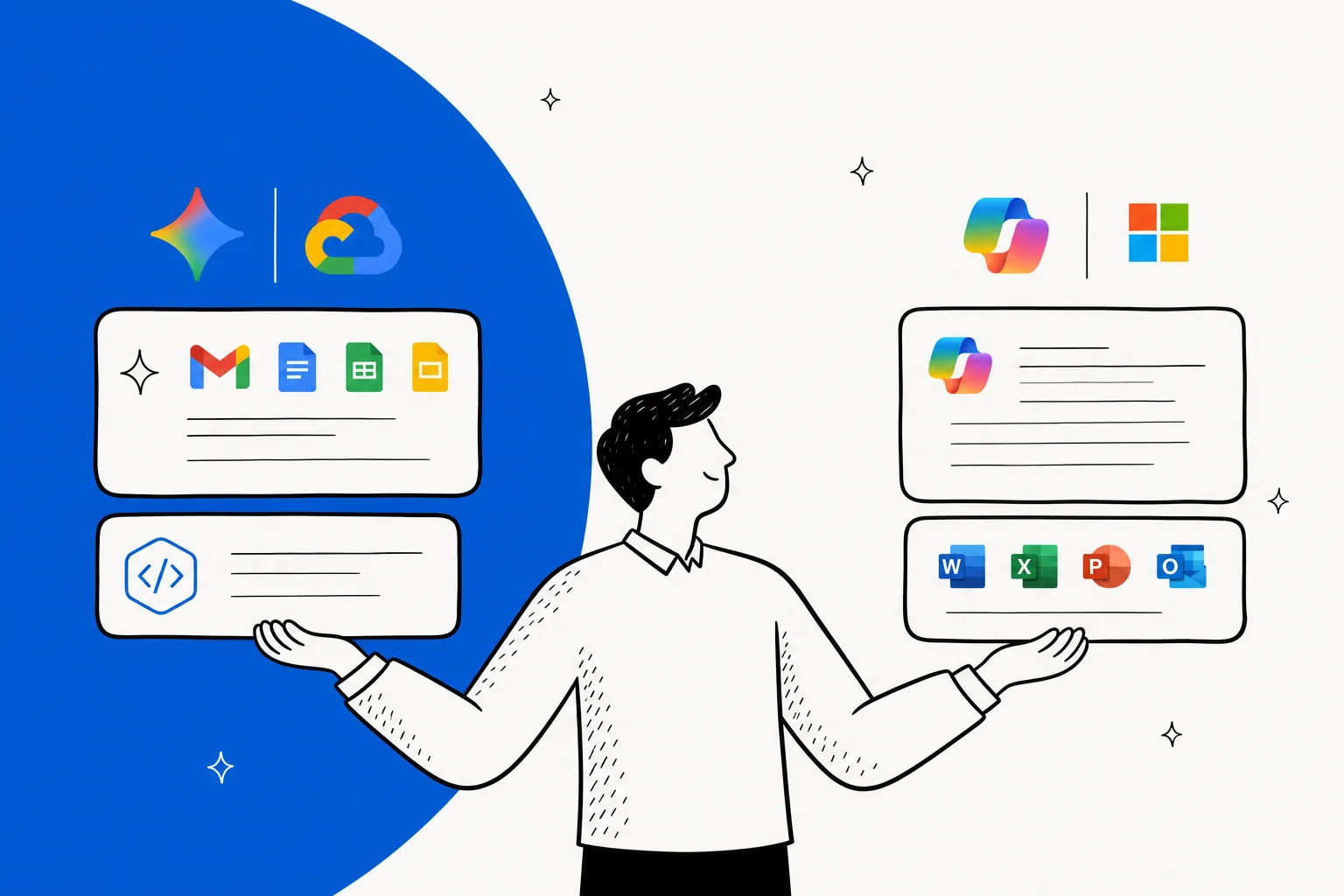
There is no Google product literally called "Copilot" - the name belongs to Microsoft. When people search for "Google Copilot," they're almost always trying to find Google's equivalent, which is the Gemini family of AI assistants. The three pieces worth knowing about:
- Gemini app - Google's standalone chatbot, the rival to Microsoft Copilot's free web chat. Free with a Google account; paid tiers add bigger models and more usage.
- Gemini for Google Workspace - the AI baked into Gmail, Docs, Sheets, Slides, Meet, and Drive. This is what most "Google Copilot" searches actually want. It maps directly to Microsoft 365 Copilot, but with one big difference: since January 2025, it's included in every paid Workspace plan, not sold as a $30/user/month add-on.
- Gemini Code Assist - Google's answer to GitHub Copilot, with a free individual tier offering 180,000 code completions per month.
The short version: if you're already on Workspace, you've probably already paid for Google's Copilot. The trick is making sure you're on the right plan (Business Standard at $14/user/month or above) to actually use it.
So, is "Google Copilot" actually a real product?
Short answer: no. "Copilot" is a Microsoft brand applied to a sprawling product family - Microsoft Copilot the free chat, Microsoft 365 Copilot the productivity layer, GitHub Copilot for developers, Copilot Studio for custom agents. Google never adopted the name. We'd bet that "Google Copilot" started as people typing the brand they knew, then expecting Google to have its own version.
Google does - but everything sits under the Gemini umbrella. Same job, different label. Here's how the families line up:
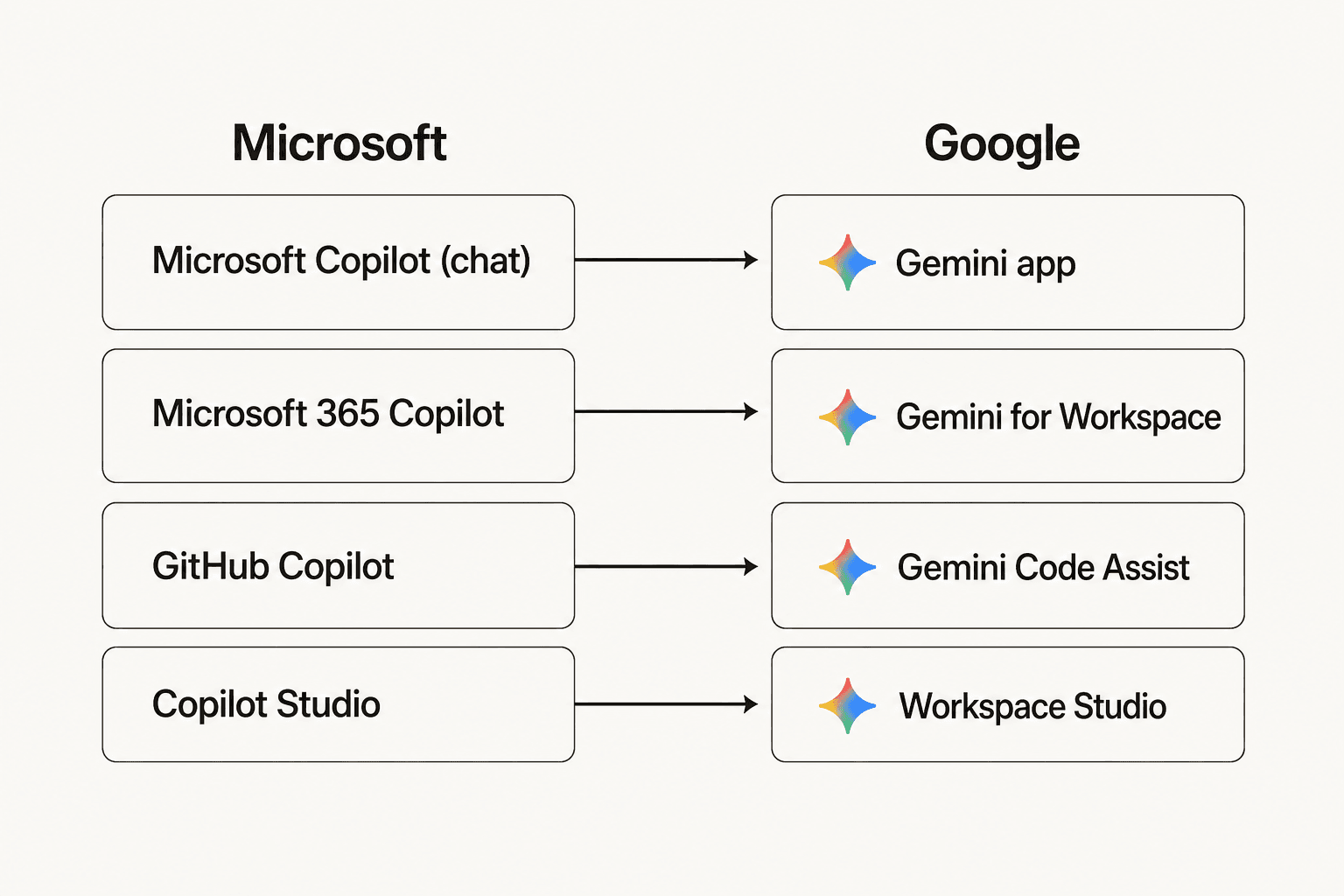
| Microsoft Copilot product | Google equivalent | What it does |
|---|---|---|
| Microsoft Copilot (free chat) | Gemini app | Web/mobile chatbot, image generation |
| Microsoft 365 Copilot | Gemini for Workspace | AI in productivity apps |
| GitHub Copilot | Gemini Code Assist | AI pair programmer |
| Copilot Studio | Workspace Studio | Custom agents, no-code |
Each row in that table is a real, shipping product on both sides. The rest of this guide unpacks the Google side, one row at a time.
The single biggest difference: Microsoft sells Copilot as a $30/user/month add-on on top of a Microsoft 365 license. Google bundles Gemini into every paid Workspace plan for free.
Meet Gemini: Google's actual "copilot"
Gemini is Google's flagship AI assistant - the consumer chatbot you talk to at gemini.google.com, the model that powers everything else in Google's AI stack. It's Google's direct competitor to ChatGPT and Claude, with a current lineup of Gemini 3.1 Pro for reasoning, Gemini 3.5 Flash for fast everyday use, and Gemini 3.1 Deep Think for extended research tasks.
If you want a deep technical breakdown of the model, our What is Gemini AI overview covers benchmarks, context windows, and the full model family. For this post, the only thing to keep straight is that "Gemini" can mean three different things in conversation:
- The underlying model - what runs everything else.
- The Gemini app - the chat product at gemini.google.com, equivalent to chatting with Microsoft Copilot's free tier.
- Gemini embedded inside other Google products - Workspace, Code Assist, Cloud, Android.
Users who actually pay attention agree the model has gotten genuinely good. One Reddit user summarised the shift:
"I used to rely only on ChatGPT for any type of AI-related tasks... But after the 2.5 Pro update (now 3 Pro), I started leaning more towards Gemini. The answers/replies I get from it are really impressive."

The free tier of the Gemini app gives you Gemini 3.5 Flash and limited 3.1 Pro access. Paying $19.99/month for AI Pro unlocks the bigger models, more usage, and tools like Deep Research. That's the consumer-side story. The interesting question is what happens when Google takes the same model and bakes it into the apps your team already uses - which is where most "Google Copilot" searches really land.
Gemini for Google Workspace: the real "Google Copilot"
If somebody asks "what's Google's version of Microsoft 365 Copilot?", the answer is Gemini for Google Workspace. (As of April 2026, Google also markets it as "Workspace Intelligence", though the underlying capabilities are the same.) It's the AI assistant that lives inside the apps a Workspace customer already pays for: Gmail, Docs, Sheets, Slides, Meet, Drive, and Chat.
Here's what Gemini for Workspace actually adds, app by app:
- Gmail - "Help me write" drafts emails from a prompt. The Gemini side panel summarises long threads. The April 2026 Workspace Intelligence release added an AI Inbox that proactively surfaces what needs your attention.
- Docs - Full document drafting, proofreading, and synthesis. Pull facts from Drive, Gmail, and the web into a draft that imitates your voice.
- Sheets - Build spreadsheets from a natural-language prompt. Auto-fill tables. Solve optimisation problems by describing them.
- Slides - "Help me visualise" generates images and infographics via Nano Banana Pro. Add fully editable slides to existing decks.
- Meet - "Take notes for me" captures action items automatically. Studio Look fixes bad webcams; Studio Lighting and Studio Sound clean up audio/video.
- Drive - AI Overviews summarise files with citations. Turn your file storage into a queryable knowledge base.
- Chat - "Ask Gemini in Chat" queries across your entire Workspace and can take action, not just answer.
- Workspace Studio - A no-code agent builder. Describe the workflow in plain English and Studio builds the multi-step automation. This is Google's direct response to Copilot Studio.
- NotebookLM - Source-grounded research with Audio Overviews, Mind Maps, and Video Overviews.
Real customers report concrete time savings: Sports Basement shaved 30-35% off their customer-service response drafting time, and Uber, Deloitte, and Pepperdine University are all named publicly on the Workspace AI page.
For the full app-by-app walkthrough, see our realistic guide to Gemini for Google Workspace and the more practical Google Workspace Gemini setup post.
Gemini Code Assist: Google's GitHub Copilot
For developers, "Google Copilot" usually means Gemini Code Assist - Google's AI pair programmer. It runs inside VS Code, JetBrains IDEs, Android Studio, and the terminal via the open-source Gemini CLI.
Where it really stands out is the free tier. Google's free Gemini Code Assist for individuals offers up to 180,000 code completions per month and 240 chat messages per day - Google describes that as "90x more than other popular free coding assistants." For students, hobbyists, or developers who don't want to expense GitHub Copilot, that's a lot of headroom.
Three editions exist:
| Edition | Annual price | Monthly price | What's included |
|---|---|---|---|
| Individuals | Free | Free | 180,000 completions/mo, 240 chats/day, Gemini CLI, agent mode, PR-review app |
| Standard | $19/user/mo | $22.80/user/mo | 1M-token local codebase context, IP indemnification, VPC Service Controls, Cloud Run + BigQuery integration |
| Enterprise | $45/user/mo | $54/user/mo | Standard + private-repo customisation, Gemini in Apigee, Gemini Cloud Assist premium |
Both paid tiers come with a 30-day free trial for up to 50 users.
A developer trick worth knowing: many people pair Gemini Code Assist's free GitHub PR-review app on top of another coding tool's output. One r/ClaudeCode tip thread puts it bluntly: "Gemini seems much better at spotting violations, security issues, performance issues." If your team is already using something like Cursor or Claude Code, adding free Gemini Code Assist as a reviewer is genuinely cheap insurance.
One transition to watch: Google announced that on June 18, 2026, the free Gemini CLI is being migrated to "Antigravity CLI". Paid Standard and Enterprise users aren't affected - but if you're on the free tier, expect a one-time rebrand.
What does "Google Copilot" actually cost in 2026?
This is where the pricing-model difference between Google and Microsoft becomes obvious. Microsoft's playbook is "buy Microsoft 365, then pay another $30/user/month for Microsoft 365 Copilot Enterprise." Google's playbook, since January 2025, is "buy Workspace, get Gemini included." But there's a catch - which plan you're on dictates how much Gemini you actually get.
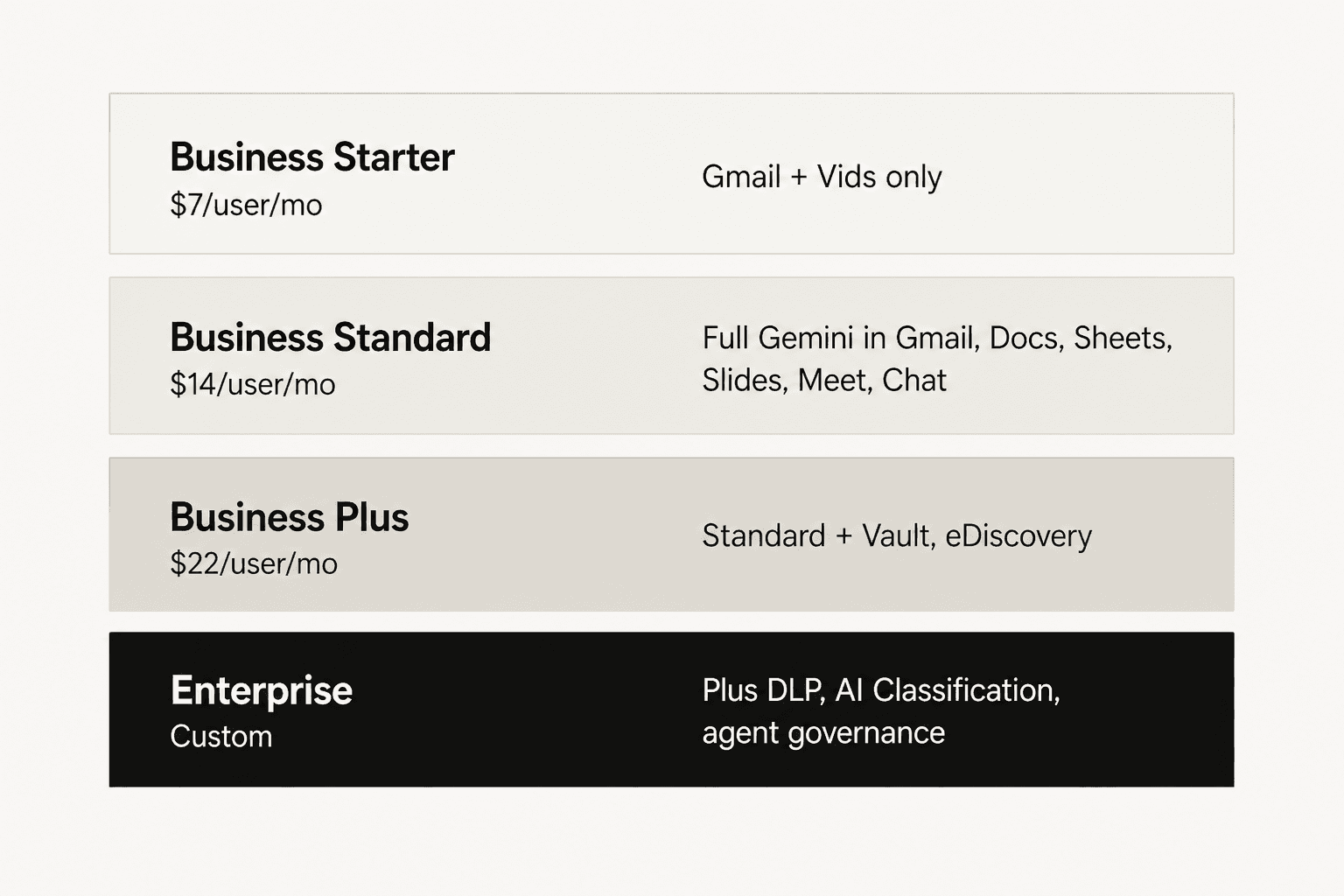
Here's the full picture, with the pricing trap called out explicitly:
| Workspace plan | Price (annual) | Gemini scope | Storage |
|---|---|---|---|
| Business Starter | $7/user/mo | Gmail + Vids only - Docs/Sheets/Slides/Drive/Meet/Chat are not included | 30 GB |
| Business Standard | $14/user/mo | Full Gemini in Gmail, Docs, Sheets, Slides, Drive, Meet, Chat | 2 TB |
| Business Plus | $22/user/mo | All of Standard + Vault, eDiscovery, advanced endpoint management | 5 TB |
| Enterprise | Custom | Plus DLP, AI Classification for Drive, agent governance, Gemini Enterprise | 5 TB+ |
Source: Google Workspace pricing.
The pricing trap most teams hit: Business Starter at $7/user/month technically includes Gemini, but only in Gmail and Vids. If your team writes anything serious in Docs, Sheets, or Slides - which is most teams on Workspace - you need Business Standard at $14/user/month or above to get the "real" Google Copilot experience. We've covered the full plan-by-plan breakdown in our Google Workspace pricing 2026 guide and the more focused Gemini Workspace pricing post.
And to make the comparison concrete: a 50-person team on Business Standard pays $14 x 50 = $700/month for Workspace including Gemini. The same 50-person team on Microsoft 365 Business Standard ($12.50/user) plus Microsoft 365 Copilot ($30/user) pays $42.50 x 50 = $2,125/month. The Gemini side is roughly a third of the cost - that's the entire pricing-model argument in one calculation.
The Gemini app (consumer side) and Gemini Code Assist follow different pricing schedules - covered above and in our standalone Gemini pricing 2026 guide.
How does "Google Copilot" actually compare to Microsoft Copilot?
The two products are genuinely close peers in 2026 - both bake an AI assistant into the productivity apps a team already uses, both lean on a strong frontier model (Gemini 3.1 Pro on Google's side, GPT-class models on Microsoft's), and both ship per-app integrations that look surprisingly similar in screenshots. We do a full head-to-head in our Gemini vs Copilot post - here's the short version of where they actually differ:
| Dimension | Gemini for Workspace | Microsoft 365 Copilot |
|---|---|---|
| Pricing model | Bundled into Workspace plans ($14+/user/mo) | $30/user/mo add-on on top of M365 |
| Productivity apps | Gmail, Docs, Sheets, Slides, Drive, Meet, Chat | Word, Excel, PowerPoint, Outlook, Teams |
| Free chat assistant | Gemini app (free) | Copilot free (free) |
| Coding tool | Gemini Code Assist (free tier available) | GitHub Copilot (paid only) |
| Custom agents | Workspace Studio | Copilot Studio |
| Underlying model | Gemini 3.1 Pro, 3.5 Flash | GPT-class via Azure OpenAI |
| Privacy posture | Workspace data not used to train; ISO 42001, SOC 1/2/3, HIPAA-eligible | Enterprise security inheritance from M365 |
| G2 rating | 4.6/5 across 48,000+ reviews | Varies by product |
Where Microsoft Copilot pulls ahead: deep coupling with the Microsoft 365 ecosystem and decades of organisational data that already live in Office formats. If your company runs on Outlook and SharePoint, Microsoft's home-field advantage is real.
Where Google pulls ahead: pricing and the fact that the underlying model is very good. A Reddit user weighing both:
"I genuinely cannot believe I wasted so much time and money on ChatGPT when Gemini is so much better."
A counterpoint on the Copilot side, from a Product Manager comparing the two:
"I use ChatGPT for creative or research-heavy tasks because it just thinks better, but prefer Copilot for drafting presentations or summarizing Teams calls because it already has the context."
Both quotes point at the same truth: the AI assistant question is no longer "which model is best" - it's "which ecosystem is your data already in." Google wins for Workspace shops. Microsoft wins for Microsoft 365 shops. Pricing is the tiebreaker.
For a focused side-by-side, our Microsoft Copilot overview and the complete Microsoft Copilot guide cover the Microsoft side in more detail.
Where Google's Copilot tools stop being enough
Gemini for Workspace is genuinely useful for the things it's built for: drafting emails, summarising threads, building spreadsheets, generating slides. Where it runs out of road is the moment your team needs something more than a writing assistant - a tool that can actually handle work end-to-end, not just suggest the first draft.
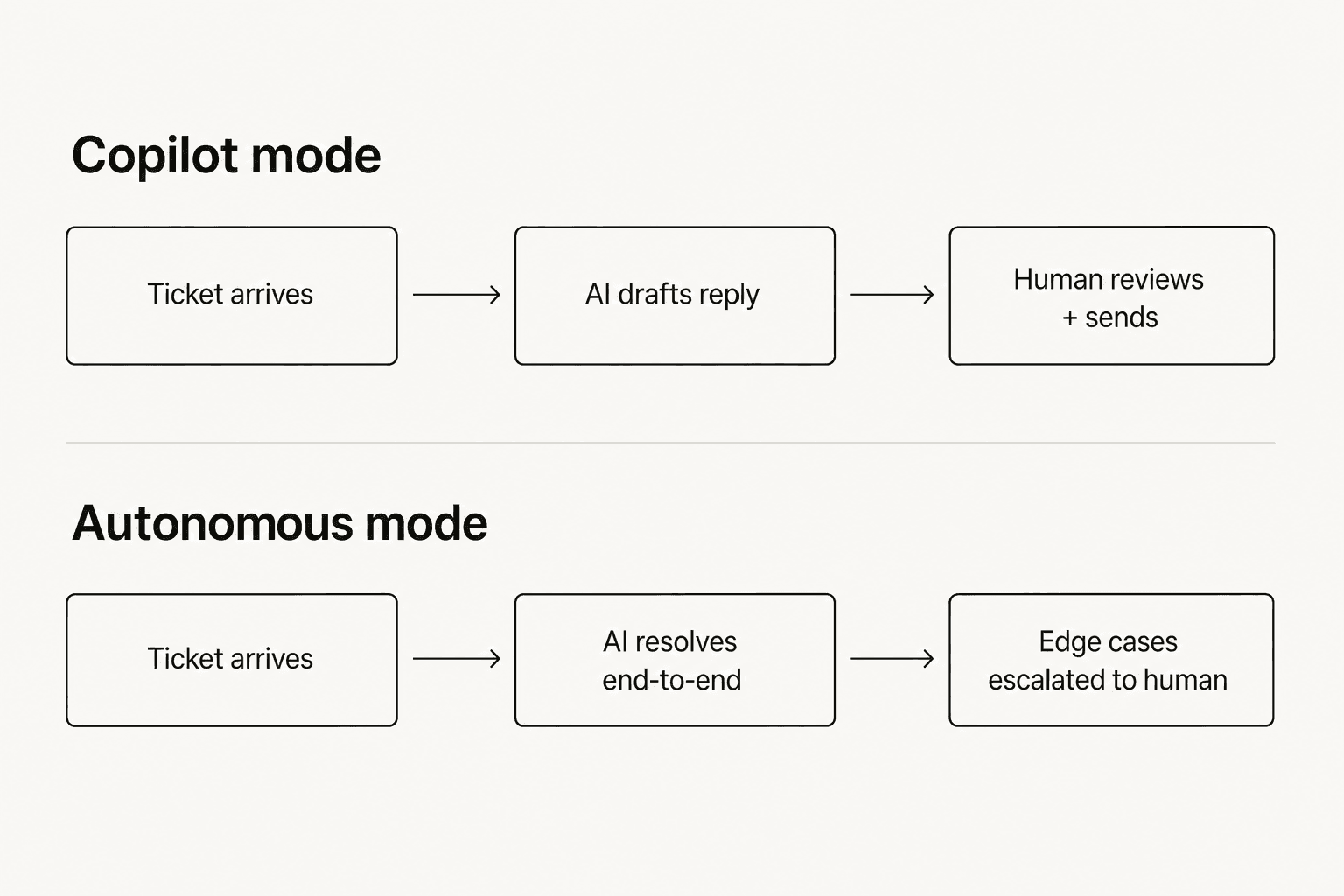
Customer support is the cleanest example. A help-desk team using Gemini in Gmail gets faster email drafting. That's nice. But the actual job - reading a ticket, deciding the answer, sending the reply, tagging the conversation, escalating edge cases - still sits with a human, with Gemini only suggesting the first sentence. The same ceiling applies to ops teams, sales teams, anyone whose work is structured and high-volume rather than open-ended drafting.
That's the difference between a copilot mode and an autonomous agent:
We've heard this exact realisation from teams who came in shopping for a "copilot" and walked out wanting something more:
"Support team is overloaded and can't keep up; came in looking for a copilot but realized they need an autonomous agent to handle at least 50% of emails."
anonymised as a DTC e-commerce ops lead, Gorgias + Shopify, ~7,000 tickets/month
For the work that fits inside a Workspace app - write an email, build a deck, summarise a thread - Gemini is the right tool. For work that needs to resolve tickets, not just draft replies, you want a layer on top of Workspace that's purpose-built for that job. Which is where dedicated AI assistants for support come in.
Try eesel for your support team
If you've read this far and your reason for searching "Google Copilot" was really "I want an AI that handles my support inbox," that's a job Gemini for Workspace isn't built for - but eesel is.

eesel runs inside the tools your team already uses - Zendesk, Freshdesk, Gorgias, Slack, Gmail - and can operate in either mode the diagram above describes: a copilot that drafts replies for human review, or a fully autonomous agent that resolves the whole ticket and only escalates edge cases. Briefing it works the way Google describes Workspace Studio - plain-English instructions, no prompt engineering - but with a few things Gemini doesn't do out of the box: confidence-based routing (the AI only acts when it's sure), training on your historical tickets, and pricing that's tied to tasks resolved instead of seats.
The pricing is also different from Microsoft and Google: no $30/user fee, no $14/user/month seat charge. eesel charges one fixed monthly price by volume, with 1 credit per ticket or chat and 100 free credits to start. A 50-person support team handling 1,000 tickets a month pays $499 on the 1,000-credit plan, not $700+.
If that's the shape of the problem you're solving, the free trial at eesel.ai takes under five minutes to wire up to your existing helpdesk - no card, 100 free credits, full feature access. There's also a deeper read of how the agent versus copilot decision usually shakes out in our Microsoft Copilot overview post.